

The landscape of enterprise cybersecurity is undergoing a fundamental shift as Microsoft rolls out rigorous new safeguards designed to mitigate the long-standing vulnerability of Remote Desktop Protocol (RDP) files. Historically, the .rdp file format has served as a cornerstone of administrative efficiency, allowing IT departments to distribute pre-configured connection settings to employees. However, this same functionality has been weaponized by sophisticated threat actors, turning a tool of productivity into a Trojan horse for remote exploitation. With the release of the April 2026 cumulative updates, Microsoft has signaled that the era of "blind trust" in these connection files is officially over.
The Anatomy of an RDP Exploit
To understand the significance of these updates, one must first appreciate how RDP files operate under the hood. An RDP file is essentially a text-based configuration script that tells the Windows Remote Desktop Connection client exactly how to behave when connecting to a remote host. Crucially, these files can be configured to perform "resource redirection." This means that when a user connects to a remote server, their local machine can automatically mount its own hard drives, clipboard, printers, and even smart card authentication tokens directly into the remote environment.
For a legitimate administrator, this is a time-saver. For a malicious actor, it is an invitation to digital theft. By crafting a rogue .rdp file and distributing it via spear-phishing campaigns, attackers can trick users into initiating a connection to a server they control. Once the connection is established, the attacker’s server can reach back into the victim’s local machine through the redirected resources. Files can be exfiltrated, clipboard data containing sensitive credentials can be harvested, and authentication mechanisms—such as Windows Hello or hardware-based security keys—can be intercepted, effectively granting the attacker the identity of the user.
State-sponsored groups, most notably the prolific APT29, have frequently integrated these techniques into their playbooks. By masquerading these files as innocuous documents or "new connection" shortcuts, they bypass traditional gateway security filters that are often tuned to look for malicious executables rather than innocuous-looking configuration text files.
A New Era of Defensive Verification
The latest security updates for Windows 10 (KB5082200) and Windows 11 (KB5083769 and KB5082052) fundamentally change the interaction model between the operating system and RDP files. Microsoft has moved toward a "Zero Trust" approach for connection initiation, ensuring that the user is no longer a passive participant in the connection process.
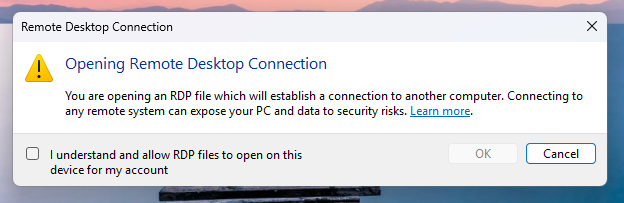
Upon the initial execution of an RDP file following these updates, users are greeted with a mandatory educational prompt. This is not merely a boilerplate disclaimer; it is a structural intervention designed to bridge the awareness gap. It forces the user to acknowledge the inherent risks associated with remote connections, clarifying that opening such files grants a remote entity significant permissions over the local machine. Once this acknowledgment is recorded, the OS transitions into a persistent, high-scrutiny mode for all future .rdp interactions.
The Granular Security Dialog
The most impactful change is the implementation of a new, comprehensive security dialog that appears before any connection is actually established. This interface provides the user (or the security-conscious employee) with a transparent view of exactly what the file is requesting.

Key features of this interface include:
- Publisher Verification: The system now checks for digital signatures. If an RDP file is unsigned, Windows explicitly tags it with a "Caution: Unknown remote connection" warning. This creates a visual barrier that is difficult for a casual user to ignore.
- Resource Redirection Transparency: Perhaps most importantly, the dialog lists every local resource that the RDP file intends to share with the remote host. By default, every single one of these options—drives, clipboards, printers, and devices—is now disabled. The user must manually opt-in if they wish to share these resources, shifting the security posture from "open by default" to "secure by default."
- Destination Visibility: The interface clearly displays the address of the remote system, preventing the common "typosquatting" or domain-masking tactics used in phishing where a user might think they are connecting to an internal corporate server while actually routing to an external attacker-controlled infrastructure.
Industry Implications and Operational Hurdles
From an enterprise perspective, these changes necessitate a review of internal deployment policies. Organizations that have relied on loosely managed RDP files for years may find that their workflows are interrupted by these new prompts. However, this friction is precisely the point. By forcing a moment of deliberation, Microsoft is effectively raising the cost of attack for cybercriminals.
For security operations centers (SOCs), this update provides an opportunity to audit how remote access is handled. It is a prompt for organizations to move away from ad-hoc RDP file distribution and toward more robust, centralized access management solutions such as Azure Virtual Desktop, Windows 365, or dedicated VPN/Zero Trust Network Access (ZTNA) solutions that do not rely on local file-based configurations.
While administrators have the ability to override these settings via the Registry (specifically the RedirectionWarningDialogVersion value within HKLMSoftwarePoliciesMicrosoftWindows NTTerminal ServicesClient), doing so should be treated as a high-risk configuration change. Microsoft’s guidance is clear: these protections should remain enabled as a baseline defensive layer. Disabling them for the sake of convenience creates a blind spot that attackers will inevitably exploit.
Looking Ahead: The Future of Remote Access
The move to restrict RDP file execution is indicative of a broader trend in the operating system market: the erosion of implicit trust in legacy configuration formats. As the lines between local and remote computing continue to blur, the OS must act as an active gatekeeper rather than a passive conduit.
Looking forward, we can expect to see further integration of hardware-backed identity verification. Future iterations of Windows might require that RDP files be cryptographically signed by an enterprise-managed certificate authority, rendering unsigned or "rogue" files completely non-functional. Furthermore, we may see the eventual deprecation of legacy redirection features in favor of more secure, containerized access methods that isolate the remote session from the host machine’s filesystem entirely.
For now, the April 2026 updates represent a significant, long-overdue victory for end-user security. By stripping away the ability for RDP files to silently compromise a system, Microsoft has effectively closed one of the most reliable backdoors in the modern Windows environment. While it places an additional burden on the user to verify the legitimacy of their connections, the trade-off—a drastically reduced attack surface—is one that the industry has needed for years.
Organizations are advised to treat this update not just as a patch, but as a catalyst for a broader security review. Audit your internal use of RDP files, educate your workforce on the risks of unsigned connection files, and leverage the new, granular control dialogs to enforce the principle of least privilege. In the ongoing war against phishing, this is a decisive, if defensive, move that aligns perfectly with the contemporary requirements of a hardened enterprise network.
