

The introduction of real-time location sharing within Google Messages marks a significant inflection point for Google’s flagship SMS/RCS application. For years, as competitors across the messaging ecosystem—from established giants like Apple’s iMessage to platform-agnostic heavyweights like Telegram and WhatsApp—offered seamless, live location tracking, Google Messages remained conspicuously absent of this fundamental utility. This omission often forced Android users into a fragmented communication experience, requiring them to switch applications to coordinate meetups, ensure safety during transit, or simply let friends track their progress on a journey. The recent, widespread rollout, confirmed in late March, finally addresses this critical parity gap, integrating a feature that has become table stakes for modern digital communication tools.
This development is not merely an incremental update; it represents a strategic move by Google to bolster the functional completeness of Messages, particularly as it champions the adoption of RCS (Rich Communication Services) as the modern standard for Android texting. The ability to share one’s live location, trackable for user-defined durations, moves Messages further away from its legacy SMS roots and solidifies its position as a capable, feature-rich platform capable of competing directly with the most sophisticated proprietary messaging services.
The Long Road to Feature Parity: Background Context
The delay in implementing live location sharing within Google Messages underscores the broader challenges Google has faced in establishing RCS as the unified messaging layer for Android. While Google has heavily invested in RCS capabilities—such as end-to-end encryption for one-on-one chats, improved group chat functionality, and enhanced media sharing—the core user experience still needed to match what users expected from a contemporary messenger.
Historically, Android users relied on third-party apps (like dedicated mapping applications or specific chat apps) or even resorted to sending static location pins, which quickly become outdated. Real-time sharing, conversely, provides a dynamic, continuously updated map view accessible directly within the conversation thread. This feature is invaluable for scenarios ranging from coordinating complex logistics, such as guiding someone to a difficult-to-find location, to providing reassurance during solo activities like late-night commutes or remote outdoor excursions.
The initial sightings of this feature within beta versions—specifically build numbers around messages.android_20260313_00_RC00.phone.openbeta—suggested an intensive testing phase before the broad deployment across both Pixel and Samsung devices, confirming broad OS and manufacturer compatibility were achieved prior to the public launch in late March. The feature’s immediate availability across various versions, including dynamic builds for different OEMs, indicates a determined effort to avoid the fragmented rollout issues that have sometimes plagued other Google services.
Expert Analysis: The Mechanics of Implementation
From a technical standpoint, the successful deployment of real-time location sharing within Google Messages relies heavily on the underlying RCS infrastructure and robust integration with Google’s mapping services. Unlike simply sending a static address, live sharing requires persistent background location services on the sender’s device, secure, encrypted data transmission, and a low-latency rendering engine on the recipient’s side.
The implementation appears to mirror best practices established by industry leaders. Users initiate sharing through the attachment menu—a standard access point for supplementary features. Crucially, Google has prioritized user control and privacy in the design:
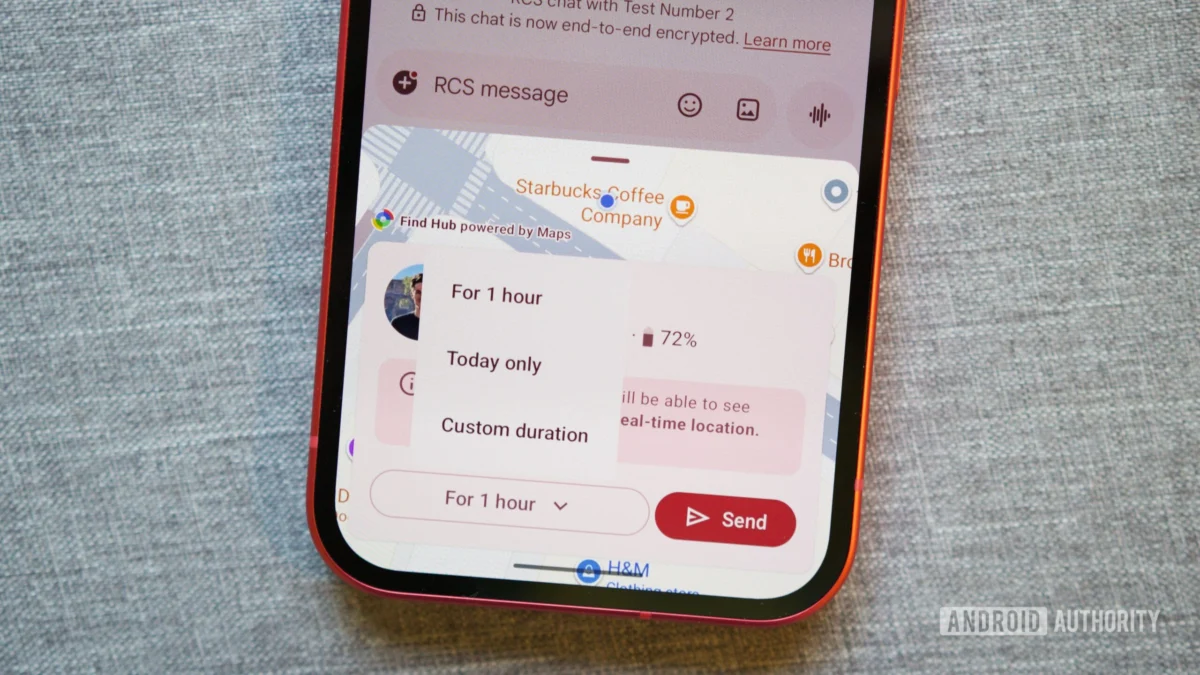
- Granular Time Control: Defaulting to a one-hour share, users are immediately presented with options to extend this to "Today only" or set a specific custom duration. This immediate prompt for time-boxing is vital for mitigating privacy concerns associated with continuous, indefinite tracking.
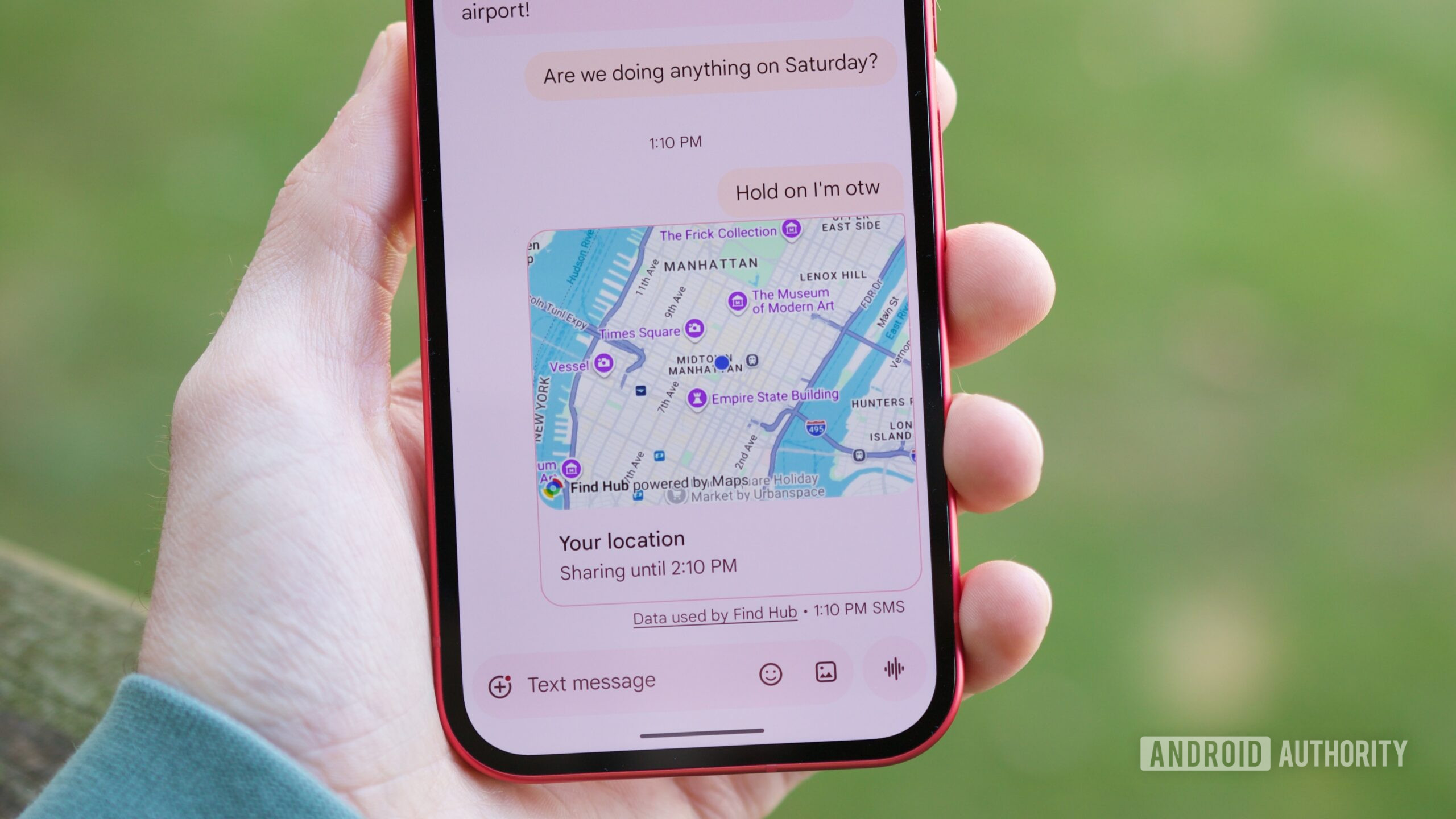
- In-Chat Visibility and Control: The shared location manifests as an interactive message bubble, accompanied by a persistent notification banner at the top of the conversation. This dual visibility ensures the sharer is constantly reminded that location data is being broadcast. The inclusion of an easily accessible "Stop" button within the message preview and the banner allows for immediate termination of the stream, a necessary safeguard.
- RCS Integration: Because this feature leverages RCS, it benefits from the established security framework, including end-to-end encryption where applicable, ensuring that the location data stream is protected between the communicating endpoints.
This careful balancing act—offering a high-utility feature while respecting user agency over personal data—is central to the success of any sensitive feature integrated into a primary communication tool.
Industry Implications: Closing the Ecosystem Gap
The arrival of live location sharing in Messages has significant ramifications for the broader messaging landscape, particularly concerning the competitive positioning of RCS.
For years, the "blue bubble versus green bubble" dichotomy was about more than just encryption; it was about feature disparity. Apple users enjoyed seamless continuity across services like iMessage, Find My, and even FaceTime, which often integrated location services fluidly. Android, fragmented by carrier support and various OEM skins, struggled to offer a unified, high-quality experience.
By finally incorporating this functionality, Google directly challenges the perception that the default Android messaging client is inherently inferior. It levels the playing field in a critical area of social utility. This forces other RCS-dependent services or applications that might have previously acted as substitutes (like third-party mapping apps used solely for sharing) to either innovate further or risk redundancy within the core texting interface.
Furthermore, this move is intrinsically tied to Google’s broader strategy around digital identity and service integration. Location data is deeply connected to Google Maps, one of the company’s most powerful and utilized assets. Embedding real-time sharing directly into Messages creates a tighter ecosystem loop, increasing user reliance on the Google suite for daily communication and navigation tasks.
Future Trajectories and Emerging Trends
The introduction of live location sharing is likely a precursor to more sophisticated location-aware features within Google Messages. As AI and contextual awareness become more central to mobile operating systems, the data generated by these location streams can be leveraged for enhanced automation and proactive assistance.
Predictive Coordination: In the near future, we can anticipate Messages using this shared data to offer proactive suggestions. For instance, if User A is sharing their location en route to meet User B, the system might automatically suggest opening navigation for User B, or even pre-load a reservation confirmation message if the ETA suggests they might be late.
Enhanced Safety Features: Building upon existing emergency features, live location sharing could integrate more deeply with Android’s safety protocols. Imagine a scenario where a user initiates a "Safety Check-in" feature which, upon arrival at a pre-designated safe location, automatically stops the location share and sends a confirmation message to selected contacts. If the user deviates significantly from a planned route or stops moving unexpectedly, the system could be programmed to prompt the user or alert emergency contacts, leveraging the established, trusted channel of the Messages app.
Cross-Platform Ambitions: While this feature is currently deeply integrated into the Android/RCS environment, the evolution of cross-platform messaging standards (like potential future extensions allowing RCS to communicate richer features with iMessage recipients) will test the limits of this integration. Will a shared real-time location link render correctly and functionally for an iPhone user opening it via SMS fallback, or will the feature remain largely confined to the RCS sphere? The utility of the feature hinges on its ability to bridge these platform divides, even if the best experience is reserved for fellow RCS users.
Operationalizing the Feature: A Practical Guide
For the user base, mastering the simple steps to initiate and manage location sharing is key to maximizing its utility. The process is streamlined for immediacy:
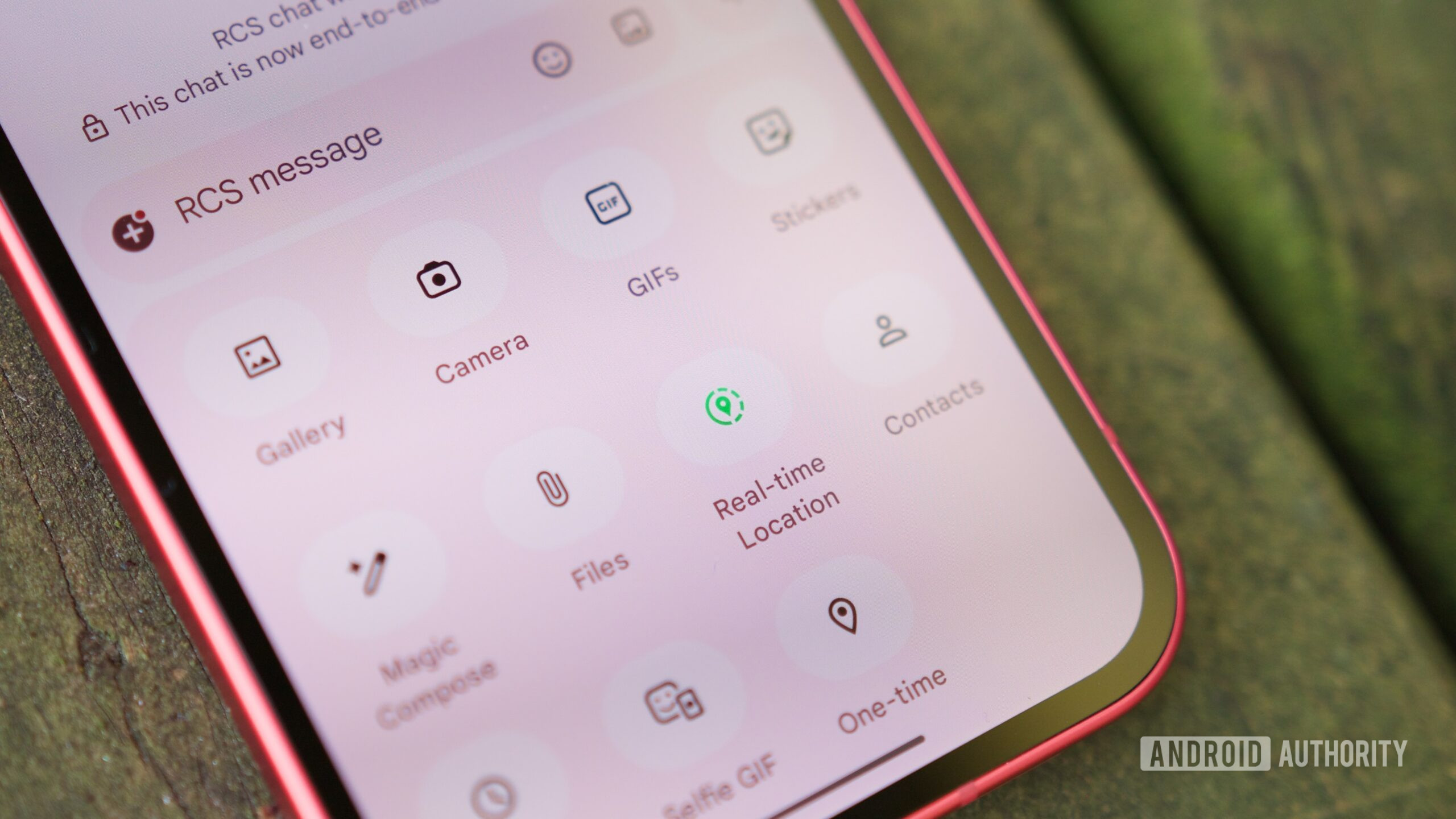
- Accessing the Share Menu: Navigate to the desired one-on-one or group conversation within the Google Messages application. Locate the attachment or "plus" icon, typically situated near the text input field.
- Selecting Location Services: Within the expanded attachment options, the dedicated "Location Sharing" icon (often represented by a map pin or similar marker) must be selected. This differs from sending a static location, which merely shares a pinpoint on the map at that moment.
- Setting Parameters: Upon selection, the interface prompts the user to define the duration. While the one-hour default is convenient for quick rendezvous, the option to select "Today only" or input a custom timeframe—be it 30 minutes or 12 hours—provides necessary flexibility based on the context (e.g., sharing for a short errand versus tracking a long road trip).
- Confirmation and Transmission: After setting the duration, confirming the share sends the interactive map preview into the chat stream.
The immediate feedback mechanism for both parties is crucial for usability. The sender sees a clear visual confirmation, including the countdown timer, both within the message bubble and via a persistent status bar at the top of the chat window. The recipient views a dynamic map thumbnail that updates instantly. Tapping this element provides an expanded view, often leveraging Google Maps integration for richer navigation options, alongside the critical ‘Stop Sharing’ control for the sender.
The termination of the share—whether manually invoked or upon time expiration—results in a clean transition. The dynamic map reverts to a static "Location share ended" notification, ensuring no residual, unintended tracking occurs, which is paramount for user trust in location-based services.
In conclusion, the delivery of real-time location sharing in Google Messages is a necessary and welcome maturation of the platform. It elevates Messages from a competent text utility to a comprehensive communication hub, aligning its feature set with modern user expectations and reinforcing Google’s commitment to establishing RCS as the robust backbone of Android messaging. The success of this feature will ultimately be measured by its adoption rate and how effectively Google builds upon this foundation in subsequent updates.
