

A significant software regression triggered by a recent update to the Microsoft Edge browser has disrupted a foundational workflow for millions of professional users: the ability to paste content into Microsoft Teams via the right-click context menu. This technical glitch, which has rendered the "Paste" command unresponsive in the desktop version of the collaboration platform, highlights the inherent fragility of modern software ecosystems where deeply integrated dependencies can lead to widespread operational friction.
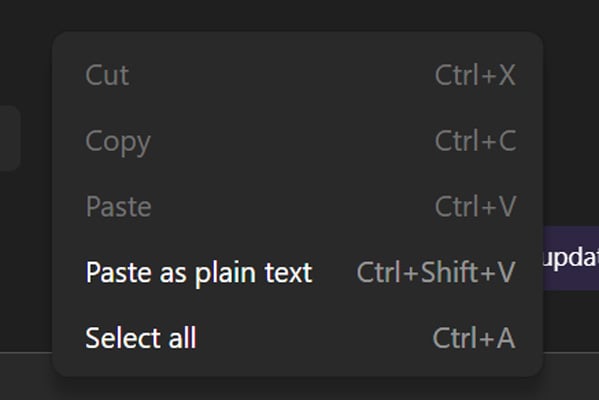
The issue, which surfaced prominently in mid-April, manifests when users attempt to transfer URLs, images, or blocks of text into chat windows using the standard mouse-driven interface. Upon right-clicking, the "Paste" option appears greyed out—a visual indicator that the browser’s underlying engine, which powers much of the Teams desktop client’s interface, is failing to register the contents of the system clipboard correctly.
The Anatomy of the Technical Failure
Microsoft Teams, particularly in its modern iteration, relies heavily on the Chromium-based architecture of Microsoft Edge to render its interface and handle web-based interactions. When a user interacts with the application, they are often interfacing with a localized instance of the Edge rendering engine. The current bug is a textbook example of a code regression, where an update designed to improve security or performance in the browser inadvertently severed a bridge between the clipboard API and the Teams application layer.
While the primary interface (the right-click menu) is compromised, the failure is localized. Users have discovered that keyboard-based shortcuts—specifically Ctrl + V on Windows and Cmd + V on macOS—continue to function as intended. This discrepancy is telling; it suggests that the issue is not a failure of the operating system’s clipboard management, but rather a disruption in the way the application’s event listeners interact with the GUI’s context menu. Essentially, the "Paste" event triggered by the menu click is being blocked or ignored, while the interrupt triggered by the keyboard buffer remains unaffected.
Industry Implications and Corporate Friction
For the modern enterprise, where communication is the lifeblood of productivity, even seemingly minor UI bugs carry substantial weight. Microsoft Teams has evolved from a simple messaging app into a monolithic workspace. When employees are forced to navigate around a broken feature, it creates a "micro-friction" effect. Multiply this across thousands of organizations, and the cumulative loss in efficiency becomes non-trivial.
The reports emanating from corporate IT administrators on platforms like Reddit and official support forums underscore the urgency of the situation. IT managers, who are tasked with maintaining stable environments, often find their troubleshooting efforts thwarted by such bugs. In this instance, standard mitigation steps—such as clearing the Teams application cache, reinstalling the client, or performing clean wipes of user data—have proven entirely ineffective. This confirms that the fault lies not in the local installation of Teams, but in the environment created by the underlying browser update, placing the burden of resolution squarely on Microsoft’s centralized engineering teams.
The Complexity of Interdependent Software Stacks
The Teams-Edge integration is both a strength and a potential vulnerability. By leveraging the browser engine, Microsoft ensures a consistent experience across desktop and web versions. However, this tight coupling means that a security patch or feature update to the browser can have cascading consequences for dependent applications.
From an industry standpoint, this incident serves as a cautionary tale regarding the "webification" of desktop software. As more applications move toward Electron-based or web-view-based architectures, the line between a browser and a desktop app continues to blur. While this allows for faster deployment of features, it also means that the stability of the software is tethered to the health of the browser engine. When an update creates a conflict, the end-user experience suffers in ways that were once rare in native, standalone applications.
Analysis of the Remediation Strategy
Microsoft has confirmed that it is rolling out a fix in stages. In the software development lifecycle, "staged rollouts" are a standard practice designed to prevent a bad fix from causing more damage than the original bug. By monitoring telemetry, engineers can observe how the patch behaves in diverse environments—ranging from legacy hardware to high-performance corporate workstations—before committing to a global release.

However, the lack of a definitive timeline for a full rollout has left many organizations in a state of flux. For companies with strict compliance policies or those that rely on automated, locked-down software update cycles, waiting for a server-side or engine-level fix can be a protracted ordeal. The reliance on keyboard shortcuts as a workaround is a practical short-term solution, but it is not a substitute for a fully functional user interface. It forces users to abandon established workflows, which can lead to errors, such as accidentally pasting the wrong information if the user is accustomed to the visual feedback of the right-click menu.
Future Impact and Long-Term Trends
The broader trend in the tech industry is toward increasing automation and, consequently, an increased reliance on continuous deployment models. Updates are pushed more frequently than ever before, often without the exhaustive, multi-week testing cycles of the past. While this allows for rapid security patching and feature delivery, it creates a "velocity-stability trade-off."
As we look toward the future of enterprise software, the expectation for "five-nines" reliability—or even just basic feature consistency—is colliding with the reality of rapid-fire updates. This particular bug in Teams serves as a proxy for a larger challenge: how do vendors maintain the integrity of complex, modular applications when the underlying components are in constant flux?
For organizations, the lesson is clear: resilience must be built into the culture of the IT department. Even as cloud-based software promises to remove the burden of maintenance from the local machine, incidents like this prove that the "cloud" is still subject to the same laws of software engineering as any other system. Bugs are inevitable. The true test of a platform is not the absence of errors, but the speed and transparency with which they are addressed.
Conclusion
As of the latest reports, Microsoft continues to monitor the situation, with telemetry data showing gradual improvement. While the right-click paste bug is an annoyance, it is ultimately a temporary hurdle. However, it should prompt a deeper conversation within the development community about the risks of interdependency in modern enterprise ecosystems.
As users await the final resolution, the incident remains a reminder of the fragility of the digital tools we rely on daily. For now, the most effective tool in the user’s arsenal remains the keyboard, highlighting that in an era of complex software, sometimes the most basic input methods are the most reliable. Organizations should continue to encourage their teams to familiarize themselves with these manual workarounds, as the landscape of software stability remains as dynamic—and occasionally volatile—as the market itself.
The ongoing monitoring of these systems will provide the necessary data to prevent similar regressions in future updates, ensuring that the integration between the browser and the collaboration platform remains a seamless experience rather than a point of failure. The goal remains to restore the full, intuitive functionality that users expect, minimizing the impact of these technical regressions on global productivity.
