

The tension between mandatory system maintenance and user productivity has long been a defining friction point in the Windows ecosystem. For years, the operating system’s aggressive approach to background updates—often characterized by sudden, non-negotiable reboots—has drawn significant criticism from both enterprise professionals and home power users. In a decisive shift toward a more user-centric philosophy, Microsoft is currently testing a suite of granular controls for the Windows Update infrastructure. This overhaul, presently being integrated into the Windows Insider Dev and Experimental channels, represents a fundamental pivot in how the world’s most widely used desktop operating system manages its lifecycle maintenance.
The Evolution of the Update Paradigm
Historically, Microsoft’s update strategy was driven by a "security-at-all-costs" mandate. Following the proliferation of global ransomware threats and the critical necessity of patching zero-day vulnerabilities, the company prioritized the rapid deployment of patches. While this approach undoubtedly fortified the global digital landscape, it frequently ignored the reality of the modern workday, where a sudden restart can mean the loss of unsaved progress, the interruption of a critical rendering task, or the premature termination of a long-running simulation.
The new initiative, led by insights derived from thousands of user verbatims, signals an acknowledgement that "security by design" does not have to be synonymous with "disruption by default." By introducing a more transparent and manageable framework, Microsoft is attempting to reconcile the need for a hardened system with the necessity of user agency.

Granular Control and the Calendar Interface
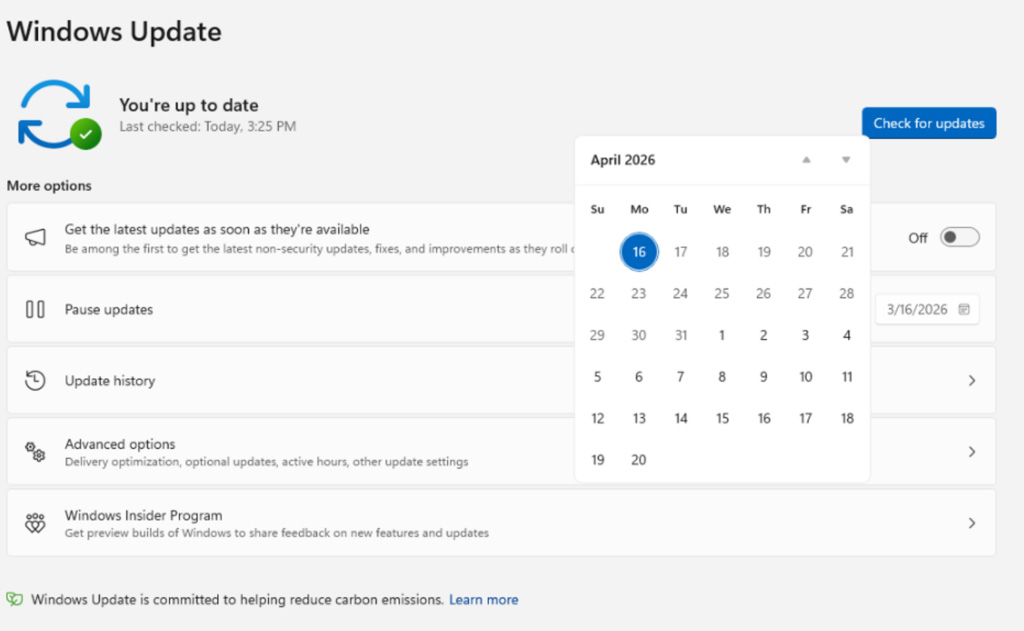
At the heart of the current rollout is the introduction of a sophisticated calendar-based management system. Previously, the "pause updates" feature was somewhat blunt, often forcing users to choose between indefinite, risky delays or immediate, inconvenient installations. The new flyout calendar interface allows users to select specific dates for update resumption, offering a pause window of up to 35 days.
What makes this iteration significant is the removal of fixed, arbitrary limitations. Users can now extend these pauses iteratively, effectively handing them the reins to their system’s maintenance schedule. This is particularly valuable for creative professionals and researchers who operate within tight project deadlines where a system reboot could represent a significant financial or temporal loss.
Separating Power from Patching
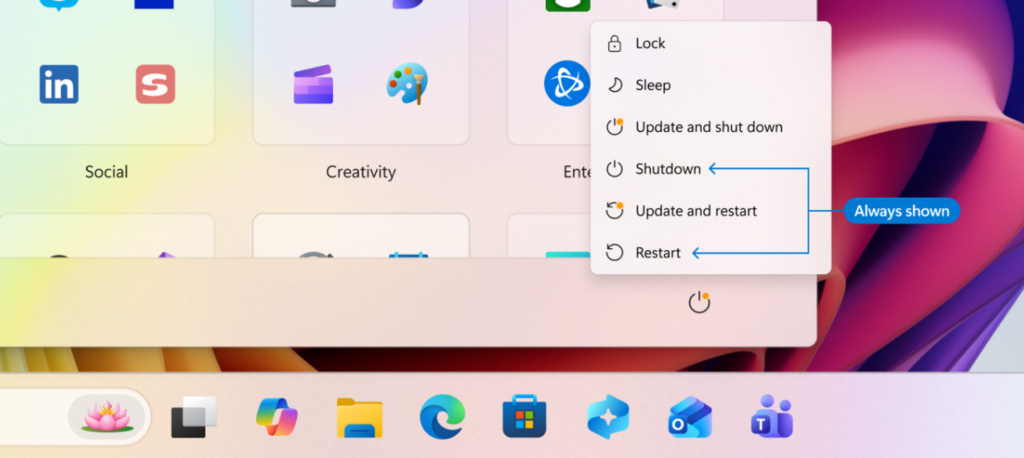
Perhaps the most welcome change for the average user is the decoupling of standard system power options from the update installation process. Under the legacy model, the Power menu often morphed into a "Update and Shut Down" trap, making it impossible to perform a simple power-off or restart without triggering a potentially lengthy installation cycle.
By bifurcating these actions, the operating system will now offer distinct "Restart" and "Shut Down" options that perform exactly as their labels suggest—shutting down the hardware without queuing updates. The update-specific variants will remain available, but they will be clearly demarcated, ensuring that users are never caught off-guard by a system that refuses to power off until a gigabyte-sized patch is installed. This change addresses the "walk-away" scenario, where a user might leave their desk believing their PC is powering down, only to return hours later to find a hung installation process.

Intelligent Driver Transparency
Driver updates have historically been a source of immense confusion. In the past, generic labels—often simply citing the manufacturer’s name—left users guessing whether a pending update was a critical security fix for a chipset or a non-essential update for an auxiliary peripheral.
Microsoft’s new, descriptive labeling system aims to demystify this process. By explicitly stating the device category—such as "Audio Driver," "Display Adapter," or "Battery Management"—users can make informed decisions about whether to approve an update. For IT administrators and enthusiasts who manage custom hardware configurations, this level of detail is a massive boon, reducing the likelihood of "breaking" a working system with a poorly vetted or unnecessary driver update.
The Strategy of Consolidation
Perhaps the most impactful, yet under-the-radar, change is the strategy of temporal consolidation. Microsoft is moving toward a model where disparate update types—firmware, .NET framework, and driver updates—are synchronized to coincide with the monthly cumulative update cycle.
This shift is rooted in a simple mathematical reality: one restart is infinitely better than five. By clustering these patches, Microsoft is drastically reducing the "reboot tax" that users pay throughout the month. The system will continue to download these components in the background, but they will sit in a latent state, waiting for the user to initiate a single, coordinated installation cycle. This orchestration is designed to maintain the integrity of the operating system while minimizing the frequency with which the user is forced to stop working.
Industry Implications and Future Trends
This shift reflects a broader trend in the software industry: the move toward "Human-Centric Computing." As operating systems evolve into increasingly complex ecosystems, the ability of the user to act as an informed administrator of their own device has become a competitive differentiator.
For the enterprise sector, these changes offer a bridge between managed compliance and employee satisfaction. IT departments often struggle with the "Shadow IT" phenomenon, where users, frustrated by forced updates, attempt to disable security features or use third-party tools to block Windows Update entirely. By providing native, robust control mechanisms, Microsoft is effectively reclaiming the trust of the user base, ensuring that security updates are eventually installed without the need for Draconian enforcement measures.
Furthermore, the introduction of the out-of-box experience (OOBE) bypass for updates suggests that Microsoft is recognizing the importance of the "time-to-first-click." Allowing users to bypass update downloads during the initial system setup is a tacit admission that forcing a user to spend their first hour with a new machine staring at a loading bar is a poor user experience.
Expert Analysis: The Balancing Act
The challenge for Microsoft moving forward will be maintaining the delicate equilibrium between user choice and collective security. While giving users the ability to defer updates indefinitely is a victory for agency, it creates a potential vulnerability surface.
Industry analysts point out that while these features empower power users, the "average" user—who may not be aware of the security risks of deferred updates—could inadvertently leave their machines exposed for long durations. It is likely that Microsoft will implement "security override" logic in the background, where critical zero-day patches might eventually bypass the user’s manual pause settings. However, by providing a transparent interface, Microsoft is setting a new standard for how operating systems should communicate their maintenance requirements.
The transition to this model is not merely a cosmetic update to the Windows interface; it is a fundamental shift in the social contract between the vendor and the end-user. By treating the user’s time as a precious resource and providing granular, predictable control, Microsoft is aligning itself with the expectations of a modern, high-performance workforce.
Conclusion: A New Era of Maintenance
As these features migrate from the testing channels to the general release, the Windows user experience is set to become significantly more fluid. The days of the "forced restart" are slowly coming to an end, replaced by a system that treats the user as an partner in the maintenance process rather than an obstacle to it.
Whether these changes will fully satisfy the most critical power users remains to be seen, but the intent is clear: Microsoft is finally prioritizing the workflow of the human operator as highly as the security of the machine. This shift marks a significant milestone in the maturity of the Windows platform, suggesting a future where OS maintenance is a background convenience rather than a primary source of daily frustration.
