


Microsoft is currently engaged in active diagnostics across multiple critical failure points affecting the classic iteration of its flagship desktop email application, Outlook. These ongoing investigations center on core functionalities, specifically email synchronization, secure connection protocols, and fundamental user interface stability. For enterprises and individual users deeply entrenched in the legacy ecosystem, these intermittent but disruptive errors represent significant productivity roadblocks, forcing a temporary migration toward newer, often less familiar, application interfaces. The convergence of these distinct issues—group management failures, third-party account authentication breakdowns, and critical UI glitches—highlights potential structural stress points within the aging codebase of the classic client as it interfaces with modern cloud services.
The EWS Group Creation Conundrum: An API Transition Pain Point
One of the most pressing technical hurdles involves users attempting to provision or modify Microsoft 365 Groups within the classic Outlook environment where Exchange Web Services (EWS) remains the active communication method for the tenant. This operation is reportedly culminating in a hard stop, manifesting as a "Can’t connect to the server" error. A deep dive into the reported telemetry reveals the failure locus: a breakdown in the Active Directory Graph (AD Graph) call designated for ValidateUnifiedGroupProperties. The resulting error message is explicit about the underlying architectural clash: "An internal server error occurred. The operation failed. Both AAD and MSGraph clients are null or AAD Graph is disabled for this API."
This technical specificity is highly informative. It signals that the classic Outlook client is attempting to leverage deprecated or improperly configured backend authentication pathways (AD Graph) that are no longer robustly supported or fully functional within the current identity management framework, which has migrated towards Microsoft Graph and modern REST APIs. Microsoft’s acknowledgment confirms this architectural friction. The company has stated that the Outlook development team is expediting the deployment of updated group management features explicitly engineered to utilize modern REST APIs. This transition is not merely a feature update; it is a necessary modernization to align the client’s communication stack with contemporary Azure Active Directory (now Microsoft Entra ID) security and operational standards. Until this REST-based functionality is universally rolled out, the official guidance remains a pragmatic, if inconvenient, suggestion: administrators and users must leverage either the New Outlook client or Outlook Web Access (OWA) for any group lifecycle management tasks.
Authentication Drift: The Gmail and Yahoo Sync Errors
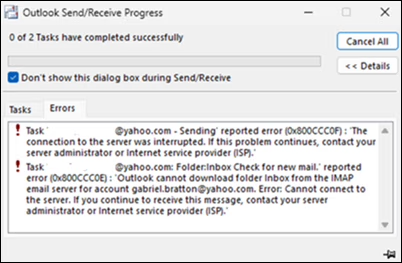
A second, distinct category of instability centers on the difficulties encountered by users integrating external mail providers, specifically Gmail and Yahoo, into the classic Outlook client. Synchronization attempts are frequently interrupted by error codes 0x800CCC0F (Connection timed out) and 0x80070057 (The parameter is incorrect). This issue appears particularly acute following credential changes. When a user updates their password for a linked Gmail or Yahoo account, the classic client is failing to trigger the necessary re-authentication prompt, leading to an immediate cessation of synchronization and the persistent display of the aforementioned error codes.

The implications here extend beyond simple connectivity. Failures in prompting for updated credentials suggest a breakdown in the client’s handling of stored authentication tokens or session management related to OAuth 2.0 or equivalent protocols used by third-party providers. Microsoft is currently engaged in root-cause analysis for this authentication drift.
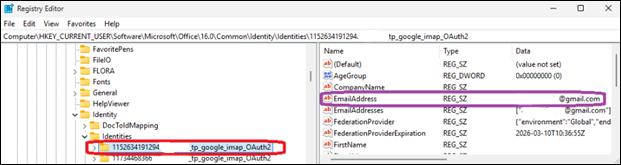
In the interim, the suggested workaround is a drastic, though often effective, measure requiring direct manipulation of the Windows Registry Editor. Users are directed to navigate to HKEY_CURRENT_USERSoftwareMicrosoftOffice16.0CommonIdentityIdentities and manually delete the registry entries associated with the affected email address. This action effectively forces the application to purge outdated identity information, compelling a clean re-establishment of the connection and authentication sequence upon the next launch or sync attempt. From an IT governance perspective, this registry modification is a high-risk intervention, typically reserved for advanced support tiers, underscoring the severity of the underlying authentication bug.
The Invisible Problem: Cursor Disappearance and Wider Application Impact
Adding to this cluster of connectivity and configuration issues is a more visually jarring, yet functionally crippling, bug: the intermittent disappearance of the mouse pointer within the classic Outlook environment. Significantly, this defect is not isolated to Outlook; reports confirm its presence across other core Microsoft 365 applications, including OneNote. The latency in acknowledging this problem—nearly two months after initial user reports surfaced—suggests the initial diagnostic path may have been complex, possibly involving interaction with display drivers or system-level graphics rendering pipelines rather than application logic alone.
Microsoft’s response to this UI anomaly emphasizes data collection. Affected customers are being instructed to escalate through their Microsoft 365 administrators to formally open a support case and, crucially, to submit detailed diagnostic log files. This suggests the company is hunting for a pattern related to hardware acceleration, specific GPU drivers, or deep operating system interactions that manifest differently across user machines.
Temporary relief mechanisms offered by Microsoft range from minor application manipulation to a full system reboot. The lighter workarounds involve clicking any item in the message list to potentially "jolt" the cursor back into visibility, or temporarily switching context to another application like PowerPoint, interacting with an editable field, and then returning to Outlook. If these subtle nudges fail, the universal solvent—restarting the affected workstation—is recommended as the final, albeit disruptive, temporary fix.
Industry Context and The Migration Imperative
These compounding issues underscore a critical strategic inflection point for Microsoft: the managed obsolescence of the classic Outlook client. For years, Microsoft has been pushing users toward the "New Outlook" client, which is fundamentally built upon a web-centric architecture leveraging Microsoft’s modern web stack. The current instability in the classic version serves as a powerful, albeit unintended, catalyst for migration.
From an industry perspective, this situation highlights the inherent risks associated with maintaining deeply customized, locally installed legacy software, especially when it relies on older application programming interfaces (APIs) like EWS to communicate with rapidly evolving cloud backends. Enterprises relying on the classic client for specific, niche functionalities—perhaps related to complex add-ins or compliance logging that haven’t been fully ported to the New Outlook—are currently facing significant operational risk. The EWS group creation failure, specifically, impacts governance and collaboration workflows directly tied to Azure identity services.
The migration away from legacy software is rarely seamless. While the New Outlook promises better performance and modern integration, it often lacks feature parity or presents different user workflows that require retraining and process adjustment. The current spate of classic Outlook errors effectively pressures IT departments to accelerate this transition timeline, potentially before all dependent workflows are fully validated in the new environment.
Analysis: The API Sunset and Identity Management Strain
The root cause analysis for both the group creation error and the third-party sync failure points toward the ongoing sunsetting of older authentication and service APIs. EWS, while robust for many years, is increasingly being superseded by Microsoft Graph, which offers a more granular, secure, and unified access model across the entire Microsoft 365 ecosystem. When classic Outlook attempts an EWS call that relies on infrastructure now exclusively served via Graph endpoints, the system defaults to errors indicating missing clients or disabled APIs—precisely what is being observed. This architectural mismatch is symptomatic of the challenge large software vendors face: ensuring backward compatibility while simultaneously driving necessary security and architectural modernization.
The Gmail/Yahoo credential problem is similarly revealing. Modern identity flows heavily rely on persistent, secure token storage managed by standardized libraries. The failure to prompt for re-authentication suggests that the classic client’s identity management module is not correctly recognizing token expiration or invalidation events triggered by external providers, leading it to attempt communication with stale credentials. This necessitates the registry purge workaround because the client’s local identity cache has become corrupted or desynchronized.
Historical Context and Future Impact
This is not an isolated incident of post-update instability. Earlier in the year, Microsoft had to deploy emergency patches to address issues stemming from late 2025 updates that specifically blocked access to encrypted emails for Microsoft 365 subscribers. This pattern of critical failures—ranging from encryption access to fundamental UI rendering and identity management—suggests that the code branch supporting the classic Outlook client is under immense strain as it attempts to bridge the gap between its traditional architecture and the requirements of a cloud-first, zero-trust security landscape.
The long-term impact of these events reinforces a clear trend: the "classic" desktop application model is reaching its operational ceiling. Future stability and feature parity will unequivocally reside within the web-based and modern clients. For organizations considering their roadmap, these current investigations serve as a compelling data point for prioritizing the deprecation timeline for any remaining classic Outlook deployments. Continued reliance on this legacy software introduces unacceptable operational risk due to unpredictable service interruptions and reliance on manual, high-risk workarounds like registry editing. The future of enterprise email productivity is demonstrably cloud-native, and these current outages are merely the growing pains associated with severing dependency on the past. The pressure on Microsoft’s support channels, and the associated frustration among end-users, underscores the high stakes involved in managing the twilight phase of widely adopted, yet aging, enterprise software.
