


The operational landscape for IT resilience within vast enterprise environments leveraging Microsoft 365 is poised for a significant, efficiency-driven transformation. Microsoft is preparing to deploy a crucial enhancement to its dedicated Microsoft 365 Backup service, a development centered on accelerating recovery processes by enabling administrators to target and restore individual files and discrete folders. This shift moves the needle from macro-level restoration events to precise, surgical data retrieval operations, directly addressing one of the most time-consuming bottlenecks in post-incident remediation.
Microsoft 365 Backup, which functions as a robust safeguard for critical data residing within SharePoint Online, OneDrive for Business, and Exchange Online, is fundamentally designed to insulate organizations against the triple threat of modern data integrity issues: sophisticated ransomware attacks, unintended user deletions, and systemic data corruption. The core value proposition of any backup solution rests not just on the act of saving data, but on the speed and efficacy with which that data can be returned to a production state following an adverse event.
Historically, the architecture of Microsoft 365 Backup, while fundamentally sound in its commitment to data preservation, mandated restoration at a higher level of granularity—the site collection level for SharePoint or the entire user drive for OneDrive. In scenarios where a breach or error involved only a handful of documents or a small directory structure, administrators were often compelled to initiate a full site or drive restoration. This process, while ensuring data completeness, dramatically inflated Recovery Time Objectives (RTOs), pulling valuable IT resources away from business continuity tasks and delaying the resumption of normal operations. For large SharePoint sites or users with terabytes of OneDrive data, restoring the entire scope simply to retrieve one misplaced spreadsheet represented an unacceptable expenditure of time and network bandwidth.
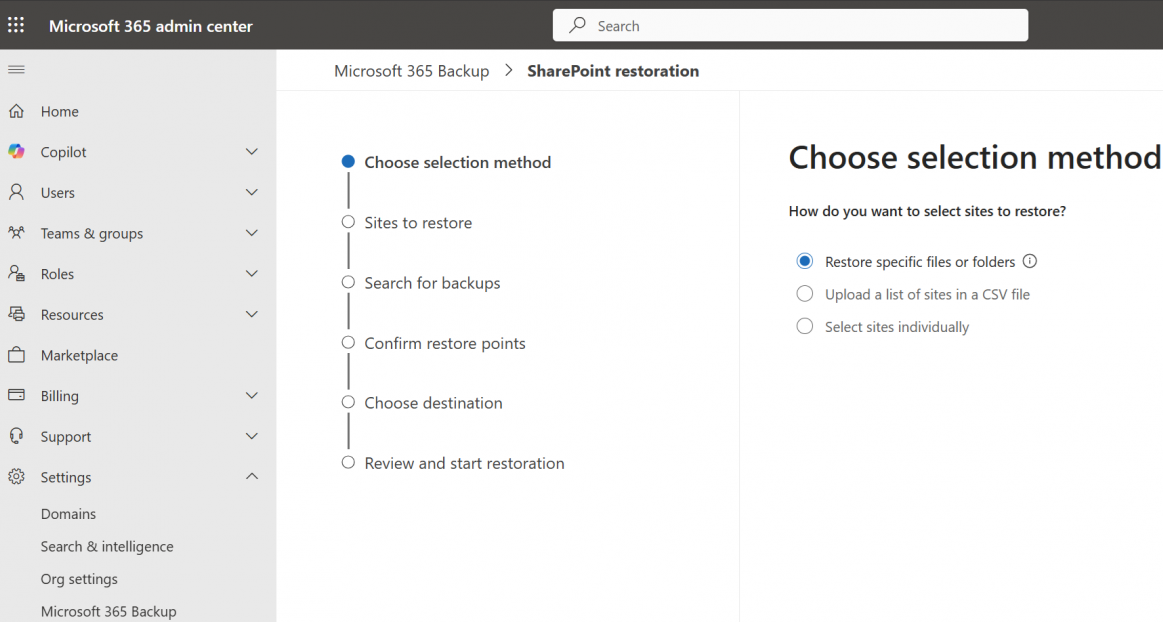
The introduction of granular restore capabilities fundamentally alters this dynamic. Administrators, equipped with this new functionality, will possess the ability to navigate through established restore points for protected SharePoint sites and OneDrive containers. Crucially, they can now browse, search within, and selectively choose only the precise files or folders necessitating recovery. This paradigm shift transforms a potentially hours-long, system-wide restoration into a targeted, minutes-long operation focused solely on the affected assets.
This advanced functionality is strictly confined to tenant environments that have already provisioned and activated the Microsoft 365 Backup service. Furthermore, the authority to execute these granular restorations is tightly controlled, reserved exclusively for administrators explicitly assigned the SharePoint Backup Administrator role. It is vital to note that this administrative enhancement is invisible to the end-user. The entire process—from the initiation of the search for restore points to the final data injection—is handled server-side by administrators, ensuring a seamless, uninterrupted user experience on the client side, even during active recovery phases.
Microsoft formalized this timeline in a recent message center update, confirming the phased rollout. The capability to browse, search, and selectively restore individual files or folders from SharePoint and OneDrive backups is slated to commence deployment in the early part of 2026. The company explicitly highlighted the benefits: "This granular restore reduces recovery time, requires the SharePoint Backup Administrator role, and respects existing backup policies without impacting users." This focus on reduced RTO is the primary metric driving this feature adoption.

The deployment schedule indicates a measured approach, prioritizing stability and enterprise readiness. The feature has already entered its public preview phase in early March 2026, allowing early adopters and Microsoft partners to stress-test the workflows and validate performance metrics against real-world data sets. General Availability (GA) across all global tenants is anticipated to follow shortly thereafter, projected to land between late April and early May 2026.
For IT departments utilizing Microsoft 365 Backup, this impending GA release necessitates proactive preparatory measures. Organizations are strongly advised to conduct a thorough audit of their current M365 Backup coverage, ensuring that all critical SharePoint and OneDrive repositories are included in the protection scheme. Equally important is the mandate for training: backup administrators must familiarize themselves with the new granular workflow—how to access the restoration interface, utilize the search parameters, and validate the integrity of the restored items. Finally, internal IT governance dictates that disaster recovery and business continuity runbooks must be immediately updated to reflect these new, faster file- and folder-level recovery scenarios, ensuring standard operating procedures align with the system’s enhanced capabilities.
Microsoft emphasizes that this upgrade is an enhancement to the interface and control mechanism, not a change to the underlying data persistence strategy. As the company noted, "This feature introduces a new method for admins to access existing Microsoft 365 Backup restore points at a more granular level (file or folder), without changing where or how backup data is stored." This reassures enterprises that data sovereignty and established retention policies remain undisturbed; the change is purely one of accessibility and retrieval efficiency. The strategic value here lies in compliance and data governance. In situations requiring the remediation of personal data exposure—perhaps in response to a data subject access request, a regulatory audit, or the discovery of sensitive information in an unsecured location—administrators now possess the surgical precision needed to isolate and restore only the relevant documentation, thereby minimizing the scope of intervention and potential data exposure during the recovery process itself.
Industry Implications and the Evolving Data Protection Mandate
This move by Microsoft is more than just a feature update; it reflects a maturation of cloud-native data protection strategies and a direct response to evolving threat vectors. In the era of sophisticated, rapid-fire ransomware, the "all-or-nothing" recovery approach is becoming increasingly untenable. When an attacker targets a few key documents within a sprawling SharePoint site, the business impact is often localized, yet the downtime caused by a site-level restore can cripple operations across unrelated departments.
The industry implication is clear: recovery speed is now the paramount metric, often outweighing raw backup capacity. Competitors in the third-party SaaS backup space have long offered file-level recovery, positioning this as a key differentiator against native cloud protection mechanisms. Microsoft’s incorporation of this functionality levels the playing field and significantly strengthens the native offering, potentially reducing the reliance on third-party vendors for core M365 data restoration needs. For organizations striving for a consolidated cloud management footprint, this makes the native backup solution substantially more attractive.
Furthermore, this addresses the administrative burden associated with compliance. Regulatory frameworks like GDPR, CCPA, and emerging data sovereignty laws require organizations to demonstrate precise control over the lifecycle and location of specific data subsets. Being able to prove that a specific document containing PII was securely restored from an immutable backup point, without touching unrelated data, significantly bolsters audit readiness.
Expert Analysis: The Significance of RTO Compression
From an expert perspective in enterprise IT resilience, the move to granular restore is a critical step toward achieving true "near-zero downtime" for data recovery within the M365 ecosystem. The difference between restoring a single file in minutes versus restoring a 5TB SharePoint site over several hours is the difference between a minor operational hiccup and a genuine business interruption event.
The requirement for the specific SharePoint Backup Administrator role is also noteworthy. It underscores Microsoft’s commitment to the principle of least privilege (PoLP) within security architecture. By segmenting the administrative duties, the responsibility for initiating high-impact restoration procedures is concentrated among a trusted, specialized group, mitigating insider risk or accidental deletions that might occur if the capability were broadly available to all global administrators. This role segmentation is a best practice in modern identity and access management (IAM) for critical infrastructure tools.
The granular approach also introduces efficiencies in data management. When a full site restore is performed, the potential for unintended overwrites or data pollution increases. A granular restore, by its nature, is an isolated operation. Administrators can verify the target location and the integrity of the specific file before committing the operation, leading to cleaner, more verifiable recovery outcomes.
Future Trajectory: Convergence of Backup and Operational Recovery
This enhancement foreshadows a broader trend in enterprise data protection: the convergence of backup and operational recovery tools. As services like M365 Backup mature, they cease being merely archival systems and evolve into active components of IT service management. The ability to seamlessly search and restore data within the backup environment hints at future integrations where AI or automated remediation workflows could directly interface with the restore points.
Consider the adjacent expansion of Windows Backup for Organizations, which Microsoft recently bolstered to allow restoration of personal settings and Store apps across enterprise devices. This indicates a strategic vision where Microsoft aims to provide a unified, integrated recovery fabric spanning endpoints (Windows), collaboration platforms (M365), and identity services. The M365 Backup granular restore is a foundational brick in this unified resilience strategy, ensuring that data within the collaboration suite can be managed with the same precision as settings on a managed device.
Looking ahead, we can anticipate further refinement in search capabilities within the restore points—perhaps incorporating advanced metadata searching or content indexing directly into the restore interface. As data volumes continue their exponential growth, the ability to rapidly locate the needle (the specific file) in the ever-growing haystack (the restore point archive) will become the defining competitive advantage for enterprise backup solutions. The successful deployment of file-level restoration in early 2026 sets the stage for Microsoft to lead in delivering not just data preservation, but instantaneous data accessibility when it matters most. Organizations should view this as a mandate to modernize their resilience strategies, moving away from legacy, time-intensive recovery models toward these new, highly automated, and granular restoration paradigms.
