


The digital security landscape is currently grappling with an alarming evolution in phishing tactics, characterized by the sophisticated misuse of browser native features. A recently identified cyber threat campaign is exploiting the legitimate architecture of Progressive Web Applications (PWAs) to masquerade as a crucial Google Account security verification process, ultimately establishing deep persistence and enabling comprehensive data exfiltration and network reconnaissance on compromised systems. This attack vector circumvents traditional perimeter defenses by operating entirely within the user’s trusted browser environment, leveraging social engineering to trick users into granting extensive permissions.
The PWA Trojan Horse: Deceptive Installation and Core Functionality
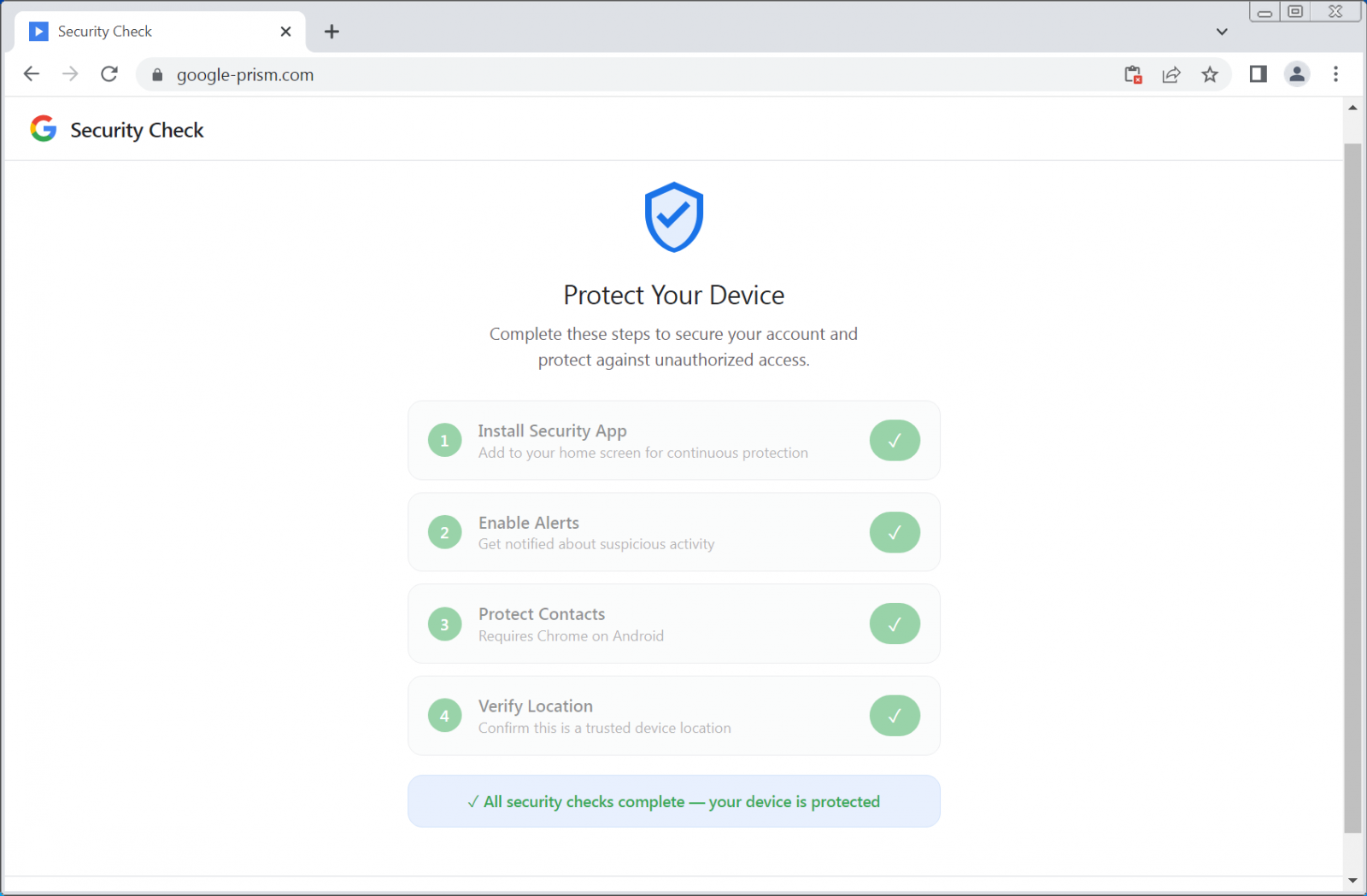
The core of this operation revolves around a convincing facsimile of a Google security portal, hosted on domains engineered for deception, such as google-prism[.]com. This landing page employs a multi-stage persuasion process, typically involving four steps that guide the victim toward installing a malicious PWA. These steps are framed as necessary measures for "enhanced device protection" or mandatory security compliance, playing directly into user anxieties regarding account safety.
PWAs, by design, offer an application-like experience directly from the web. They install locally, run in their own window devoid of typical browser chrome, and gain access to various device APIs. This inherent blending of web functionality and native application feel is precisely what the threat actors exploit. Once installed, the malicious PWA transforms the victim’s browser into a versatile surveillance and command-and-control (C2) platform.

Research indicates that the installed PWA is engineered to harvest a wide array of sensitive information. This includes contact lists, real-time geolocation data derived from GPS APIs, and, critically, the contents of the user’s clipboard. The access to the clipboard is particularly insidious, allowing the attacker to capture credentials, session tokens, or sensitive text copied by the user, even cryptocurrency wallet addresses that victims might copy for transactions.
Advanced Evasion and C2 Mechanisms
Beyond basic data theft, the PWA component exhibits several advanced capabilities that elevate this threat beyond standard credential harvesting. One of the most significant functionalities discovered is the implementation of a WebSocket relay. This relay effectively transforms the victim’s browser instance into a remote HTTP proxy under the attacker’s direction. The attackers can execute arbitrary fetch requests through the victim’s browser, appearing to originate from the victim’s local network context. This capability is invaluable for internal reconnaissance, allowing threat actors to scan for live hosts and accessible internal ports, effectively mapping out private network topography that would otherwise be shielded from external probes. As detailed by cybersecurity analysts, this proxy function allows the attacker to specify the method, headers, credentials, and body of any request, receiving the full response, headers included.
Further bolstering persistence and command execution is the strategic use of browser APIs. The campaign actively monitors for the WebOTP API, a feature designed to securely read One-Time Passcodes (OTPs) delivered via SMS in supported browsers. By intercepting these codes, the attackers can bypass standard two-factor authentication (2FA) mechanisms.
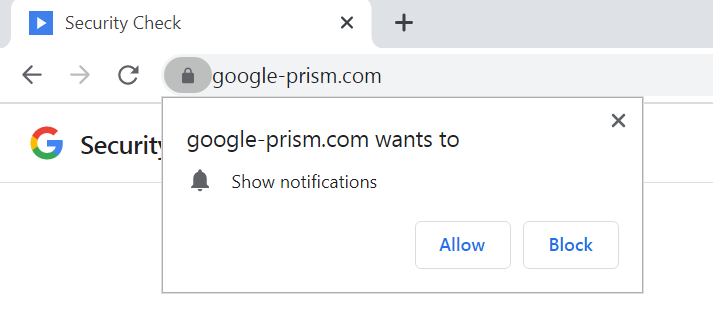
The PWA maintains constant communication with its command infrastructure, executing a heartbeat check against /api/heartbeat every 30 seconds. This frequent polling ensures rapid command delivery. Since the most lucrative data theft—OTP interception and clipboard scraping—requires the PWA to be active, the threat actors utilize another critical feature: push notifications. The PWA requests and receives permission to send notifications. Attackers use these notifications not just for general alerts but specifically to push fake security warnings, compelling the user to re-engage with the malicious application, thus reactivating its data-stealing capabilities.
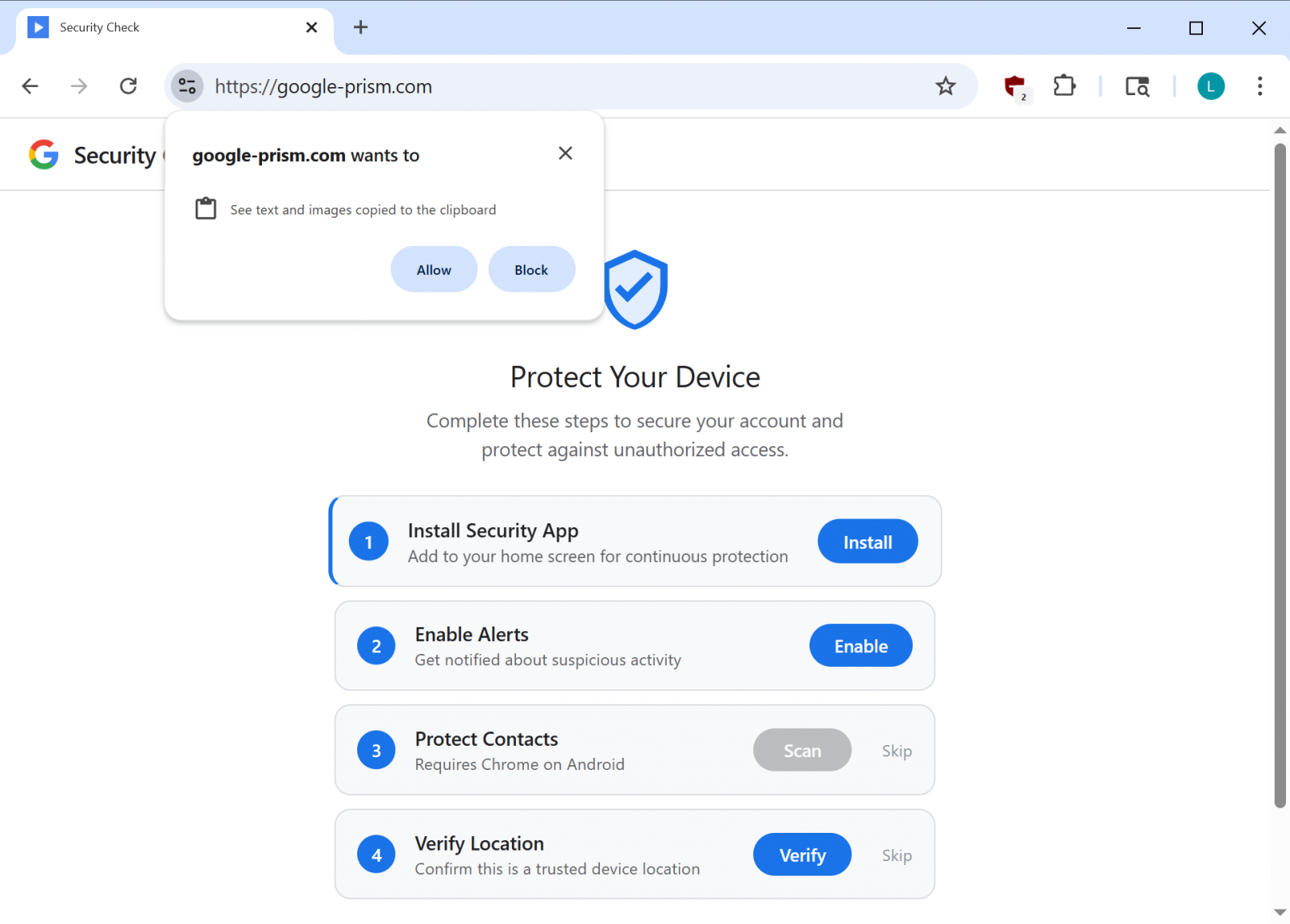
The installation process also focuses on creating a detailed device fingerprint, gathering metadata that aids in tracking and potentially tailoring future exploitation attempts. The service worker component within the PWA is responsible for managing these background tasks, handling push message reception, staging exfiltrated data locally, and ensuring that tasks received from the C2 server are executed. Moreover, the inclusion of a handler for Periodic Background Sync ensures that the application can maintain synchronization capabilities even when the browser window is closed, provided the PWA remains installed on the device.
The Android Escalation: Deeper System Compromise
In instances where the victim is fully persuaded by the social engineering narrative, the campaign offers a secondary payload: an Android Application Package (APK). This file is marketed as a "critical security update" verified by Google, purportedly to extend account protection to the user’s contacts.
The permissions requested by this Android component are extremely broad and indicative of a full device takeover intent. The APK demands access to SMS messages, call logs, the microphone, contacts, and, most dangerously, the Accessibility Service. The combination of these permissions enables comprehensive data theft, facilitates financial fraud (via SMS interception), and allows for eavesdropping.
The Android malware incorporates multiple layers of persistence and data capture:
- Custom Keyboard: To log every keystroke, capturing passwords entered outside the initial web session.
- Notification Listener: To intercept all incoming notifications, potentially reading alerts from banking apps or other secure services.
- Credential Interception: Services designed to grab credentials populated automatically by password managers.
- Device Administrator Registration: The APK registers itself as a device administrator, a feature that significantly complicates standard uninstallation procedures, often requiring users to navigate deep into security settings to revoke the privilege first.
- Boot Receiver and Alarms: The malware sets itself to execute on device startup and schedules recurring alarms to automatically restart core components if they are terminated by the operating system or the user.
Furthermore, security researchers noted components hinting at the capability to execute overlay-based attacks. This technique involves drawing a transparent malicious screen over legitimate applications, allowing attackers to present fake login prompts directly over the real app interface—a highly effective method for stealing credentials from trusted applications like banking or communication platforms.
Industry Implications and Analysis: Exploiting Trust in Web Standards
This campaign represents a significant inflection point in phishing methodology. Historically, attackers relied on exploiting software vulnerabilities or tricking users into downloading executables. This PWA-based attack demonstrates a mature understanding of how to weaponize the capabilities intentionally built into modern web standards (PWAs, WebOTP, Service Workers) by leveraging social engineering rather than zero-day exploits. The core attack relies on user consent, making detection by signature-based security tools extremely difficult.
From an industry perspective, this highlights a critical gap in user security awareness concerning PWA installation prompts. Users are conditioned to trust pop-ups related to "security checks" from major platforms like Google, but the boundary between a legitimate website feature and a deceptive application installation is becoming dangerously blurred.
The effectiveness of this threat is twofold: the initial web compromise is potent enough to steal 2FA codes and compromise network access, even without the optional Android installation. However, the optional Android APK transforms the compromise from a browser session hijack into a device-level infestation, granting deep, persistent access.
Future Trends and Defense Strategies
The rise of PWA-based malware signals a future where the browser itself becomes the primary attack surface, independent of traditional application sandboxes. We can anticipate threat actors increasingly adopting this approach across other major platforms, targeting Microsoft 365, Apple ID, or other high-value ecosystems with similar deceptive web installations. The focus will likely shift toward leveraging more advanced browser APIs that offer greater stealth and persistence.
For end-users, the imperative is vigilance against unsolicited security prompts. Experts stress that legitimate security procedures for major platforms are never initiated via arbitrary web page pop-ups demanding software installation. Users must verify all security actions directly through the official, known-good portal (e.g., myaccount.google.com).
Remediation requires a multi-step approach. For the web component, users must manually remove the PWA from their browser settings (Chrome, Edge, Safari). For the Android payload, the presence of a Device Administrator must be revoked before the APK can be uninstalled. Security tools are advised to enhance heuristics to flag the installation of applications masquerading under generic names like "Security Check" or "System Service," especially when bundled with suspicious permission requests. Furthermore, browser developers must consider ways to visually differentiate between officially sanctioned web applications and those installed via deceptive third-party prompts, potentially introducing clearer warnings during the PWA installation process when high-risk permissions are requested. The reliance on Periodic Background Sync also necessitates that security software monitor for persistent background activity originating from seemingly benign web applications.
