


The release of the Windows 10 KB5075912 Extended Security Update (ESU) package marks a significant, albeit highly specialized, moment in the lifecycle management of Microsoft’s legacy operating system. This update, strategically deployed as part of the February 2026 Patch Tuesday cadence, is not aimed at the general Windows 10 user base, which reached its official end-of-life milestone previously. Instead, it is a vital lifeline for organizations and enterprises—specifically those running Windows 10 Enterprise LTSC (Long-Term Servicing Channel) or those paying for the ESU program—to maintain compliance and robust security posture as the official support window narrows to its final phase.
The immediate priority addressed by KB5075912 is the remediation of critical vulnerabilities discovered during the February 2026 cycle. Foremost among these concerns is the patching of six identified zero-day vulnerabilities. In the contemporary threat landscape, where exploit chains are rapidly developed and deployed, the timely patching of flaws that are already being actively exploited "in the wild" is non-negotiable for any organization maintaining legacy systems. For environments still tethered to Windows 10, whether due to highly specialized hardware dependencies, regulatory constraints, or the sheer logistical difficulty of mass migration, this ESU deployment is the only mechanism preventing exposure to these actively weaponized exploits.
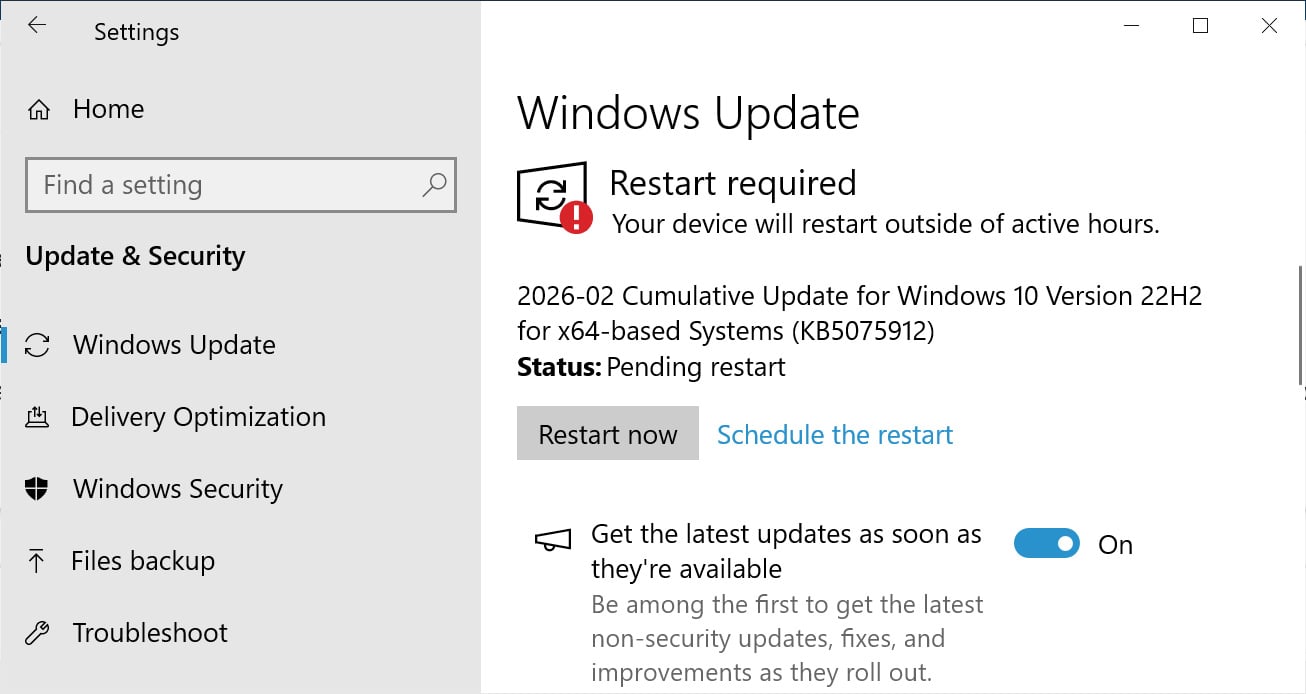
Installation procedures remain streamlined for this niche audience. Eligible users enrolled in the ESU program, or those utilizing the LTSC variant, access the update through the standard Windows Update mechanism within the Settings panel, initiating a manual ‘Check for Updates’ scan. Upon successful application, the operating system builds are advanced: standard Windows 10 systems under ESU coverage move to build 19045.6937, while Windows 10 Enterprise LTSC 2021 increments to build 19044.6937. These build numbers are crucial reference points for IT administrators verifying deployment success across their protected fleets.
Beyond the Patch: The Looming Certificate Crisis
While the immediate neutralization of zero-days is paramount, the KB5075912 update serves a second, equally critical, infrastructural function: the continued rollout and implementation of replacement Secure Boot certificates. This element of the update addresses a long-term compliance and security ticking clock that Microsoft has been signaling since mid-2025.
Secure Boot, a cornerstone feature of modern UEFI firmware, is designed to ensure that a device boots only using software trusted by the Original Equipment Manufacturer (OEM). This protection relies on cryptographic signing. The issue stems from the impending expiration of several foundational Windows Secure Boot certificates issued around 2011, scheduled to lapse in June 2026. If these root certificates expire without being superseded, the system’s ability to cryptographically validate the integrity of the boot chain—including the Windows kernel, third-party bootloaders, and essential Secure Boot revocation updates—is fundamentally compromised.
The practical implication of this expiration is severe: a loss of trust in the boot process could allow sophisticated threat actors to inject malicious code or rootkits during the earliest stages of system startup, effectively bypassing nearly all subsequent endpoint detection and response (EDR) and security software. By proactively pushing new certificates via updates like KB5075912, Microsoft is ensuring the cryptographic chain of trust remains unbroken for those still operating on Windows 10 platforms, even as the platform ages out of mainstream support. This continuous delivery mechanism suggests a phased rollout, targeting specific cohorts of ESU users as Microsoft expands the scope of deployment for these essential root keys.
Contextualizing the ESU Program and Windows 10’s Twilight
To fully appreciate the significance of KB5075912, one must understand the context of the Extended Security Updates program. Windows 10 officially reached its standard end-of-life in October 2025. The ESU program is an expensive, year-by-year subscription service allowing organizations to continue receiving critical security patches after the official support deadline. It is a necessary bridge for organizations that cannot, or choose not to, immediately migrate to Windows 11 due to factors such as legacy application compatibility, specialized hardware integration requirements, or complex regulatory environments that mandate long validation cycles.
The fact that Microsoft is still issuing patches that include fixes for newly discovered zero-days in February 2026 underscores two realities: first, the inherent security debt carried by maintaining legacy operating systems; and second, Microsoft’s commitment—for a price—to protect these systems until their ESU contracts conclude. For organizations utilizing ESU, this monthly or periodic update is not optional; it is the cost of maintaining operational continuity while mitigating active, sophisticated threats.
Furthermore, the release notes indicate that KB5075912 consolidates previously released security and bug fixes. This implies that the update incorporates the cumulative security burden of prior months, ensuring that systems brought up to date receive the full spectrum of necessary hardening, not just fixes for the current month’s discovered flaws.
Expert Analysis: The Security Architecture Implications
From a security architecture perspective, the dual focus of this update—zero-day defense and certificate lifecycle management—highlights the complexity of modern endpoint hygiene.
Zero-Day Mitigation: The six zero-days addressed in the February 2026 Patch Tuesday likely target widely used components that span across supported and unsupported operating systems. For Windows 10 ESU users, these vulnerabilities are particularly dangerous because the underlying OS architecture is older, potentially lacking some of the more advanced exploit mitigation techniques built into Windows 11, such as enhanced hardware-backed security features. Successfully patching these flaws directly prevents immediate remote code execution or privilege escalation vectors that threat actors prioritize.
Secure Boot and Firmware Integrity: The Secure Boot certificate replacement is arguably the more strategic fix. It moves the security focus from application-layer exploits to the foundational firmware integrity layer. In discussions around "hardware root of trust," Secure Boot is fundamental. If this trust mechanism fails due to expired keys, it creates a permanent vulnerability that traditional antivirus or firewalls cannot address because the infection occurs before the operating system loads its security stack. Microsoft’s continuous work here is vital to prevent the degradation of hardware-level security assurances on these aging devices.
An expert observer might note that while Microsoft is managing the certificate expiry, the long-term solution remains migration. The ESU program, by its nature, is temporary. Organizations leveraging these updates are essentially buying time, and the security team’s focus should be on developing a migration strategy to a supported platform to permanently exit this high-risk state before the final ESU coverage period ends. Relying indefinitely on patching a platform that no longer receives feature updates or comprehensive driver support introduces ancillary risks related to compatibility and unpatched non-security vulnerabilities.
Resolution of Known Issues: A Minor But Important Tweak
The update also successfully resolves a specific, known bug that was causing operational disruption: the failure of certain Windows 10 devices to properly shut down or hibernate when System Guard Secure Launch was enabled. System Guard Secure Launch is an advanced security feature, often utilized in enterprise settings, designed to verify the integrity of the boot process using Trusted Platform Module (TPM) capabilities. A bug interfering with basic power states (shutdown/hibernate) when a key security feature is active is a significant operational irritant, potentially leading to data loss or unnecessary power consumption. Fixing this ensures that ESU subscribers can utilize their security features without compromising basic system usability.

Industry Implications and Future Trajectory
The ongoing support for Windows 10 via ESU, even this deep into 2026, sends a clear message to the enterprise sector: Microsoft recognizes the inertia in large-scale enterprise upgrades. However, the increasing cost and the narrow scope of ESU support reinforce the pressure toward Windows 11 adoption.
For the broader cybersecurity industry, these patch cycles serve as a continuous barometer of the threats facing legacy infrastructure. Security vendors must ensure their threat intelligence feeds and behavioral analysis tools are tuned to identify attack patterns that specifically target older OS kernels and libraries still present in patched Windows 10 builds.
Looking forward, the industry trend is unequivocally toward mandating modern security foundations—TPM 2.0, VBS (Virtualization-Based Security), and hardware-backed integrity checks—all features more natively supported and enforced by Windows 11. The KB5075912 update is a necessary, high-cost detour, ensuring that organizations buying extra time do not find that time curtailed by active exploitation or fundamental firmware trust failures. Microsoft’s final commitment to these systems is measured in months, not years, making the efficient deployment of this patch a critical Q1 2026 task for IT security managers worldwide.
In summary, KB5075912 is a high-stakes maintenance release, bundling urgent zero-day remediation with crucial cryptographic infrastructure maintenance (Secure Boot certificates), all delivered to the most security-sensitive, yet technologically reliant, segment of the Windows 10 user base. While it successfully plugs immediate and long-term risks for ESU participants, it simultaneously emphasizes the approaching, inevitable deadline for platform modernization. The absence of any reported known issues with this specific build suggests a clean deployment for the targeted systems, allowing ESU subscribers to focus their resources on planning the final transition away from the platform.
