

The modern mobile computing landscape is defined by an ever-increasing density of features, particularly within the Android ecosystem. Samsung, in particular, has cultivated a reputation for embedding a staggering array of functionalities within its One UI skin, often leading to powerful capabilities remaining undiscovered by the average user. Much like the previously highlighted, deeply buried connectivity laboratories settings, another highly potent, yet remarkably obscure, utility exists within Samsung’s software arsenal: Separate App Sound. This feature, which allows for the independent routing of audio streams from individual applications to distinct output devices, represents a significant advancement in personal audio management—a feature whose absence on rival Android platforms is keenly felt by power users.
The Genesis of Precision Audio Control
To fully appreciate the utility of Separate App Sound, one must consider the historical context of Android audio management. For years, the default behavior across the entire Android operating system, and indeed most mobile OSes, has been a singular audio focus. When an external output device (such as Bluetooth headphones, a dedicated speaker, or a car stereo) is connected, virtually all system and application audio is funneled to that destination. This monolithic approach creates friction in multi-tasking scenarios. If a user is streaming music to a home theatre system via Bluetooth, a critical incoming call notification, a navigation prompt, or an errant social media video notification will abruptly hijack the primary audio output, often resulting in a jarring interruption or, worse, the user missing important information.
Samsung introduced Separate App Sound initially with the Galaxy S8 series back in 2017. This timing places its debut squarely within a period where smartphone use was rapidly diversifying beyond simple communication into sophisticated media consumption, mobile gaming, and professional conferencing. Despite its longevity—nearly seven years in the Samsung ecosystem—its low discoverability, buried several layers deep in the Settings menu, has rendered it one of the platform’s best-kept secrets. Its recent resurfacing in user communities underscores how many long-time Android users remain unaware of this powerful tool for managing overlapping audio demands.
Decoding the Mechanism: How Separate App Sound Operates
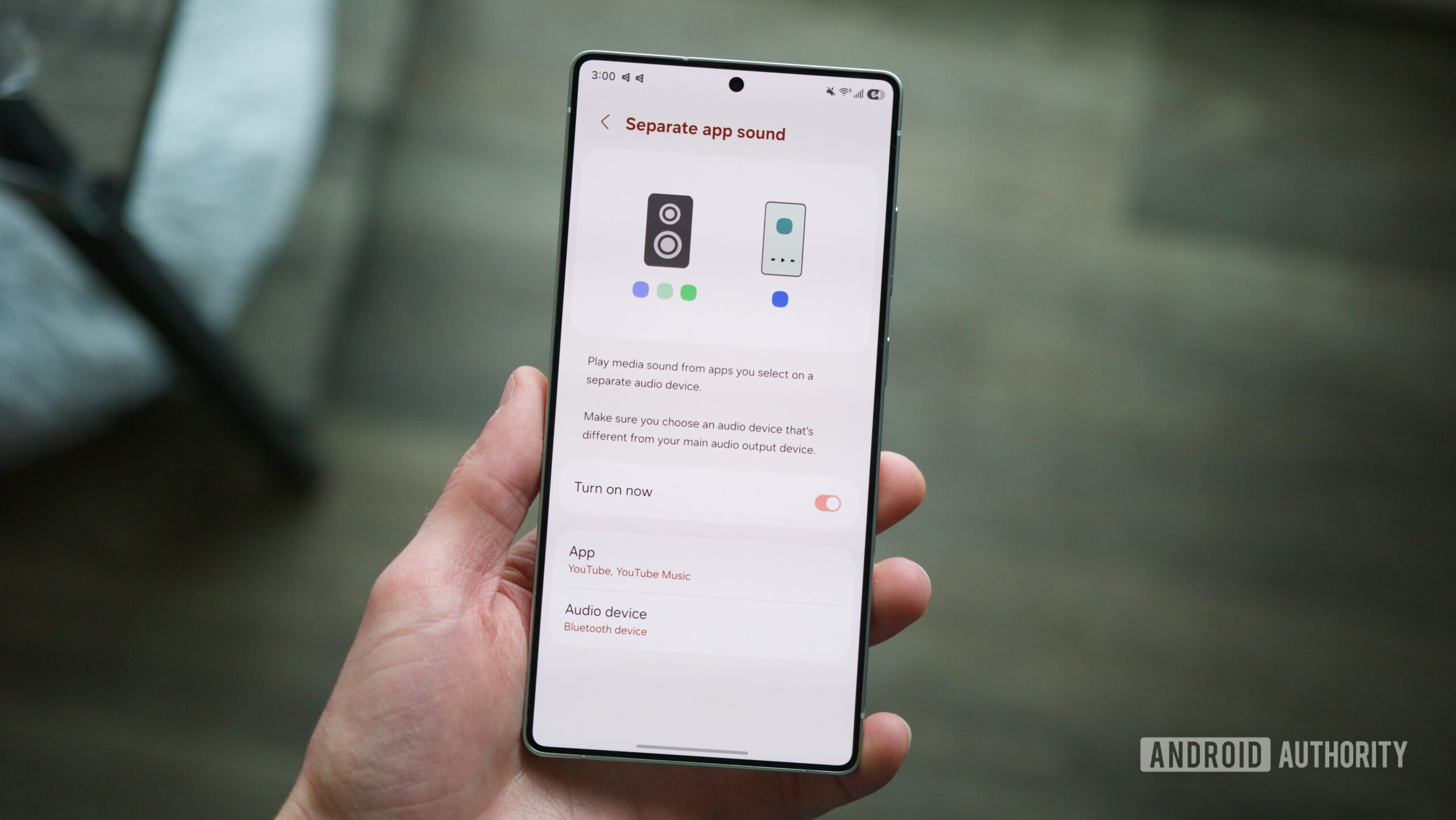
Separate App Sound fundamentally addresses the "all or nothing" nature of standard audio output selection. It provides a mechanism to carve out specific applications and assign their audio streams to an output device different from the system’s primary audio destination.
The operational path, while somewhat obscured within the Settings hierarchy, is straightforward once located:
- Access Settings: Navigate to the main system Settings application.
- Locate Sound Settings: Open the "Sounds and vibration" menu.
- Find Advanced Audio: Scroll down to the advanced or related settings, often labeled "Separate app sound" or similar phrasing under an "Advanced settings" sub-menu.
- Enable the Feature: Toggle the main switch for Separate App Sound to the "On" position.
- Configure Audio Outputs: The system will then prompt the user to define two key elements:
- Select Apps: A list of installed applications appears, allowing the user to choose which apps will utilize the dedicated routing.
- Select Output Device: For the chosen application(s), the user must specify the secondary output device. This could be a specific pair of earbuds, a named Bluetooth speaker, or the phone’s internal loudspeaker if the primary output is set elsewhere.
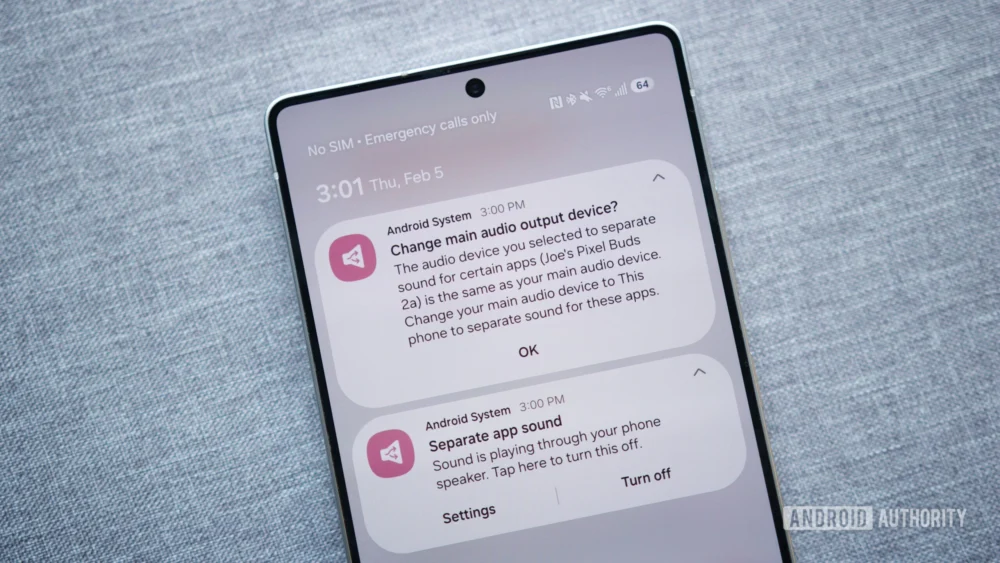
A crucial element of this setup involves the system’s interpretation of the primary audio output. If the user has Bluetooth headphones connected for general use (the default primary output), and they assign Spotify to route through the phone’s internal speakers, the system must dynamically manage the switch. Upon selecting the application and output, the OS often presents a confirmation dialogue. This dialogue clarifies the state change: the selected apps will use the dedicated output, while all other audio (notifications, calls, system alerts, unassigned apps) will revert to the phone’s default speaker or the original primary output if the user confirms the adjustment. This subtle but vital distinction ensures that background processes maintain audible presence while media playback remains isolated.
Expert Analysis: Why This Feature Commands Attention
From an engineering and user experience perspective, Separate App Sound is a masterclass in providing contextual control without compromising system stability. Its implementation demonstrates a deep understanding of how users interact with their devices across diverse environments.
Audio Prioritization and Context Switching: Standard Android treats audio streams with a strict hierarchy. Media usually supersedes alerts, but connectivity changes (like dropping a Bluetooth connection) force a system-wide reset. Separate App Sound bypasses this rigid structure by creating parallel audio paths managed at the application layer rather than solely at the hardware connection layer. This capability is invaluable for professional users relying on VoIP applications. For instance, a user conducting a sensitive video conference via Google Meet on a laptop might still use their Galaxy phone for private WhatsApp audio messages. By routing the Meet audio to dedicated earbuds and the WhatsApp audio to the phone speaker, the user maintains call privacy while ensuring immediate notification delivery.
Mitigating Multitasking Headaches: The issue of unwanted media bleed-through is pervasive. Consider a scenario where a user is navigating via Google Maps connected to their car’s Bluetooth system. If a passenger opens TikTok or Instagram, the brief, loud clips from those apps would typically blast through the car speakers, overriding the navigation voice prompts. With Separate App Sound, the user designates the music/navigation apps to the car stereo, while social media apps are explicitly routed to the phone’s onboard speaker. The result is seamless background navigation audio alongside isolated, brief media bursts—a significant quality-of-life improvement.
Accessibility and Power User Empowerment: While often framed as a convenience, this feature also has implications for accessibility. Users who rely on screen readers or specific auditory cues might need those alerts delivered via the most immediate channel (the phone speaker) while routing continuous media streams to a more comfortable, distant output device like a soundbar.
Industry Implications and the Android Dilemma
The most compelling aspect of Separate App Sound is its exclusivity to Samsung’s One UI. This highlights a significant ongoing tension within the Android ecosystem: the conflict between Google’s vision for a standardized core operating system (AOSP) and the desire of Original Equipment Manufacturers (OEMs) to differentiate through proprietary enhancements.
While Android offers robust multimedia frameworks, granular, per-app output selection has historically required root access or complex third-party apps that often introduce latency or instability. Samsung’s implementation, being native to the OS layer (likely integrated deeply within their specific audio HAL or framework), functions reliably.
The industry implication is clear: this feature is a tangible differentiator that Google has yet to integrate system-wide. If Google were to adopt a similar feature directly into stock Android (perhaps leveraging Project Mainline updates or future Android versions), it would level the playing field. However, OEMs like Samsung invest heavily in creating these "sticky" features—those that make switching brands genuinely inconvenient for power users accustomed to specific workflows.
For competitors, the challenge is twofold. They must either reverse-engineer a stable solution or lobby Google to include it. Until then, this specific capability remains a compelling reason for users prioritizing advanced audio management to remain within the Samsung Galaxy fold. It shifts the perception of One UI from merely being "feature-bloated" to being "feature-complete" in critical niche areas.
Future Trends and Potential Evolution
Looking forward, the evolution of mobile audio management will inevitably lean toward greater isolation and spatial awareness, making features like Separate App Sound even more relevant.
Spatial Audio Integration: As augmented reality (AR) and spatial computing become more mainstream, the need to mix real-world audio (from the environment or direct conversations) with digitally rendered audio streams will increase. A future iteration of Separate App Sound could allow users to route a critical incoming notification sound to the left earbud, while a background podcast plays stereoscopically through both, all while ambient noise cancellation remains active.
Advanced Headphone Profiles: The feature could become dynamic, linking routing preferences directly to the connected hardware profile. For example, when headphones designated for "Work" are connected, all communication apps route to them, and entertainment apps default to the phone speaker. When "Leisure" headphones are connected, the reverse occurs automatically. This requires deeper integration with Bluetooth profiles and device recognition that goes beyond simple pairing.
OS-Level API Exposure: For developers, the ideal future state would involve an official Android API exposing this capability. If Google provided a standard AudioRoutingManager accessible to all apps, the entire ecosystem could benefit, moving the feature from a proprietary curiosity to a platform standard. This would enable third-party apps (like specialized gaming overlays or professional streaming tools) to leverage this segmentation immediately.
In conclusion, Samsung’s Separate App Sound is far more than a minor setting tweak; it is a sophisticated solution to the complex reality of modern smartphone audio multitasking. Its longevity and continued obscurity are testaments to the deep customization inherent in the Samsung experience, yet its sheer utility suggests it should be a baseline expectation for any premium mobile operating system. For the discerning user navigating simultaneous demands for media, communication, and system awareness, this hidden gem transforms a frustrating limitation into a finely tuned instrument of control. The lingering question remains: how long can the rest of the Android world afford to ignore this level of audio autonomy?
