

Microsoft has successfully patched a significant usability issue within the Windows 11 operating system, one that temporarily rendered the traditional password sign-in option invisible on the lock screen for users who had installed specific updates released since August 2025. This resolution, delivered via the optional January 2025 cumulative update, KB5074105, marks the closure of a notable bug tracking back to the initial rollout of certain non-security fixes for Windows 11 versions 24H2 and 25H2.
The context surrounding this particular glitch is rooted deeply in Microsoft’s ongoing efforts to streamline and modernize the Windows logon experience. Modern authentication protocols heavily favor biometric methods (like Windows Hello Fingerprint), hardware keys (like FIDO2 credentials), and simplified numeric PINs over the legacy text-based password entry. This strategic shift aims to enhance both security posture—by encouraging multi-factor authentication adoption—and user convenience. The lock screen interface reflects this prioritization. Typically, the password icon only materializes when the system detects a plurality of available sign-in methods. If a device is configured exclusively for password access, Windows 11 defaults to presenting the password entry field directly, logically omitting a redundant selector icon.
The complication arose when users utilizing multiple authentication factors—say, a PIN and a password—installed the August 2025 preview update, specifically KB5064081, or any subsequent builds derived from it. In these specific configurations, the operating system logic faltered. Instead of displaying the expected array of icons (PIN, Password, etc.), the password icon frequently vanished entirely, leading to user confusion and potential momentary frustration during system access.
When Microsoft initially acknowledged this behavior in November, they classified it as a known issue within the support documentation. Crucially, even though the visual indicator—the small icon denoting the password option—was absent, the underlying functionality remained intact. Affected users discovered that by precisely hovering their mouse cursor over the area where the icon should have been positioned on the lock screen, a functional, albeit invisible, button materialized. Clicking this phantom element successfully invoked the password text box, allowing for standard credential entry and subsequent login. While this provided a viable workaround, it represented a sub-optimal user experience, particularly for enterprise environments where standardized, predictable interfaces are paramount for maintaining workflow efficiency and minimizing helpdesk calls.
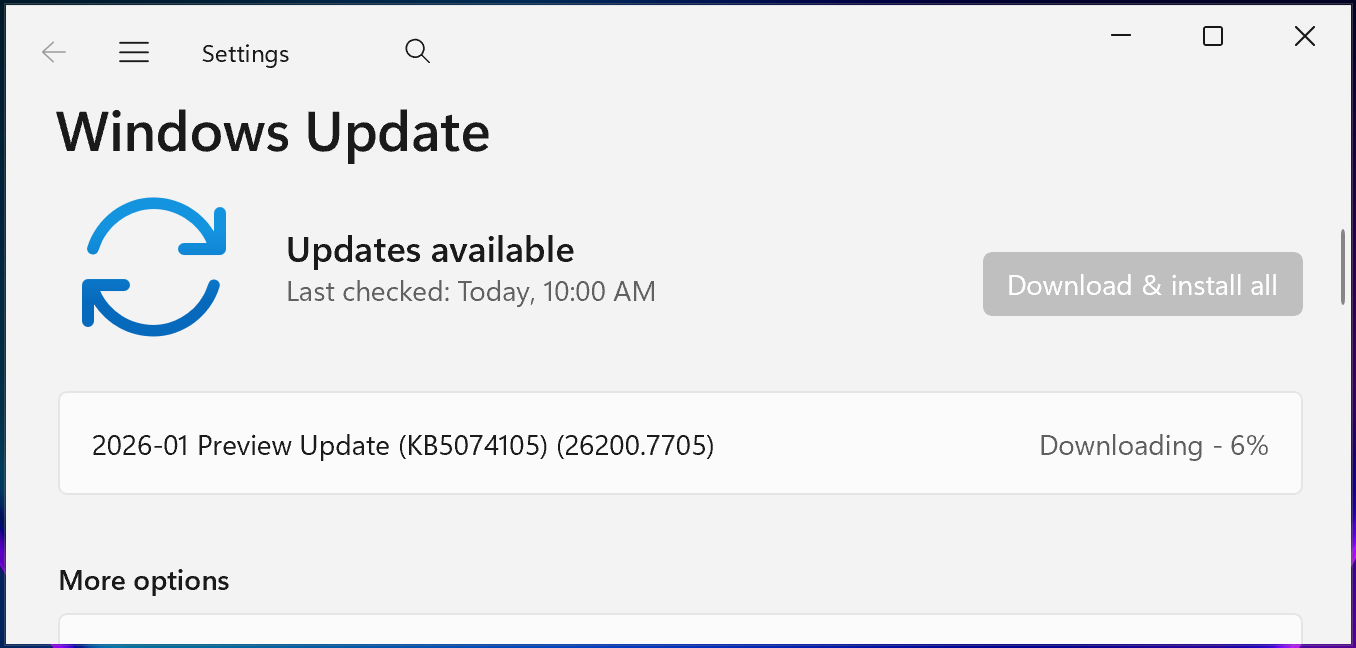
The rollout of KB5074105, made available on Thursday, January 29, 2025, officially eradicates this specific interaction error. This optional cumulative update bundles a wide array of corrections, reflecting the continuous maintenance cycle required for complex operating systems. KB5074105 is reported to contain 32 distinct fixes, touching upon critical areas such as boot sequence stability, sign-in reliability, and software activation integrity.
The scope of KB5074105 extends well beyond the lock screen cosmetic fix. It resolves several severe systemic instabilities introduced or exposed by previous updates. One notable correction targets issues preventing systems from booting correctly, specifically addressing failures during iSCSI boot operations that resulted in the dreaded "Inaccessible Boot Device" error. Furthermore, it stabilizes the startup sequence itself, rectifying a condition where the system would freeze during initialization if Windows Boot Manager debugging features were active. Such fixes are vital for maintaining operational uptime in data centers and specialized workstation environments reliant on these advanced debugging capabilities.
From an application and licensing perspective, the update also tackles a high-priority hang issue involving the core shell process. Specifically, Explorer.exe stability has been reinforced, resolving a scenario where the shell would seize up immediately following the first user login if certain applications were designated to launch automatically at startup. This points to subtle threading or resource contention bugs that only manifest during the complex initialization phase of a new user session. Additionally, for organizations managing large-scale migrations or feature updates, KB5074105 mends a critical flaw in the digital licensing mechanism. Previously, PC upgrades could fail during the Windows license migration phase because the hardware failed to correctly register its entitlement with the centralized Windows Activation server, potentially leading to unlicensed or functionally degraded systems post-upgrade.

The context of these ongoing patches is significant when considering the ecosystem implications. The August 2025 updates, which contained the initial seeds of these problems, were part of Microsoft’s broader push toward stabilizing the Windows 11 24H2 and 25H2 feature releases. When foundational updates—especially those released outside the standard Patch Tuesday cycle, as KB5064081 was (a non-security preview)—introduce such visible bugs, it signals potential regressions in the quality assurance pipeline regarding user interface (UI) validation, particularly around authentication workflows that bridge legacy and modern protocols.
Industry analysts often view these post-release hotfixes as a barometer for the maturity of a new Windows release cycle. While the ability to quickly issue a fix like KB5074105 demonstrates responsiveness, the initial proliferation of issues stemming from KB5064081 highlights the complexity of managing backward compatibility while innovating on security paradigms like the lock screen. For IT administrators, mandatory rollout of non-security preview updates often carries inherent risk; this case underscores why many large organizations defer adoption of preview releases until they are integrated into the subsequent mandatory monthly cumulative update cycle.
Furthermore, the resolution of related issues stemming from the same August update batch provides a holistic view of the disruption Microsoft faced. In late September 2025, the company had to address a separate, severe problem also traced back to KB5064081: interruptions, freezing, or complete black screens when attempting to view Digital Rights Management (DRM)-protected video content across applications utilizing Blu-ray, DVD, or Digital TV functionalities. This points to a broader systemic impact on multimedia processing or kernel-level access controls introduced by that specific August patch set.
Other fixes from that period, also now confirmed as resolved, included significant performance degradation—namely, severe lag and stuttering—affecting Network Device Interface (NDI) streaming software across both Windows 10 and Windows 11 devices. NDI is crucial in professional broadcasting, live production, and remote collaboration; performance hits here can directly translate into lost productivity or compromised media quality. Finally, the August updates inadvertently created application installation roadblocks for standard, non-administrator users, often triggering unwarranted User Account Control (UAC) prompts that halted installations. The successful remediation of these varied issues—from subtle UI glitches to critical boot failures and professional workflow disruptions—within the subsequent cumulative updates underscores the breadth of Microsoft’s engineering response throughout late 2025.
From a security and user experience trend analysis perspective, the initial disappearance of the password icon, though accidental, forces a discussion on the future of user authentication visibility. As biometrics and hardware keys become the default, the password option is destined to become increasingly marginalized. The user interface design philosophy appears to favor hiding less secure or less frequently used options unless explicitly required or when multiple options are present. In the long term, operating systems may evolve to present authentication based on context—for instance, displaying the password field only when a security key is absent or when accessing highly restricted system settings, rather than as a persistent, selectable icon.
The deployment strategy for KB5074105 is standard: users can obtain it via the Settings app under Windows Update, choosing to ‘Check for Updates’ and initiating the download and installation process. For environments requiring strict control or immediate application, manual installation via the Microsoft Update Catalog remains the alternative path.
In conclusion, the repair of the invisible password icon bug represents a successful conclusion to a minor but irritating episode in the Windows 11 maintenance narrative. It validates the practice of deferring non-critical updates until they are bundled into broader, more stable cumulative releases, while simultaneously affirming Microsoft’s commitment to iterating rapidly on feedback received regarding core user interactions, even those related to legacy authentication methods still essential for many users and enterprise configurations. The focus now shifts to the stability of the 2026 update cadence, ensuring that future feature rollouts carry fewer regressions across diverse hardware and configuration profiles.