

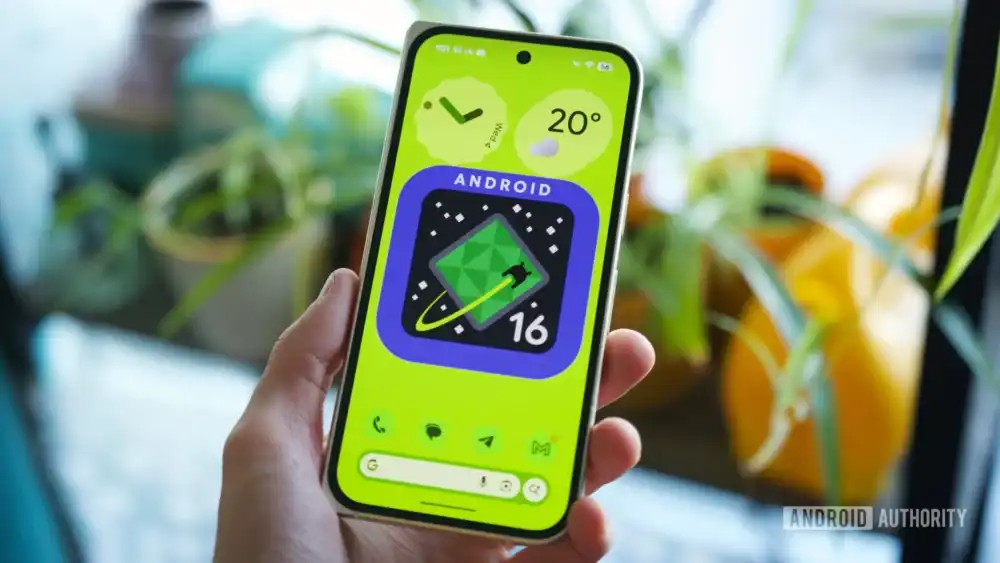
The release of Android 16’s Quarterly Platform Release 3 (QPR3) marks a significant evolutionary step for the platform, particularly for users entrenched in the Pixel ecosystem. While the headline features—such as the maturation of Desktop Mode and advanced multitasking capabilities debuting on the Pixel Tablet—represent major architectural shifts, the true day-to-day utility often resides in the granular refinements delivered through these mid-cycle updates. QPR3, bundled alongside the latest Pixel Drop, is not merely a maintenance release; it is a strategic consolidation of user feedback, pushing personalization and core functionality to a new level. For those prioritizing immediate, tangible improvements on their handheld devices, several key features demand immediate exploration and adoption. Understanding these changes provides insight into Google’s broader vision for mobile interaction and aesthetic control.
Context and Industry Implications of QPR Updates
Quarterly Platform Releases (QPRs) have become a critical component of the Android development cycle, moving beyond the traditional once-a-year major OS launch. This iterative approach allows Google to deploy substantial feature sets, security patches, and performance optimizations more frequently, mirroring the cadence seen in competitive mobile operating systems. The industry implication is a faster response time to evolving user demands and security landscapes. QPR3, in particular, seems focused on refining the user interface layer—the area where users interact most directly with the OS—signaling a commitment to polishing the user experience rather than merely introducing massive, disruptive changes. This focus on refinement is crucial for maintaining platform maturity and developer confidence.
1. Advanced Customization and Control for the At a Glance Widget
The At a Glance widget has long been a focal point for Pixel-exclusive features, serving as a contextual information hub. QPR3 elevates this widget from a passive information display to a fully controllable element of the home screen real estate.
For purists and minimalists, the most radical, yet long-requested, feature is the complete removal option. This addresses a segment of the user base who find the persistent widget disruptive or redundant. The process, involving a long-press on the widget followed by accessing Settings to toggle "Show on home screen," grants users absolute dominion over their primary screen real estate. This is a notable concession to personalization freedom, contrasting with earlier versions where the widget was immutable.
Furthermore, accessibility and aesthetic integration have seen significant upgrades. The introduction of a High Contrast Background option, accessible via the same settings menu, directly tackles legibility issues against complex or very light wallpapers. This seemingly minor toggle demonstrates an understanding of real-world usage scenarios where default transparency can degrade usability.
More impactful, however, is the integration of richer, proactive data streams. QPR3 officially rolls out native support for real-time Sports Scores, end-of-day Stock Details, and dynamic Commute Updates. These data points are not merely added; they are contextually managed. The observed behavior, where sports scores surface shortly before and after scheduled events, suggests a deep integration with the underlying calendar and location services. From an expert perspective, this tight integration signifies Google leveraging its background data processing capabilities—likely tied to the Assistant ecosystem—to deliver information precisely when it is most relevant, bypassing the need for users to actively launch dedicated sports or finance applications. The fact that these updates propagate seamlessly to the lock screen and Always-On Display underscores a commitment to ubiquitous, glanceable information delivery across the device states. This move solidifies At a Glance as a genuine competitor to third-party dashboard widgets.
2. Generative AI-Powered Custom Icon Theming
Building upon the theming enforcement introduced in QPR2, QPR3 introduces a paradigm shift in home screen aesthetics with AI-generated custom icon packs. Where previous updates focused on applying system-wide color palettes (Material You) to existing icons, this feature allows the system to dynamically create entirely new visual representations for every application icon on the home screen.
The creation process is accessed via the Wallpaper & style menu under the new "Create" icon option. Users are presented with five distinct stylistic starting points: Scribbles, Cookies, Easel, Treasure, and Stardust. While Cookies and Stardust appear as predefined themes, Scribbles, Easel, and Treasure offer iterative customization, allowing users to tweak the base theme or color profile to harmonize with their current wallpaper.
The technical sophistication here lies in the generative algorithms. The system must analyze the extant iconography of thousands of applications, many of which lack standardized vector assets, and render a cohesive, thematically appropriate replacement. The ability to apply this generated pack universally—covering even obscure local applications and dynamically updating for newly installed apps—is a major step forward in Android visual coherence. This feature moves personalization beyond simple color shifts; it allows users to impose a consistent artistic layer across the entire application environment. This has significant implications for brand identity on mobile devices, empowering users to enforce a strict design language regardless of developer compliance. The time investment users may spend fine-tuning these styles underscores the growing importance of visual customization in the modern smartphone experience.
3. Granular Control Over the Google Search Bar Widget
The persistent Google Search bar at the bottom of the home screen, a staple of the Pixel experience, receives long-overdue functional parity with the standalone Google widget. This update transforms a static element into a highly configurable utility panel.
Through the new "Widget settings," users can now dictate the widget’s visual treatment with precision. Options include overriding the dynamic Material You theme to enforce a fixed Light, Dark, or a specific custom color theme. Crucially, transparency levels are now adjustable, allowing the widget to either recede subtly into the background or stand out prominently.
The most practical functional addition is the customization of the Quick Shortcuts. Users are no longer locked into Google’s default suggestions. The ability to select shortcuts such as Translate, Sports, or Song Search offers a direct optimization for individual workflows. For power users, the inclusion of the ability to change the default search engine—currently limited to Google and DuckDuckGo—signals a foundational step toward greater search engine neutrality within the core OS interface, a topic of increasing regulatory scrutiny globally. While the current provider list is sparse, the architectural allowance suggests future expansion to include other engines, which would be a significant win for user choice.
4. Centralized Display Comfort Filters
Historically, mitigating eye strain on Pixel devices relied on the "Night Light" feature, often buried within Quick Settings or deep in the display menu. QPR3 consolidates and enhances these capabilities into a dedicated Comfort filters section under Display & touch settings, recognizing that blue light management is a 24/7 consideration, not just a nighttime event.
This centralization introduces two distinct, adjustable filters. Comfort View targets blue light reduction specifically, operating with a focus on maintaining accurate color representation elsewhere on the spectrum (reds, yellows, etc.). Its intensity is dynamically adjustable or can be set to adapt based on ambient light sensors, offering a nuanced approach to daytime screen fatigue.
Conversely, Night Light functions as a comprehensive display warmer. It reduces overall brightness while shifting the entire color temperature toward warmer tones, coupled with blue light attenuation. The added control over scheduling—beyond the traditional sunset-to-sunrise setting, now allowing for user-defined time blocks—provides enhanced utility for users with non-standard working hours. This focus on granular display ergonomics reflects a broader industry trend acknowledging the physiological impact of sustained screen exposure.
5. Integrated Flashlight Intensity Control
A persistent minor frustration for Pixel users has been the inability to precisely control the brightness of the integrated LED torch without resorting to third-party applications or accessibility overlays like the Magnifier. Android 16 QPR3 finally remedies this by baking the functionality directly into the Quick Settings toggle.
The mechanism requires a tap-and-hold gesture on the flashlight icon, rather than a simple tap. This interaction triggers a "Flashlight Strength" slider overlay. Users can then modulate the output intensity via vertical swiping, providing immediate visual feedback. This shift from a binary on/off state to a variable intensity control enhances the flashlight’s utility in diverse scenarios—from a low-level locator light to a maximum-output beam. This is a clear example of feature parity catch-up, bringing Pixel devices in line with capabilities long present on other high-end Android hardware.
6. Establishing the Satellite Connectivity Hub
With the introduction of emergency satellite communication on recent Pixel hardware, managing this critical, low-frequency feature became fragmented across multiple settings menus. QPR3 introduces a dedicated Satellite Hub, aiming to centralize diagnostics, app permissions, and status monitoring for satellite connectivity.
Accessing this hub requires a preliminary step: enabling Developer Options by repeatedly tapping the Build Number in "About phone." Once enabled, a new "Satellite" tile can be activated within the "Quick settings developer tiles" menu. This new tile, once added to the notification shade, opens the "Satellite connectivity" page. This page is intended to list all system-level apps utilizing satellite links, such as Emergency SOS, messaging, and location services.
While the current implementation appears to be in a somewhat preliminary or beta state—evidenced by reported initial bugs and non-functional settings shortcuts—the establishment of this hub is vital for future resilience. Industry analysts view this as laying the groundwork for more sophisticated satellite integration, potentially including third-party app access or enhanced diagnostic tools beyond basic emergency contact. Making this feature accessible via a developer tile suggests Google is actively testing user interaction patterns before a potential public rollout without the developer prerequisite.
7. Reversing the Navigation Button Order
For users transitioning between different Android manufacturers, the traditional layout of the three-button navigation bar has been a source of minor cognitive friction. Historically, Google mandated a specific order (Recents on the left, Back on the right), contrasting with the layouts preferred by many users migrating from legacy Samsung or OnePlus devices, who often expect the Back button on the right.
QPR3 introduces a long-awaited accommodation for these users. Within Settings > Display & touch > Navigation mode, tapping the settings cog adjacent to "3-button navigation" now exposes an option to invert the positional order of the Back and Recents buttons. This small tweak significantly improves onboarding and comfort for users who rely on the traditional navigation paradigm, showcasing Google’s increasing attention to legacy user habits during platform evolution. While gesture navigation is the default direction for many, acknowledging and providing robust options for button navigation remains crucial for accessibility and user retention across diverse demographics. This flexibility minimizes the learning curve associated with switching devices within the Android ecosystem.