


The digital information landscape is undergoing a profound transformation. Amidst the proliferation of short-form video, ephemeral social media updates, and the rapidly advancing capabilities of generative AI chatbots, the foundational act of reading long-form digital content—articles written by human journalists and subject matter experts—risks becoming an exercise in digital frustration. The contemporary web, driven by aggressive monetization strategies, frequently buries substantive text beneath a deluge of intrusive advertising, autoplaying media, complex navigational overlays, and superfluous graphical elements. For those of us who still value deep engagement with written material, this cluttered environment actively degrades comprehension and focus.
Historically, the solution to this pervasive "web clutter" involved third-party utilities. Services like Instapaper, Pocket, and the venerable Readability bookmarklet served as essential intermediaries, scraping the core text from a webpage and presenting it in a clean, standardized format. While these tools remain effective, relying on external services introduces dependencies, potential latency, and layers of data handling. A significant shift is occurring as major browser developers integrate these content refinement capabilities directly into the core experience. Google Chrome, in particular, is quietly deploying a powerful native feature—the experimental Reading Mode—that promises to redefine how users interact with text-heavy sites, rendering external services increasingly obsolete. This feature, when activated, strips away the digital detritus, offering a meticulously curated, focused reading environment that has become, for dedicated readers, arguably the most crucial, yet often overlooked, capability within the browser ecosystem.
The Genesis and Current Status of Native Reader View
The concept of stripping a webpage down to its textual essence is not new, but its integration directly into the primary browsing application represents a strategic pivot toward user experience optimization over pure page real estate monetization. Chrome’s Reading Mode operates on the principle of intelligent content parsing, utilizing sophisticated algorithms to differentiate between primary article content (headings, paragraphs, embedded media captions) and peripheral noise (advertisements, site navigation bars, tracking scripts, and promotional sidebars).
Crucially, this feature is not universally visible to all users; it remains firmly in an experimental or A/B testing phase, endemic to Google’s development strategy for major features. This staggered rollout means that many users might be unaware of its existence, or conversely, might see it appear and disappear based on internal testing parameters.
For mobile users—where screen real estate is most precious and distractions most acute—the presence of Reading Mode is often signaled in one of two ways. Sometimes, a dedicated, small icon appears adjacent to the address bar, indicating that the current page is eligible for simplification. More consistently, however, the functionality is nested within the main three-dot overflow menu, labeled explicitly as "Show Reading mode." The successful manifestation of these cues indicates the feature is active for the current user session.
For users encountering the feature’s absence, accessing it requires delving into the experimental configuration settings, accessible via the chrome://flags URL. This area is the staging ground for pre-release functionalities. To ensure consistent access, technical users must specifically locate and modify flags related to content parsing and rendering. Specifically, setting the "Reader Mode triggering" flag to "All articles" forces the browser to attempt parsing on every eligible page, rather than relying on Chrome’s internal, often conservative, heuristics. Complementing this, enabling "Reader Mode improvements" often unlocks the latest iterations of the parsing engine, ensuring compatibility with modern web structures. A mandatory browser relaunch follows these adjustments, solidifying the configuration change.
On desktop platforms, the deployment strategy is often less opaque. In many contemporary builds, Reading Mode is available by default, accessible via a right-click context menu item: "Open in Reading mode." This desktop implementation frequently offers a richer array of customization tools than its mobile counterpart. However, desktop users who prefer the persistent, non-intrusive icon cue found on mobile can also force the "Reading Mode Omnibox Chip" flag to "Enabled" within chrome://flags, thereby bringing the visual prompt directly into the URL bar area upon article detection.
Expert Analysis: The Value Proposition of Content De-Cluttering
The significance of this built-in functionality extends beyond mere convenience; it represents a critical reassertion of user agency over the consumption experience. From a cognitive perspective, the presence of numerous visual stimuli increases cognitive load, forcing the reader’s attentional resources to be diverted away from semantic processing toward filtering irrelevant data. This phenomenon, known as "visual noise," directly correlates with reduced reading speed and poorer retention.
Chrome’s Reading Mode functions as a high-fidelity content filter, achieving what third-party extensions used to accomplish, but with superior integration and performance. Because it is baked into the browser engine, the parsing is generally faster and more context-aware of the browser’s own rendering pipeline, leading to a smoother transition and less jarring layout shifts.
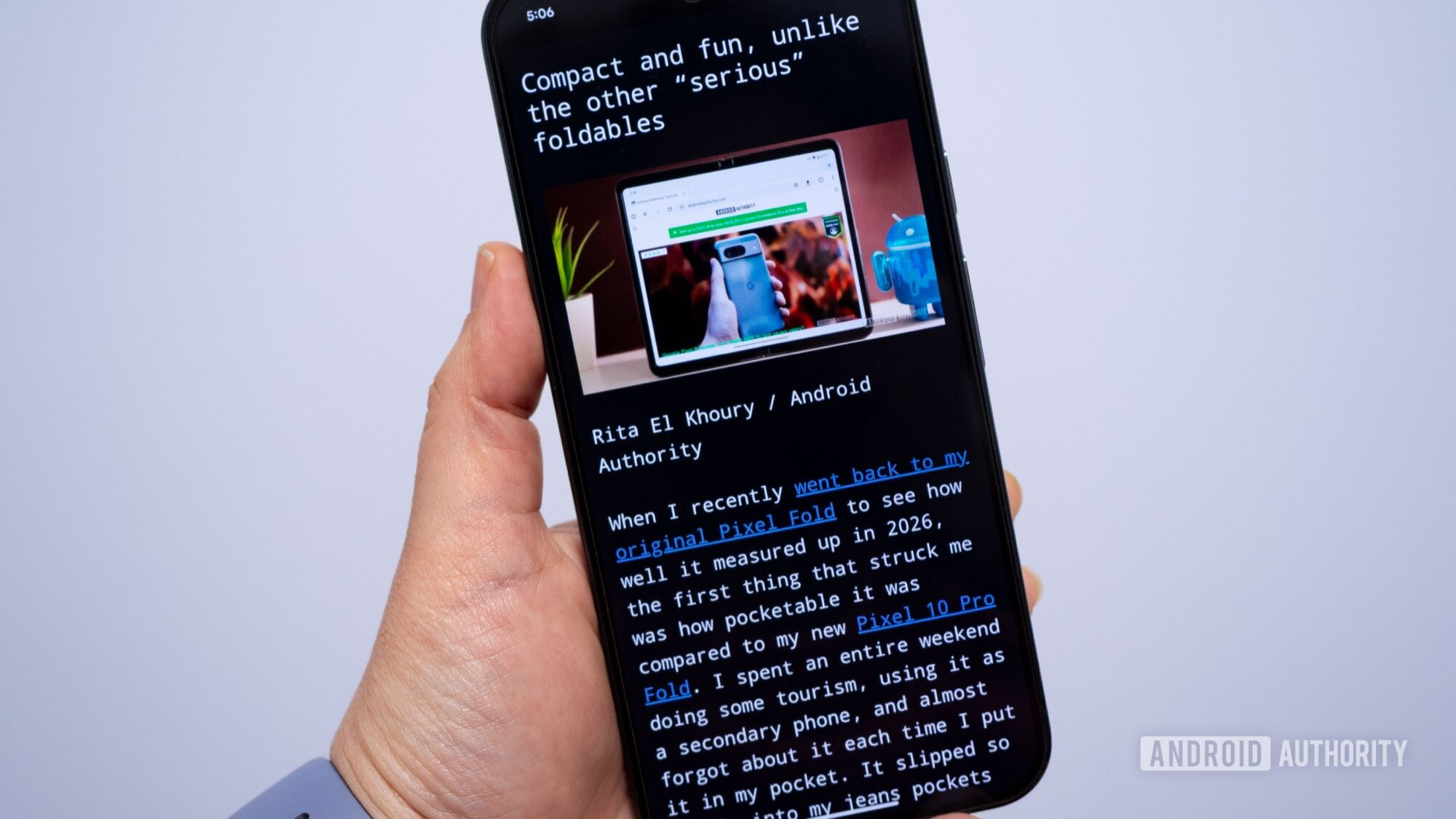
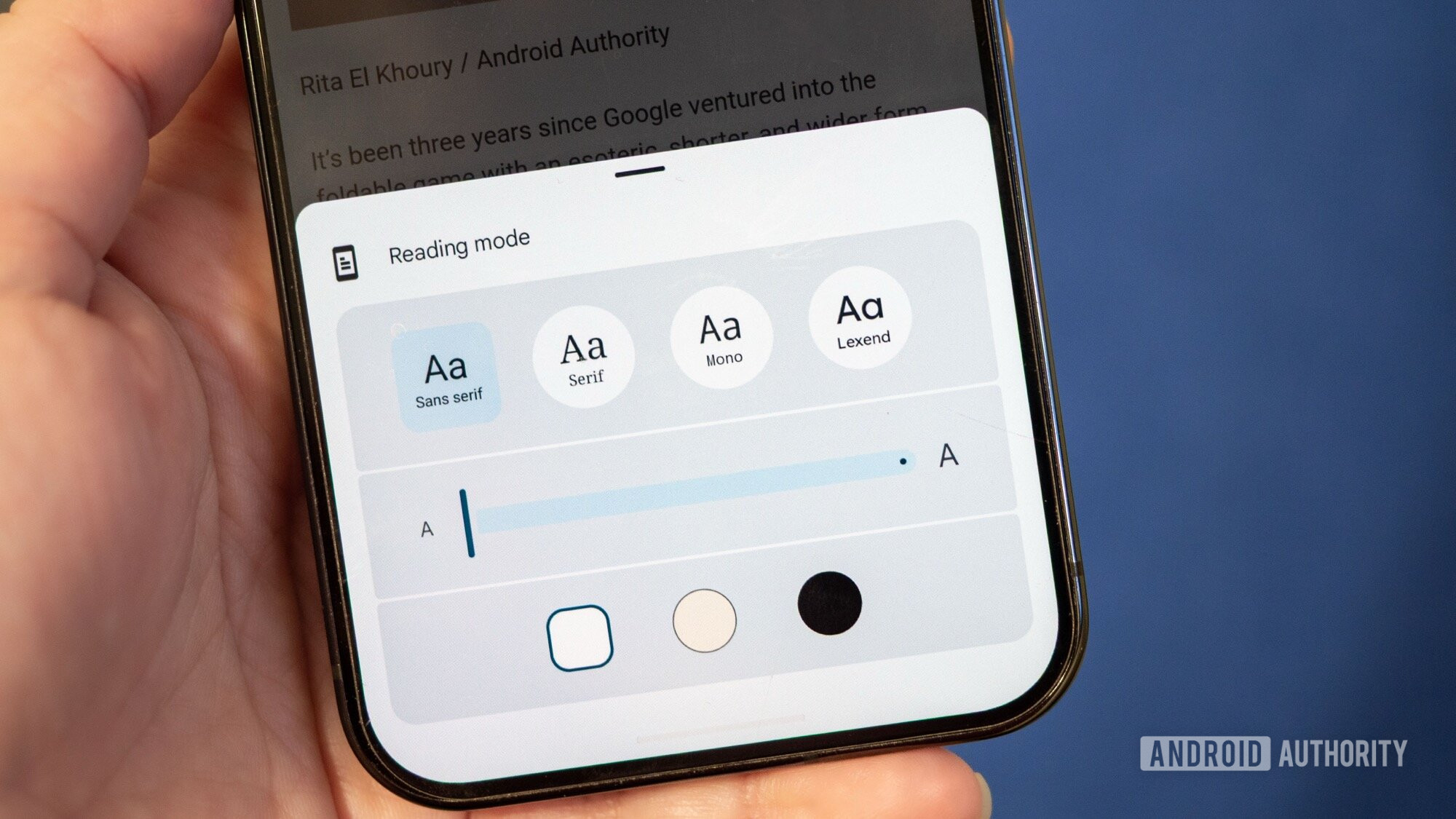
The primary advantage lies in the customization suite. Reading Mode transforms static, site-dictated aesthetics into user-defined environments. Mobile users gain immediate access to font adjustments—including size scaling for improved accessibility—and critical theme switching. The ability to toggle between standard light mode, sepia (beige), and true dark/black mode is vital for prolonged reading sessions, particularly in low-light conditions, minimizing eye strain by reducing blue light emission and contrast glare.
The desktop implementation elevates this customization further. Desktop environments, with their larger display areas, allow for more granular control over typographical hierarchy. Users can often select from a wider range of vetted, highly readable fonts (e.g., serif vs. sans-serif variants optimized for screen reading), adjust line height (leading), and modify character spacing (tracking). Advanced users often gravitate toward specific high-contrast palettes or subtle background tints, such as a very light blue or a muted green, which studies have shown can enhance focus for certain individuals by reducing the stark contrast of pure white backgrounds. The inclusion of an "auto mode" that dynamically syncs the Reading Mode theme with the operating system’s global light/dark settings demonstrates a commitment to seamless environmental integration.
Beyond the Visual: Accessibility and Audio Integration
The utility of Reading Mode extends powerfully into the realm of accessibility through its integrated text-to-speech capabilities. This feature directly addresses users with visual impairments or those who benefit from auditory learning modalities.
Accessible through the overflow menu on mobile as "Listen to this page," this function leverages advanced speech synthesis technology. It offers users two distinct modes of auditory consumption. The first is an AI-generated summary or "podcast-style overview," which uses advanced natural language processing (NLP) to condense the article’s main points before beginning the full read. This is exceptionally useful for triage—allowing a user to quickly ascertain the relevance of a lengthy piece before committing to a full reading.
The second, more traditional option, is a precise word-by-word reading of the entire parsed text. This feature includes controllable playback speed, allowing users to accelerate or decelerate the narration to match their preferred listening pace. This native audio functionality eliminates the need for dedicated screen readers or external audiobook applications solely for web articles, unifying the content access workflow within the browser.
Industry Implications and Competitive Context
The development and promotion of a native, robust Reading Mode by Google has significant implications for the broader digital publishing industry and the competitive landscape of web browsers.
For Publishers: While initially seen as a threat to ad impressions, high-quality content providers are increasingly recognizing the value of ensuring their core message is delivered intact. If a user cannot easily read an article due to aggressive formatting or intrusive ads, the publisher loses the reader entirely—a far greater loss than a single ad impression. By offering a clean gateway, Chrome potentially retains readers on high-quality journalistic sites longer, fostering brand loyalty and increasing the likelihood of direct traffic or subscription conversion down the line.
For Browser Competition: This native functionality puts pressure on competitors like Mozilla Firefox and Apple Safari (which already has a highly developed Reader View) to maintain or advance their own built-in simplification tools. In the browser wars, features that demonstrably improve the core utility of web navigation—reading—become crucial differentiators. Chrome’s implementation, particularly the advanced NLP audio features, sets a high benchmark for parity across the ecosystem.
Future Trajectories and Trend Analysis
The trajectory of Chrome’s Reading Mode suggests an evolution toward proactive, context-aware content curation driven by machine learning. The current reliance on manual flag toggling is a temporary measure; the long-term goal is almost certainly automatic activation based on highly accurate, real-time content scoring.
We can anticipate several future developments:
- Semantic Integration: Future iterations will likely move beyond simple structural parsing to understand the intent of the content. This could lead to the automatic omission of non-essential citations or the dynamic restructuring of complex data visualizations into more digestible text summaries within the reading pane.
- Cross-Platform Consistency: Currently, the desktop version offers superior aesthetic control. Future updates are expected to harmonize these customization options across mobile and desktop, allowing users to maintain their preferred visual configuration regardless of device.
- Deeper Interactivity: The text-to-speech function hints at richer interactivity. We may see the integration of dynamic annotation layers, where users can highlight passages within the Reading Mode, which are then synced across devices via their Google account, effectively turning the browser into a personal digital reading notebook without external plugins.
- AI-Assisted Comprehension: Building upon the current AI overview feature, future iterations could offer on-the-fly definitions, context explanations for specialized jargon, or even comparative summaries drawn from other indexed articles, leveraging Google’s vast information retrieval network directly within the reading environment.
For the foreseeable future, as the internet continues to prioritize speed and brevity, the ability to force a moment of quiet, focused concentration remains a powerful, albeit hidden, advantage. Utilizing and advocating for the refinement of Chrome’s Reading Mode is not just about accessing a handy setting; it is about preserving the capacity for deep engagement with the written word in an increasingly distracting digital world. Mastering the activation sequence through the chrome://flags interface grants the user a crucial, high-leverage tool that fundamentally improves the daily utility of the modern web browser.