

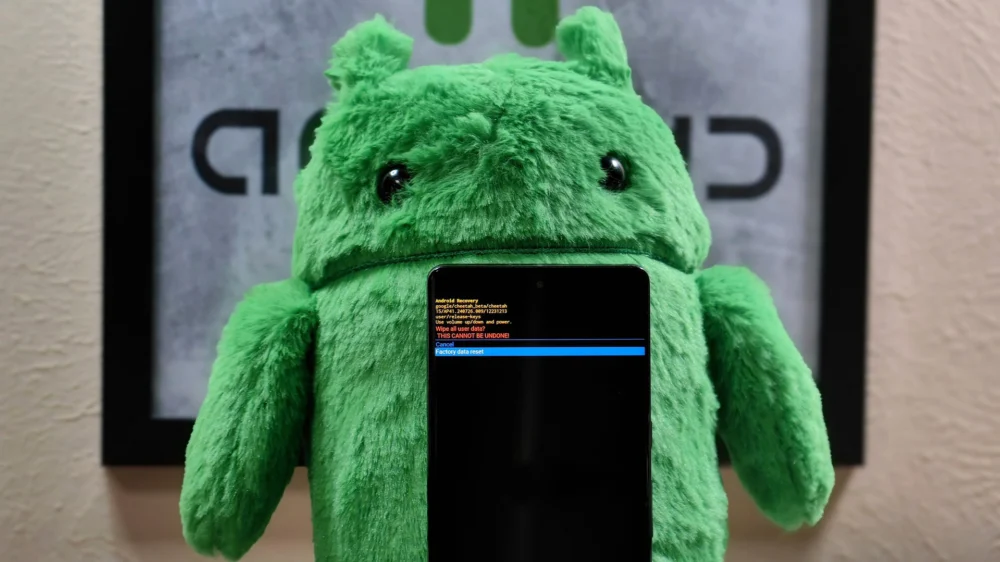
The deployment of Samsung’s February software package across its flagship Galaxy device lineup appears to signal a significant, and potentially controversial, shift in the manufacturer’s approach to system-level accessibility. Beyond the routine security enhancements inherent in a monthly patch cycle, reports indicate that Samsung is systematically dismantling key functionalities within the Android Recovery menu—a low-level, pre-boot environment long considered an essential safety net and diagnostic tool for technically proficient users. This move effectively curtails the autonomy traditionally afforded to power users attempting advanced troubleshooting or system maintenance outside the standard operating system interface.
The Android Recovery menu, an interface that remains largely hidden from the average consumer, serves as a vital partition for system management tasks. Historically, this menu has been the gateway to critical operations such as performing a complete factory reset (a necessary step for deep-level corruption fixes), sideloading operating system updates via ADB (Android Debug Bridge) or external storage, and, perhaps most importantly for routine maintenance, manually clearing the system cache partition. This cache clearing function has been a long-standing remedy for idiosyncratic post-update glitches, including unexpected battery drain, general system sluggishness, or transient application errors that persist after standard software updates.
Initial observations of this feature reduction surfaced among owners of the latest Galaxy S25 series devices following the application of the February security patch. Subsequent verification from specialized tech analysis groups has confirmed this modification extends to other recent hardware, notably the Galaxy Z Fold 7. The consensus among those who have accessed this pared-down environment suggests a radical simplification. Where once a comprehensive list of diagnostic and recovery options was presented, the updated Recovery menu reportedly now presents a severely limited selection, often comprising only three core options: rebooting the system, applying updates from external sources (if supported), and initiating the full factory data reset.
The implications of removing functions like the cache partition clear are substantial for the segment of the user base that demands granular control over their device performance. The cache partition is a temporary storage area used by the operating system to speed up access to frequently used data. When an operating system undergoes a major update, residual or corrupted data within this partition can frequently lead to instability. Manually wiping this partition bypasses reliance on automated, and sometimes incomplete, system clean-up routines. Its removal forces users to either proceed with a full factory reset—a time-consuming procedure involving data loss and extensive re-setup—or to tolerate persistent minor software annoyances.
The rollout pattern of this change suggests an intentional, phased implementation guided by software version rather than purely hardware dependency. Specifically, devices running the stable One UI 8.0 iteration paired with the February security patch appear to have fully transitioned to this restricted Recovery interface. An interesting counterpoint emerges with the Galaxy S25 Ultra, where units running the One UI 8.5 beta—even when incorporating the same February security patch—reportedly retained the full, traditional suite of Recovery options. This disparity suggests that the decision to curtail these tools is tied directly to the specific stable software branch Samsung is pushing to the general public, rather than a universal hardware limitation imposed by the chipset or bootloader architecture.
This strategic decision by Samsung to streamline its low-level system access is unlikely to occur in a vacuum. Within the broader Android ecosystem, the trend has generally been toward increased security hardening and abstraction, often resulting in the obscuring or removal of interfaces that might offer vectors for misuse or accidental user error. For hardware manufacturers like Samsung, maintaining a pristine user experience—one that minimizes perceived complexity—is paramount for mass-market appeal. However, this pursuit of simplicity often directly conflicts with the needs of the advanced enthusiast or IT professional who relies on these tools for efficient maintenance and debugging.
The context for this feature attrition is further complicated by existing industry murmurs regarding other low-level access points. There have been parallel, though unconfirmed, reports circulating about the potential disappearance of Samsung’s “Download Mode” (Odin Mode) on forthcoming devices, possibly extending to the anticipated Galaxy S26 series. Download Mode is crucial for flashing custom firmware, official firmware packages via PC tools, and performing deep-level hardware recovery. If the reduction in Recovery Mode options is a precursor to a wider strategy of locking down all non-standard system access points, it signals a profound philosophical divergence from the traditional, more open ethos of the Android platform.
From an industry implications standpoint, this tightening of control centralizes troubleshooting authority squarely within Samsung’s official service channels. If a user encounters a persistent software bug that previously required a simple cache wipe, they are now potentially funneled toward official support pathways, which might involve lengthy diagnostics or, ultimately, a factory reset. This shift impacts third-party developers and community moderators who often rely on these tools to diagnose issues specific to their custom ROMs or advanced configurations. It restricts the community’s ability to self-diagnose and pre-emptively solve problems before they escalate into warranty claims or widespread support tickets.
Analyzing the potential technical rationale, one must consider the evolution of the Android operating system itself, particularly concerning data management. Modern Android versions, especially those built upon newer kernel architectures, employ sophisticated methods for managing temporary files and caches dynamically. It is plausible that Samsung’s engineers have determined that the manual cache clearing function is now largely redundant because the system’s automated garbage collection and file management routines are sufficiently robust to handle data residue effectively after updates. Furthermore, the adoption of file-based encryption and enhanced security protocols may necessitate that certain low-level system operations—like cache clearing—be handled exclusively within the protected environment of the standard OS boot sequence, rather than via an unauthenticated, pre-boot recovery shell.
However, this technical justification does not assuage the concerns regarding power user disenfranchisement. These users often represent the earliest adopters and most vocal advocates for flagship devices. Alienating this demographic can have disproportionate effects on early product perception and market buzz. Expert analysis suggests that successful enterprise-grade hardware—which Samsung’s flagships increasingly aspire to be—must strike a delicate balance: protecting the average user from self-inflicted harm while retaining necessary escape hatches for advanced diagnostics.
The future impact of this trend warrants close scrutiny. If Samsung continues to abstract away crucial diagnostic tools, the longevity and maintainability of these devices, from a user-empowerment perspective, will diminish. We may see a greater divergence between the experience offered by stock Android on Pixel devices (which often retains more transparent access to certain debugging tools) and Samsung’s heavily customized One UI environment. This could force advanced users to make more significant compromises when selecting a premium Android device, potentially driving a segment of the tech community toward rooting or unlocking bootloaders earlier in the device lifecycle—actions that often void warranties and introduce their own security trade-offs—simply to regain the baseline control they previously enjoyed out-of-the-box.
The discrepancy observed between the stable One UI 8.0 build and the One UI 8.5 beta is particularly instructive. It suggests that the feature removal is a conscious software policy decision being baked into the finalized, mass-market builds, while the beta channel—often used by developers and early testers—still mirrors the more permissive state of development builds. This reinforces the notion that the change is deliberate streamlining for public release rather than an incidental bug.
In summary, Samsung’s recent software update appears to be making a significant, albeit undocumented, trade-off: sacrificing granular, low-level system maintenance capabilities for a simplified, supposedly more secure, pre-boot environment. While this aligns with broader industry trends toward user experience homogenization and security hardening, it represents a tangible step backward for the community that thrives on deep system interaction and advanced self-service repair capabilities. The industry will be watching closely to see if this aggressive simplification extends to other critical system access modes, fundamentally redefining what it means to be a "power user" in the Samsung ecosystem. The long-term success of this strategy hinges on whether the automated system health checks can genuinely replace the utility of manual intervention for complex, lingering software issues.