

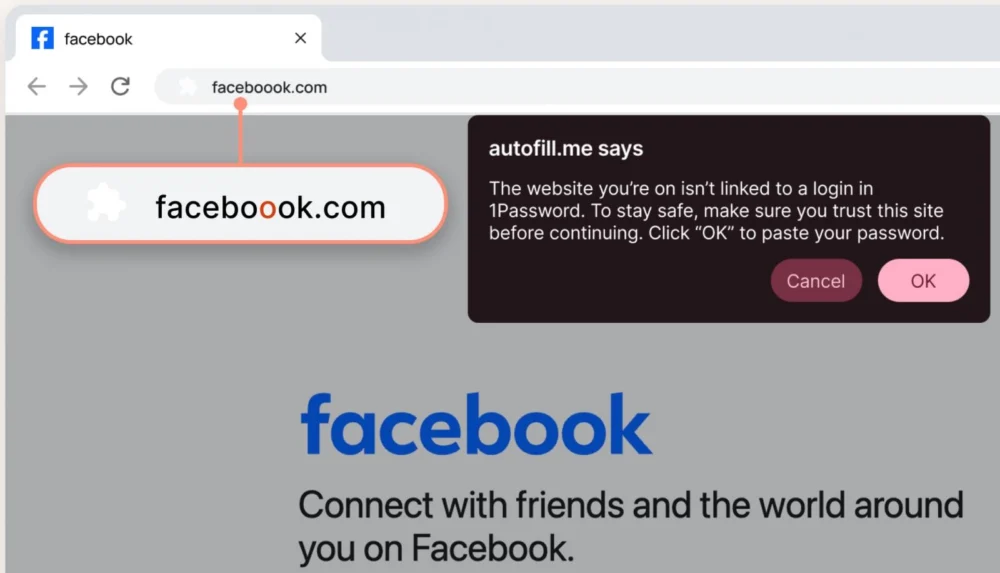
The digital security landscape is undergoing a fundamental shift, driven largely by the rapid maturation of generative Artificial Intelligence, which has dramatically lowered the barrier to entry for creating highly convincing phishing campaigns. Recognizing this escalating threat vector, the widely adopted credential management service, 1Password, is reinforcing its defensive posture by introducing a new, explicit user interface alert system designed to flag suspected malicious websites before users unwittingly surrender sensitive credentials. This enhancement moves beyond the inherent, URL-matching security baseline previously offered by the platform, aiming to directly mitigate human error in the face of increasingly deceptive digital lures.
1Password, a cornerstone of modern enterprise identity and access management (IAM) infrastructure, boasts a substantial user base across the global corporate sector. Its integration depth, evidenced recently by native passkey management support within the Windows ecosystem, underscores its critical role in securing digital workflows. Fundamentally, all non-hardware-based password managers operate on a principle of strict URL matching: if the website address does not precisely correspond to the saved entry in the user’s vault, the manager will refuse to auto-populate usernames and passwords. This mechanism serves as a primary, passive defense against credential harvesting attempts.
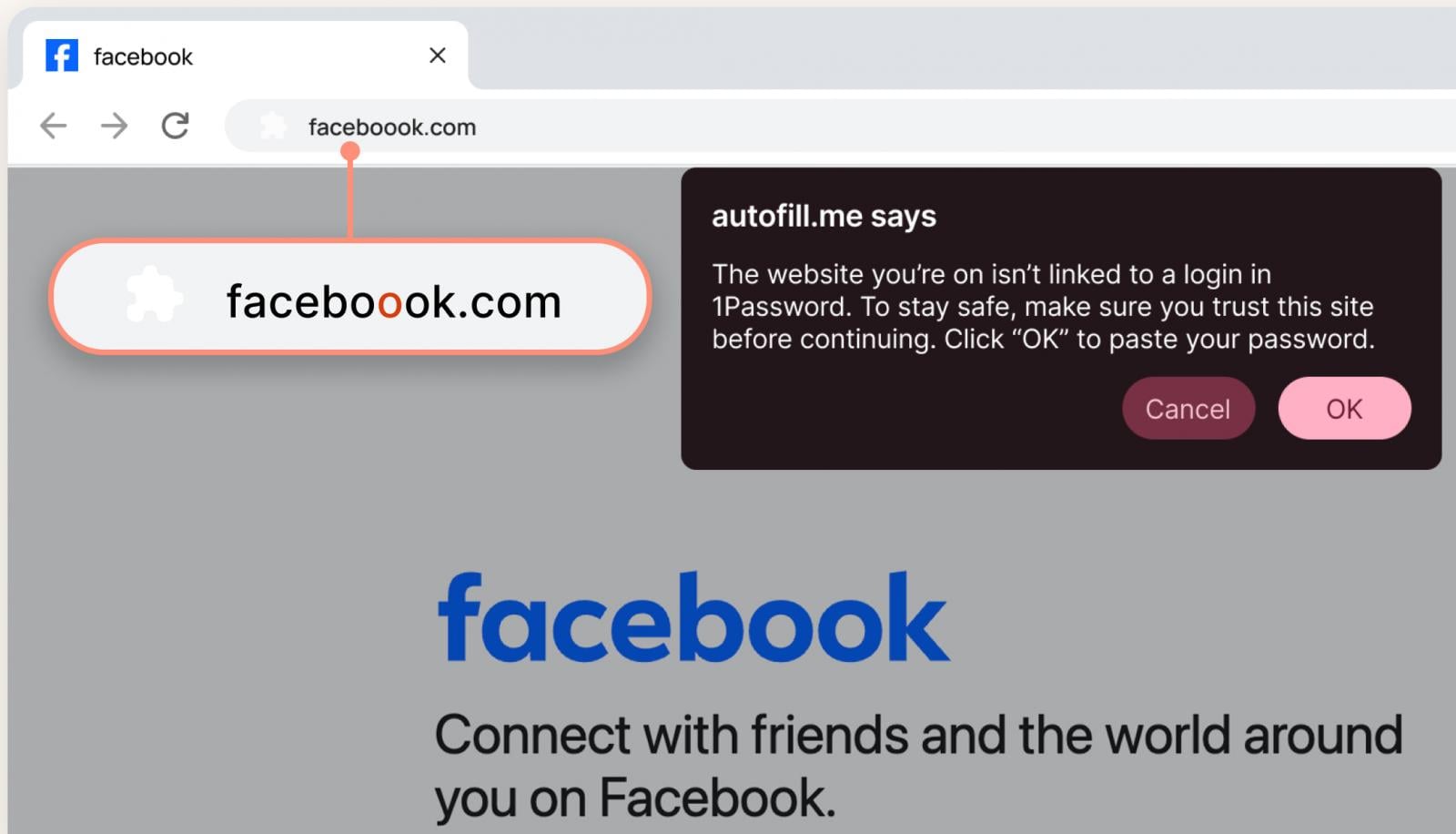
However, this foundational protection is proving insufficient against advanced social engineering tactics. Threat actors frequently employ "typosquatting," registering domain names that are visually similar to legitimate sites—substituting an ‘o’ for a ‘0’, or inserting an extra character—hoping to trick users who are moving quickly or are distracted. When a user lands on a typosquatted site, the password manager correctly refuses to fill the credentials. The critical vulnerability emerges when the user, believing the manager has "glitched," is still convinced by the visual fidelity of the counterfeit site that they are in the right place. This often prompts them to manually type in their login details, completely bypassing the automated protection layer.
1Password’s introduction of a visual, interruptive pop-up warning directly addresses this critical psychological and technical gap. As the vendor articulated, discerning a single character alteration in a lengthy URL, particularly when the surrounding webpage design perfectly mimics the authentic service, is a task many users will fail under real-world pressure. The new alert functions as a mandatory cognitive speed bump. It forces the user to pause, re-evaluate the context, and actively confirm the legitimacy of the address before proceeding with manual entry or dismissing the warning. This transforms a passive security feature (non-filling) into an active intervention designed to reinforce secure behavior.
The rollout strategy for this feature emphasizes broad applicability and administrative control. For individual subscribers and family plans, the protection is activated by default, ensuring immediate access to the enhanced defense. For corporate deployments, the feature is integrated into the administrative console under Authentication Policies, granting IT and security teams granular control to enforce this layer of defense uniformly across the organization. This centralized management is vital for maintaining consistent security hygiene within complex corporate environments where lateral movement following a single compromised account can lead to catastrophic breaches.
The urgency behind this development cannot be overstated, especially when contextualized against the current threat intelligence landscape. The democratization of powerful AI tools has catalyzed a surge in the volume and sophistication of phishing attacks. AI models can generate flawless, context-aware phishing emails, craft highly realistic landing pages in multiple languages instantly, and even mimic the specific vernacular of internal communications. This scalability means security teams are fighting an exponential increase in low-effort, high-impact attacks.
Data collected by 1Password underscores the severity of the user-side risk. A recent survey involving 2,000 U.S. participants revealed alarming behavioral statistics: 61% admitted to having been successfully phished at some point, and a staggering 75% conceded they rarely or never scrutinize URLs before clicking embedded links. In the enterprise context, the stakes are exponentially higher. The same research indicated that one-third of employees admit to reusing corporate passwords on personal accounts—a direct pathway to credential stuffing attacks—and nearly half of those who reuse passwords have previously succumbed to phishing. Furthermore, a concerning cultural divide exists, with almost half of employees viewing phishing defense as solely the IT department’s burden, rather than a shared responsibility, leading to widespread complacency evidenced by 72% admitting to clicking suspicious links. The finding that over half of users opt to simply delete suspicious messages rather than report them highlights a systemic failure in security reporting culture, necessitating stronger automated controls.
Industry Implications: Shifting the Burden of Proof
This proactive alerting mechanism represents a subtle but significant philosophical shift in the balance of security responsibility. Historically, the burden has rested heavily on the end-user to possess the vigilance required to spot subtle digital fraud. While security awareness training remains crucial, relying solely on training has proven inadequate against technologically advanced, persistent adversaries. By integrating a hard-stop visual cue directly into the workflow of the password manager—a tool users already trust and rely upon for daily authentication—1Password is effectively embedding security decision-making into the authentication process itself.
For other identity providers and enterprise security vendors, this move sets a new expectation. Password management is evolving from a secure storage utility into an active security gateway. Competitors will inevitably face pressure to match or exceed this level of proactive intervention. The industry trend is clearly moving toward "secure defaults" and "pessimistic design," where the system assumes potential malice and requires explicit user confirmation to proceed past a warning threshold.

This development is also deeply intertwined with the ongoing industry transition toward passkeys, which promise to eliminate password-based phishing entirely by relying on cryptographic public-key infrastructure managed by the operating system or hardware authenticators. However, the transition to a passwordless world is not instantaneous. Millions of legacy systems and user behaviors remain dependent on passwords for the foreseeable future. Therefore, bridging technologies like 1Password’s new alert are essential "in-the-meantime" solutions to mitigate risk during this lengthy migration period. They acknowledge the reality of the current threat landscape while supporting future standards.
Expert-Level Analysis: Beyond URL Matching
From a technical security standpoint, the efficacy of this feature depends heavily on the underlying detection engine. A robust implementation requires more than simple string comparison against a static list of known bad domains. Sophisticated phishing detection often involves heuristic analysis, behavioral profiling, and continuous real-time lookups against continuously updated threat intelligence feeds.
The core challenge lies in differentiating between a legitimate, but new, domain and a newly registered typosquatted domain. Advanced systems might employ machine learning to analyze domain age, registration metadata, SSL certificate discrepancies, and similarity metrics (like Levenshtein distance) against high-value target domains. If 1Password’s engine successfully correlates a low-reputation, newly registered domain that closely mimics a known banking or corporate login page, it can trigger the warning with high confidence.
Furthermore, the user experience design of the warning is paramount. If the pop-up is too intrusive, users will quickly develop "alert fatigue" and learn to bypass it reflexively, rendering the feature useless—a common pitfall in security UX. The goal, as the vendor suggests, is to encourage momentary reflection, not outright frustration. The alert must be clear, state the risk precisely (e.g., "This URL appears suspicious and does not match your saved entry for [Legitimate Site Name]"), and offer a clear path to either proceed cautiously or cancel the action.
Future Impact and Trends: Integrating Contextual Security
Looking ahead, this type of proactive alerting is indicative of where identity and access management tooling is heading: context-aware, integrated security woven seamlessly into the user workflow. The next logical extensions of this feature will likely involve deeper integration with enterprise risk scores and device posture assessment.
-
Risk-Adaptive Alerting: In the future, the system might not just check the URL, but also the user’s context. For instance, if a user accessing a financial site from an unmanaged personal device in a geographically unusual location triggers the phishing warning, the alert severity could escalate, perhaps requiring biometric re-authentication or even temporary lock-out until IT security is notified.
-
AI-Driven Phishing Defense Maturation: As AI models become better at generating attacks, security tools must leverage AI to build defenses. We anticipate 1Password and its peers investing heavily in models trained specifically on identifying patterns in AI-generated deceptive content, perhaps analyzing page layout inconsistencies or subtle differences in rendered fonts that a human eye might miss but a machine can reliably flag.
-
The Death of the Password Prompt: Ultimately, the continued enhancement of defenses against credential theft reinforces the industry’s drive toward passkeys. While these new alerts are a critical stopgap, they are a temporary measure against a vulnerability inherent in the password paradigm. The most significant long-term impact of features like this might be demonstrating to reluctant organizations just how pervasive and difficult to circumvent phishing has become, thereby accelerating their migration to phishing-resistant authentication methods.
In summary, 1Password’s introduction of visual, explicit phishing warnings marks a necessary evolution in consumer and enterprise security tooling. It recognizes the sophisticated nature of modern social engineering, acknowledges the inherent fallibility of human perception under duress, and deploys an immediate, contextually relevant intervention to protect credentials in the interim period before full passkey adoption becomes ubiquitous. This is a tangible step toward building a more resilient digital defense infrastructure that actively guides users away from danger, rather than passively waiting for them to make a mistake.