

The steady cadence of Microsoft’s servicing model continues with the release of the KB5074105 optional cumulative preview update for Windows 11. This specific patch, designated for late-month deployment, carries significant weight not due to headline-grabbing new features, but because it targets fundamental operational stability issues that have plagued certain user groups. Featuring an extensive list of approximately 32 individual refinements, the core focus of this release centers squarely on resolving vexing problems related to system booting, user sign-in procedures, and the integrity of digital license activation.
Understanding the context of these "preview" updates is crucial for IT professionals and power users alike. Unlike the mandatory, security-focused Patch Tuesday releases that occur mid-month, these end-of-month updates are fundamentally non-security in nature. They serve as a vital proving ground, allowing enterprise administrators and early adopters to validate bug fixes, performance tweaks, and minor feature enhancements before they are bundled into the broad, unavoidable monthly quality updates. This pre-deployment validation phase is indispensable for maintaining operational uptime in complex corporate environments, minimizing the risk of unforeseen compatibility issues arising during the larger, more disruptive Patch Tuesday rollout.
The critical nature of the fixes within KB5074105 highlights underlying fragility points within the Windows 11 ecosystem. Specifically addressing issues in core system processes like Explorer.exe startup, boot manager stability, and digital rights management (DRM) registration underscores a commitment by Microsoft to refine the user experience at its most basic levels—getting the system on, letting the user log in, and verifying proper licensing.
Addressing the Startup Paralysis: Explorer.exe and Boot Manager Fixes
One of the most frustrating experiences for any user is encountering a system that hangs or becomes unresponsive during a critical phase of operation. KB5074105 tackles several such scenarios head-on.

A particularly disruptive issue resolved in this January preview update involved scenarios where the Explorer.exe process—the graphical shell responsible for the desktop, taskbar, and file management—would inexplicably freeze or hang. This hang was specifically triggered during the initial login sequence when a pre-configured set of applications were set to launch automatically upon startup. For businesses relying on specific kiosk modes or heavily customized desktop environments that necessitate immediate application launch upon user authentication, this bug introduced significant workflow friction and perceived system instability. By patching this interaction between startup application execution and the shell initialization process, Microsoft aims to smooth out the crucial first moments of user interaction with the operating system.
Furthermore, the update addresses deep-level boot process malfunctions. A notable fix targets systems where debugging features within the Windows Boot Manager were enabled, leading to the entire system locking up during startup. Debugging tools are essential for developers and advanced system administrators troubleshooting low-level kernel issues, but their presence should not impede standard boot functionality. The resolution here indicates a refinement in how the boot manager handles its diagnostic hooks when the system is intended for normal production use, enhancing reliability for those who require specialized diagnostic tools occasionally.
Perhaps even more critical for infrastructure stability is the correction concerning iSCSI boot failures. Internet Small Computer System Interface (iSCSI) is a protocol heavily utilized in enterprise environments for network-based storage access, allowing servers and workstations to boot directly from remote storage arrays. Failures in this process, often manifesting as the dreaded "Inaccessible Boot Device" error, render the machine completely inoperable until manual intervention or a complex recovery sequence. Fixing the bug that triggered these failures during iSCSI boot scenarios directly impacts the uptime of infrastructure components reliant on this technology, reinforcing the patch’s importance beyond the average desktop user.
The Licensing Labyrinth: Activation Stability
Beyond the immediate boot and login snags, the update addresses a crucial administrative and user concern: digital license activation. The fix targets failures encountered during Windows license migration, often occurring during major version upgrades (e.g., moving from an older feature release to the current stable branch).
Modern Windows licensing relies heavily on digital entitlements tied to hardware IDs, registered and validated against Microsoft’s activation servers. When a system undergoes a major in-place upgrade, it must successfully re-register its digital license entitlement. The bug patched by KB5074105 prevented this registration from completing correctly, effectively leaving the upgraded system in a state where it believed it lacked a valid license, despite possessing one prior to the migration. This forces users or IT staff into unnecessary troubleshooting steps involving manual re-entry of keys or protracted support calls. Ensuring robust, successful activation migration is paramount for maintaining compliance and operational status across large deployments, making this fix a key quality-of-life improvement for deployment teams.

Technical Footprint and Version Management
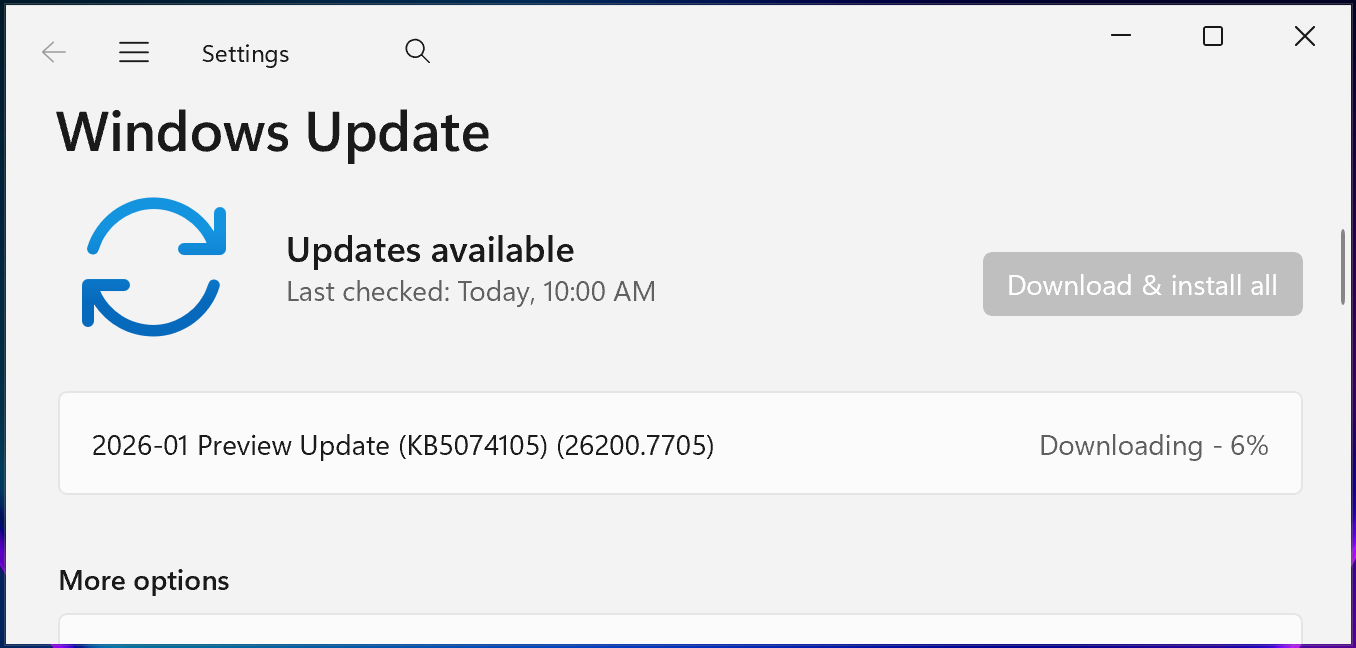
Installing KB5074105 pushes Windows 11 installations onto specific build numbers, confirming its role in maintaining the current feature branch integrity. Devices running Windows 11 version 25H2 will advance to build 26200.7705, while those on the newer 24H2 release will move to build 26100.7705. This precise versioning confirms that the update is a cumulative, non-breaking quality adjustment, designed to stabilize the existing feature set without introducing architectural changes that necessitate a full feature release.
The cumulative nature of these non-security previews means that users installing KB5074105 will receive all preceding quality improvements released in the current servicing cycle, ensuring a streamlined path to the next major Patch Tuesday release.
Industry Implications: Clarity in Servicing and Naming Conventions
Microsoft’s servicing strategy itself is undergoing subtle but significant evolution, evidenced by accompanying announcements related to KB5074105. The move toward clearer identification between Windows 11 and Windows Server 2025 updates marks an important step toward reducing administrative overhead and preventing cross-platform patching errors.
Historically, especially during periods of feature parity between the client OS (Windows 11) and the server OS (Windows Server), updates sometimes shared similar identifiers or build streams, creating ambiguity for administrators managing heterogeneous environments. Microsoft has explicitly stated that starting with the January 2026 security release (the next major cycle), Windows Server 2025 will receive distinct Knowledge Base (KB) identifiers and build numbers, separate from Windows 11 versions 24H2 and 25H2. This decision, while seemingly procedural, has profound implications for automated patch management systems, compliance auditing, and troubleshooting workflows. Administrators can now rely on unambiguous identifiers, minimizing the risk of mistakenly applying a client-side patch to a critical server, or vice versa.
Furthermore, the adoption of simplified Windows Update titles across the board signals a broader trend toward user-centric documentation. By stripping away verbose technical artifacts like platform architecture indicators from the update titles, Microsoft is aiming to make update notifications more accessible and less intimidating for general users, while still retaining the detailed technical information in the underlying release notes accessible via the Microsoft Update Catalog. This dual approach caters both to the casual user seeking confirmation of a successful patch and the IT professional requiring granular detail.
The Role of Optional Updates in Modern IT Strategy
The classification of KB5074105 as an optional update dictates its strategic deployment. In enterprise settings, optional updates are rarely deployed universally until they have been thoroughly vetted. The typical workflow involves:
- Initial Assessment: IT teams review the release notes, identifying fixes relevant to their specific infrastructure challenges (e.g., iSCSI usage, custom startup routines).
- Pilot Deployment: The update is rolled out to a small subset of non-critical workstations or staging environments.
- Validation Period: The pilot group runs for a week or two, confirming that the fixes resolve the intended issues without introducing regressions or performance degradation.
- Broad Deployment: If validation is successful, the update is incorporated into the broader deployment schedule leading up to the next Patch Tuesday.
The fixes for boot hangs and activation failures are precisely the types of issues that warrant this cautious, phased rollout. A failure in activation, even if temporary, can trigger security alerts or licensing violations within compliance software, while a boot failure halts productivity entirely. By providing these fixes now, Microsoft allows organizations to proactively mitigate these risks before the mandatory security updates lock these changes into the standard deployment pipeline.
Future Trajectory: Stability as the Core Metric
The focus of KB5074105 underscores a prevailing theme in the current stage of Windows 11’s lifecycle: stabilization. With the major architectural shifts associated with the 24H2 and 25H2 releases likely settled, the emphasis shifts toward refining the day-to-day reliability. As operating systems become increasingly integrated with cloud services, complex storage protocols (like iSCSI), and intricate startup sequences involving containerization or virtual environments, the potential failure surface expands exponentially.
Future trends suggest that these end-of-month preview updates will become increasingly critical for maintaining parity across diverse hardware and software configurations. We anticipate Microsoft will continue to leverage this mechanism to squash niche but high-impact bugs—those that might only affect 0.1% of the user base but cause 100% downtime for that small segment. The ability for users to manually trigger the installation via Settings > Windows Update (‘Check for Updates’ followed by ‘Download and install’) or pull directly from the Microsoft Update Catalog provides necessary agility for organizations facing immediate, specific technical hurdles addressed by this release.
In summary, while KB5074105 may not generate headlines for flashy new user interfaces, its impact on foundational system integrity—ensuring users can boot reliably, log in smoothly, and maintain proper licensing status—makes it a quiet but essential update for the operational health of the Windows 11 environment moving into the next servicing cycle.