

The relentless pace of innovation in artificial intelligence necessitates a corresponding evolution in user interface design, particularly for multimodal, context-aware systems like Google’s Gemini. As Google pushes Gemini from a purely conversational chatbot into a deeply integrated, real-time digital assistant capable of perceiving and interacting with the user’s immediate environment, the supporting user experience (UX) elements must adapt rapidly. Recent deep dives into the latest iterations of the Gemini application code—specifically version 17.8.59.sa.arm64—reveal significant, iterative refinements planned for the Gemini Live floating overlay, suggesting a strategic push toward greater efficiency and contextual fluidity in user interaction. This ongoing development underscores a broader industry trend: the transition from static, menu-driven AI interfaces to dynamic, ambient computing shells.
The Context: Gemini Live and the Ambient Computing Paradigm
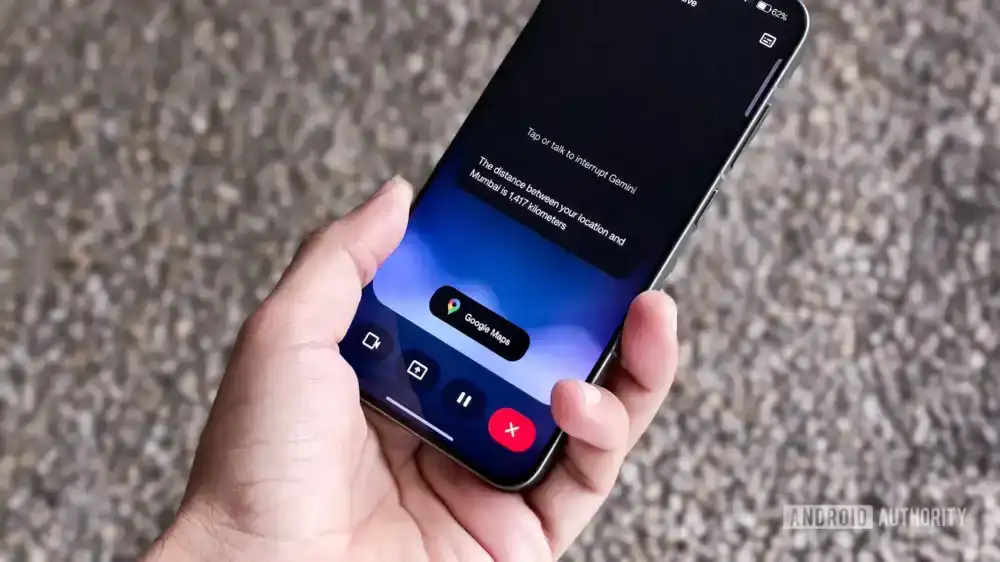
Gemini Live represents Google’s ambition to move beyond simple text or voice queries. It aims to leverage the device’s ambient capabilities—the camera feed, the screen content, and real-time audio—to provide immediate, situated assistance. When a user activates Gemini Live, the system overlays a small, persistent interface onto the current application, allowing for continuous dialogue and visual understanding without completely obscuring the primary task. This is a critical step toward ambient computing, where the digital assistant is always present and ready to assist based on the context of the user’s activity, whether browsing a webpage, navigating a map, or troubleshooting an application.
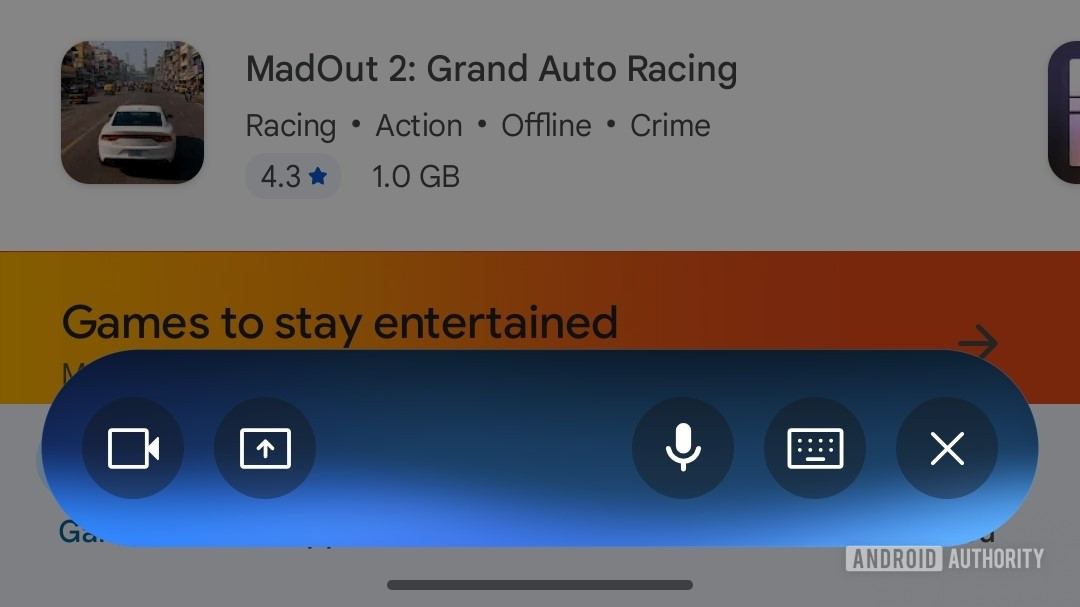
The initial implementation of the Gemini Live overlay, deployed earlier this year, reflected this ambition but also the complexity of integrating multiple input modalities. The original design featured distinct, separate buttons for four core functions: voice input, keyboard text input, screen sharing/analysis, and camera input. While functionally comprehensive, this arrangement resulted in a visually dense and somewhat cumbersome floating widget. For a feature designed to be lightweight and unobtrusive, the density risked creating friction, defeating the purpose of seamless, real-time assistance.
Unpacking the Next-Generation Overlay Consolidation
The latest teardown unveils a deliberate move by Google’s development teams to streamline this control panel. The forthcoming UI blueprint suggests a consolidation strategy aimed squarely at reducing visual clutter and improving tap accuracy, particularly crucial when interacting with a small overlay on a mobile screen.

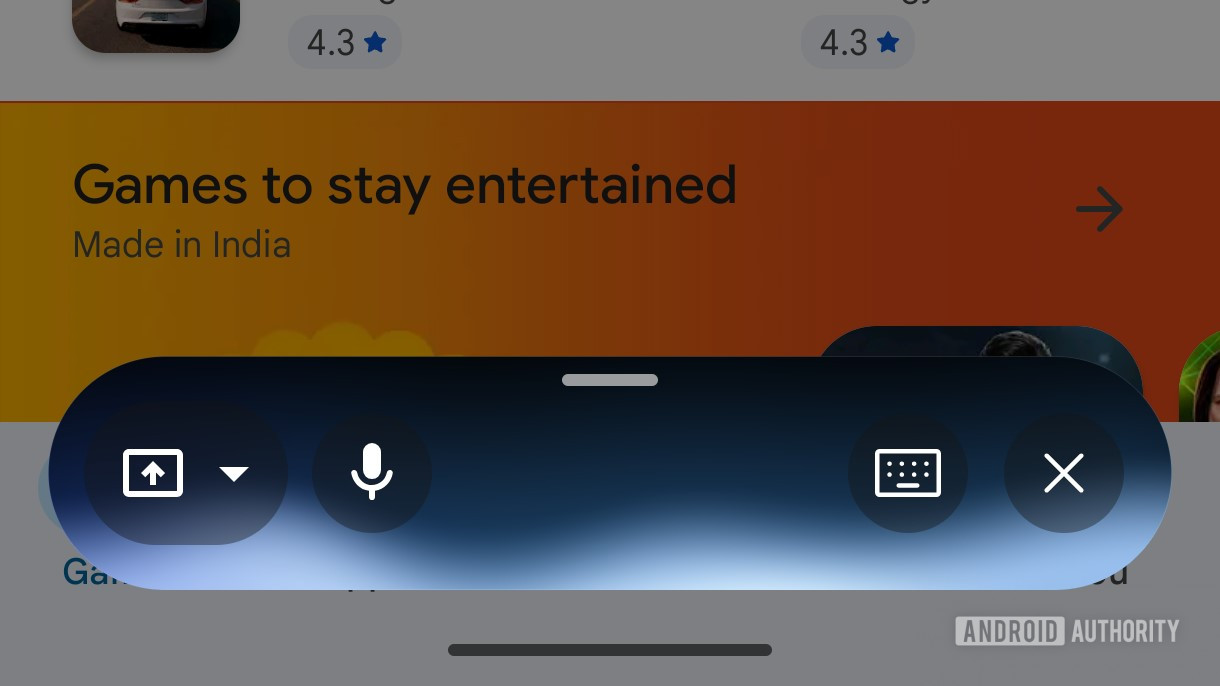
The most immediate visual shift is the reorganization of input methods. Voice input, the likely primary mode for a "Live" interaction, is relocated to the far left of the overlay. More significantly, the distinct icons for camera input and screen sharing are being merged into a single, unified input button. This consolidation is a clear indication of functional grouping; Google appears to be treating the act of "sharing the user’s view" as one category, differentiating it from direct conversational input.
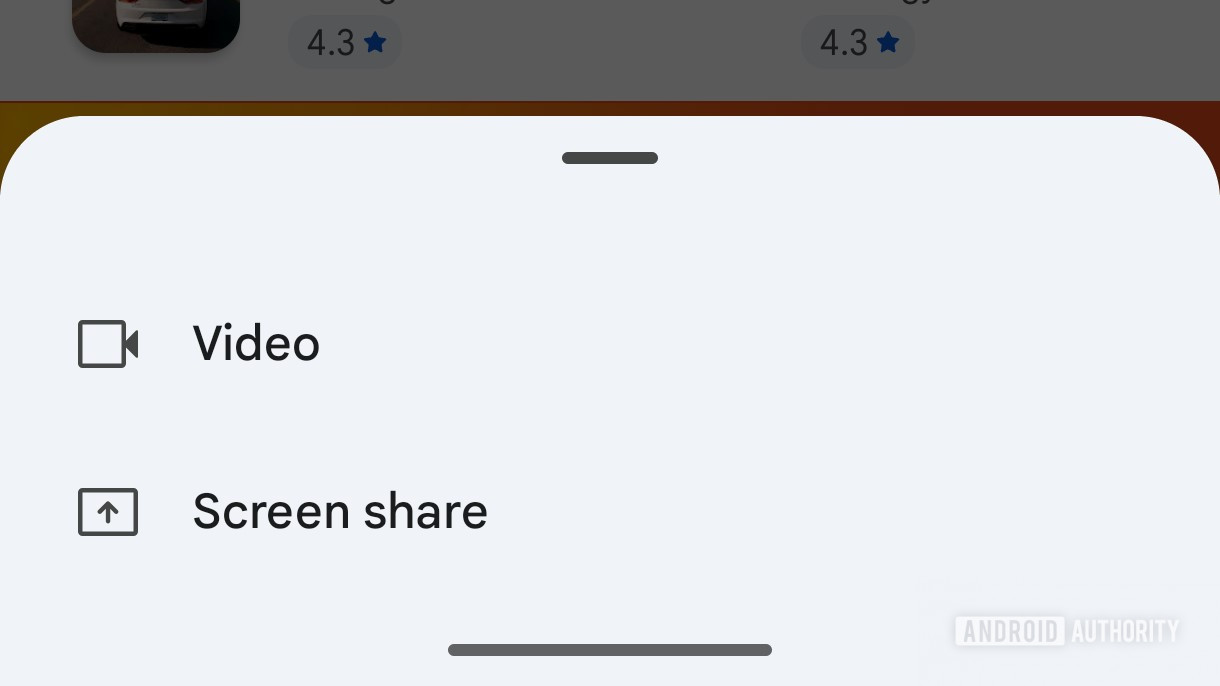
When a user taps this newly unified view-sharing button, the interface is expected to pivot, presenting a secondary, ephemeral card that prompts the user to select the specific modality: camera feed or screen content. This hierarchical approach is a common UX pattern for managing complex feature sets—it keeps the primary interface clean while deferring the choice until it is explicitly needed. By collapsing two distinct actions into one primary tap followed by a quick selection, Google streamlines the initial engagement sequence.
Furthermore, the navigation mechanism for controlling the overlay itself is being refined. A new handle has been integrated at the top edge of the floating bar. The action associated with this handle—dragging it upward—is designed to seamlessly transition the user out of the minimized overlay mode and into the full-screen Gemini Live experience. This provides a clearer, more intuitive gesture for escalating the interaction from brief contextual help to a dedicated, immersive session, eliminating the need to hunt for a separate "expand" button.
Parallel Refinements in the Core Input Box
Beyond the Live overlay, the analysis of the application code points to concurrent efforts to refine the main Gemini input experience. These changes suggest a holistic commitment to decluttering the entire Gemini ecosystem. Specifically, modifications have been observed in the primary text input field area:
- Microphone Icon Simplification: The voice input microphone icon is shedding its circular border, adopting a cleaner, borderless presentation. In modern interface design, removing unnecessary visual framing enhances focus on the core interactive element and contributes to a lighter aesthetic.
- Live Button Highlighting: Conversely, the dedicated "Live" activation button is receiving an enhanced visual treatment, likely involving a colored accent border. This contrast is strategic: by minimizing surrounding elements and drawing attention to the Live entry point, Google is implicitly encouraging users to adopt the more advanced, context-aware multimodal features.
These micro-adjustments, when combined with the overlay consolidation, paint a picture of a highly disciplined approach to UX engineering: reduce visual noise where interaction is frequent but simple (voice mic), and enhance visibility where entry to a complex feature set is desired (the Live button).
Industry Implications: The Race for Contextual AI Dominance
These UI adjustments are not merely aesthetic tweaks; they represent tactical maneuvers in the fierce competition among major technology players defining the future of AI interaction. The evolution of Gemini Live speaks directly to the industry’s shift toward contextual AI and on-device intelligence.
For years, AI assistants were tethered to specific wake words and cloud processing. Gemini Live, by integrating real-time visual and screen context, positions itself as a true operating system co-pilot. The usability of such a powerful tool hinges entirely on the immediacy of access. If the interface is slow, confusing, or visually intrusive, users will revert to traditional application workflows. Google’s continuous optimization of the overlay reflects an understanding that the latency of thought-to-action must be minimized.
Competitors like OpenAI (with ChatGPT integrations) and Apple (with anticipated iOS-level AI enhancements) are observing this space closely. The battleground is shifting from who has the most powerful Large Language Model (LLM) to who can deliver that power most fluidly within the user’s workflow. A successful overlay must become "invisible" until needed, and then instantly responsive. The consolidation of camera and screen sharing into a single tap suggests Google is prioritizing the speed of visual data capture—a necessity for any AI aiming to understand and assist with dynamic on-screen tasks, such as complex form filling, debugging code snippets visible on screen, or navigating unfamiliar application interfaces.
Expert Analysis: Deconstructing the UX Philosophy
From a human-computer interaction (HCI) perspective, the changes observed in Gemini Live align with established principles of minimizing cognitive load. The original four-button setup violated Hick’s Law by presenting too many choices simultaneously in a high-stakes, real-time environment. By reducing the primary choice set to three consolidated elements (Voice, Text, View Share), Google is applying the Principle of Progressive Disclosure.
The introduction of the secondary selection card for view sharing is a perfect example of this. It acknowledges the user’s need for camera and screen access but delays the commitment until the user has mentally processed the requirement. This tiered approach is superior for maintaining flow state.
Furthermore, the integration of the drag handle for full-screen transition addresses the concept of modal persistence. The overlay needs to be easily dismissible or expandable based on the depth of the required interaction. A handle provides tactile feedback and a clear visual affordance for changing the interaction mode, which is more direct than relying on a dedicated "minimize" or "maximize" icon, which can often be ambiguous.
This iterative development cycle, revealed through APK teardowns, is characteristic of Google’s current AI rollout strategy: rapid, granular testing in the wild. They are treating the user base as a vast beta testing group, pushing small UI experiments frequently to empirically determine which configurations yield the highest engagement and lowest error rates for their most advanced features.
Future Impact and Emerging Trends
The trajectory suggested by these code artifacts points toward several key future trends for AI integration:
1. Predictive Input Prioritization: The explicit separation and emphasis on voice and view-sharing suggest that future iterations will prioritize these modalities over pure text input within the Live context. We can anticipate more sophisticated voice command structures that directly map to visual cues (e.g., "Gemini, analyze the red button in the top right corner").
2. Deeper Ecosystem Integration: The inclusion of screen sharing and camera access as primary interaction vectors signals Google’s intent to deeply embed Gemini within Android OS functionality. Future updates will likely see Gemini Live interacting with system settings, managing notifications, or even launching specific apps based on visual context, potentially blurring the line between the AI assistant and the core operating system functionality, much like Microsoft is attempting with Copilot integration in Windows.
3. Cross-Platform Consistency: While these findings relate to the Android application, the underlying UX philosophy—simplification, consolidation, and progressive disclosure—will almost certainly migrate to other platforms where Gemini is deployed, including web interfaces and potentially future hardware integrations. Achieving a consistent, low-friction entry point for real-time AI assistance across all touchpoints remains the ultimate goal.
4. Contextual Awareness Beyond the Overlay: The existence of the "Maps extension" mentioned in the accompanying image metadata, though not detailed in the text, suggests that these UI improvements are being built to support highly specialized extensions. A refined overlay means that when a user asks Gemini for directions or points of interest while viewing a map, the interface for toggling camera input (e.g., to identify a landmark) or screen input (e.g., to share a route summary) will be optimized for that specific domain.
In conclusion, the observed changes in the Gemini Live overlay—from consolidating inputs to refining the entry and exit gestures—are concrete evidence of Google’s meticulous, iterative engineering process. They are not just polishing an existing feature; they are actively architecting the primary interface for their vision of ambient, contextual AI. As these refinements roll out, they will set a new benchmark for how users expect to interact with powerful generative models in real-time, pushing the entire industry toward interfaces that disappear into the background until their intelligence is urgently required. The careful calibration of this small floating bar speaks volumes about the magnitude of Google’s long-term aspirations for ubiquitous AI assistance.