


Microsoft is currently pushing significant updates through its Windows 11 Insider Preview channels, focusing on bolstering the security posture of command-line operations while simultaneously refining the user experience for modern audio peripherals. These dual-pronged enhancements signal a sustained commitment to enterprise resilience and consumer convenience within the evolving operating system landscape.
The most architecturally significant change resides in how Windows 11 handles Command Prompt (CMD) and batch file execution. For years, batch scripts, while ubiquitous in IT automation, have presented a nuanced security challenge. Their interpreted nature and ability to execute sequences of system commands make them prime targets for injection or modification during runtime, especially in environments where scripts might be shared, downloaded, or modified by multiple actors. Malicious actors can exploit race conditions or timing windows to swap out a legitimate script with a compromised version just as it begins execution, a technique often used to escalate privileges or exfiltrate data undetected.
To directly counteract this vulnerability, Microsoft is introducing robust locking mechanisms. IT administrators are being provided with a granular control via a new registry setting: LockBatchFilesInUse, situated under HKEY_LOCAL_MACHINESoftwareMicrosoftCommand Processor. When this value is enabled, the operating system ensures that the integrity of the batch file is maintained from the moment execution is initiated until it completes. Any attempt to write to or modify the file during its active processing session will be blocked, effectively eliminating the possibility of runtime script tampering.
Furthermore, this capability is extended to policy authors managing application deployment through the LockBatchFilesWhenInUse application manifest control. This holistic approach ensures that security policies can be enforced consistently, whether through direct registry manipulation by a system administrator or through application control frameworks used in managed corporate environments.

The strategic implications of this hardening extend beyond mere security isolation. As noted by the Windows Insider team, this change offers a tangible performance boost, particularly when integrated with existing code integrity measures, such as Windows Defender Application Control (WDAC) or legacy Code Integrity policies. Historically, when code integrity checks are applied to script execution, validation might need to occur at various junctures—potentially on a per-statement basis within a lengthy batch file. By locking the file and validating its signature only once at the outset, the overhead associated with repeated verification is drastically reduced. This optimization translates directly into faster script execution times, a critical factor in high-throughput environments like patch management, deployment pipelines, and infrastructure provisioning where hundreds or thousands of scripts may run daily.
This move reflects a broader industry trend toward "secure-by-default" architecture, where legacy mechanisms are fortified against modern threat vectors. While PowerShell and other scripting languages have gained prominence, batch files remain deeply embedded in legacy system management tools and older deployment routines. Rather than forcing wholesale migration, Microsoft is opting to secure the existing infrastructure layer, demonstrating pragmatic support for heterogeneous IT landscapes.
The Evolution of Audio Sharing in Windows 11
Complementing these deep system security changes, the Insider builds also feature significant refinement to the Shared Audio functionality, first previewed in late 2025. Shared Audio, built upon the modern Bluetooth Low Energy (LE Audio) standard, is designed to streamline the process of sending synchronized audio streams to multiple compatible receivers—be it headphones, earbuds, or speakers. This feature is particularly relevant for collaborative settings, shared media consumption, or for users requiring assistive listening devices.
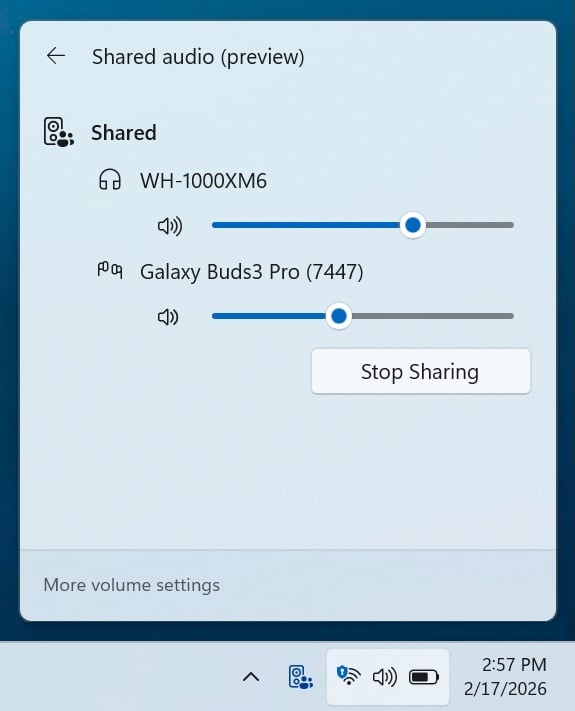
The initial iteration of Shared Audio, while groundbreaking for its LE Audio support, suffered from a usability constraint common in early multi-user setups: monolithic volume control. Adjusting the volume for one listener invariably affected all others sharing the stream. The latest update addresses this limitation head-on by introducing granular, per-user volume sliders. Each connected device or listener now possesses an independent volume control accessible within the system’s sound mixer interface. This level of control transforms Shared Audio from a novel gimmick into a practical tool for environments where participants have varying hearing sensitivities or environmental needs.
Accompanying this functional enhancement is an improved user interface cue. A persistent, dedicated taskbar indicator now signals when an active sharing session is underway. This visual affordance serves two purposes: it acts as an immediate reminder that audio is being broadcast or received by multiple endpoints, and it provides a one-click pathway directly to the sharing settings panel, streamlining session management.

The ecosystem supporting Shared Audio is also expanding rapidly. The compatibility list is growing to incorporate high-profile consumer and peripheral devices, notably the Samsung Galaxy Buds 4 and Buds 4 Pro, the Sony WF-1000XM6, and the Xbox Wireless Headset. This integration of major gaming and audio brands underscores Microsoft’s commitment to making LE Audio a standard feature, moving beyond niche adoption toward mainstream utility. For the gaming sector, supporting the Xbox Wireless Headset directly in this context means seamless audio mirroring for co-op play or spectator events without requiring complex intermediary hardware.
Technical Deep Dive and Insider Rollout
These features are currently being tested across two distinct preview branches. The enhanced batch file security controls are primarily associated with the Dev Channel build 26300.7939 (KB5077243), indicating a potential path toward general availability in a future major feature release. The Beta Channel is receiving related stability improvements via build 26220.7934 (KB5077242), which includes the refinements to Shared Audio.
For IT professionals monitoring these developments, the key takeaway regarding batch file security is the integration point. The reliance on both a specific registry key (HKEY_LOCAL_MACHINE) and an application manifest control highlights Microsoft’s strategy to layer security enforcement. The registry setting provides system-wide enforcement, suitable for locked-down enterprise machines, while the manifest control offers application-specific scoping, necessary for software vendors or deployment tools that need to manage the behavior of their own scripts without altering the global system configuration.
From an analytical perspective, the push for batch file integrity is a quiet but crucial step in hardening the operating system kernel’s interaction with user-space scripts. While Microsoft has invested heavily in securing compiled binaries through technologies like HVCI (Hypervisor-Enforced Code Integrity), the dynamic nature of interpreted scripts like BATCH and CMD has often lagged. By ensuring the executable content cannot mutate mid-flight, the OS reduces the attack surface significantly, particularly against privilege escalation vulnerabilities that exploit file locking mechanisms.
Industry Implications and Future Trajectories
The combination of advanced script locking and mature Bluetooth LE integration paints a picture of a Windows 11 platform maturing beyond its initial release focus.
For Enterprise Security: The batch file locking mechanism is a proactive defense against insider threats and sophisticated malware that attempts to hijack running automation routines. In the context of Zero Trust architectures, where every process execution must be verifiable, this feature provides the necessary cryptographic assurance that the script being executed is the intended script. It simplifies auditing and compliance reporting related to automated system tasks. Organizations leveraging Configuration Manager, Intune, or other deployment tools that rely heavily on legacy or custom batch scripts will see immediate security dividends.
For Consumer Experience and Connectivity: The refinement of Shared Audio addresses the friction points that often derail new technology adoption. By solving the volume control issue and rapidly expanding hardware compatibility, Microsoft is positioning Windows 11 as a leading platform for next-generation wireless audio. As LE Audio becomes the standard for low-power, high-fidelity transmission, Windows needs robust, user-friendly native support to compete with proprietary ecosystems. This update moves the needle substantially in that direction.
Looking forward, these updates hint at future development vectors. The focus on command processor security suggests Microsoft may continue to scrutinize the performance and integrity of older subsystem components, potentially paving the way for more comprehensive control over scripting environments like WSL (Windows Subsystem for Linux) interaction or future container execution models.
In the audio space, the seamless integration of LE Audio suggests that Microsoft is preparing for a future where audio management is entirely decentralized and highly personalized. We might anticipate further integration with spatial audio technologies or even tighter synchronization controls for mixed-reality applications where perfect audio timing is essential.
In summary, the latest Insider builds are not merely incremental feature drops; they represent foundational strengthening. The rigorous enforcement of batch script immutability bolsters the core security integrity demanded by modern enterprises, while the sophisticated evolution of Shared Audio ensures Windows 11 remains competitive and convenient for consumers navigating an increasingly connected world of personal audio hardware. These developments confirm Microsoft’s strategy of simultaneously addressing high-level security architecture and low-level user experience details in parallel development streams.