

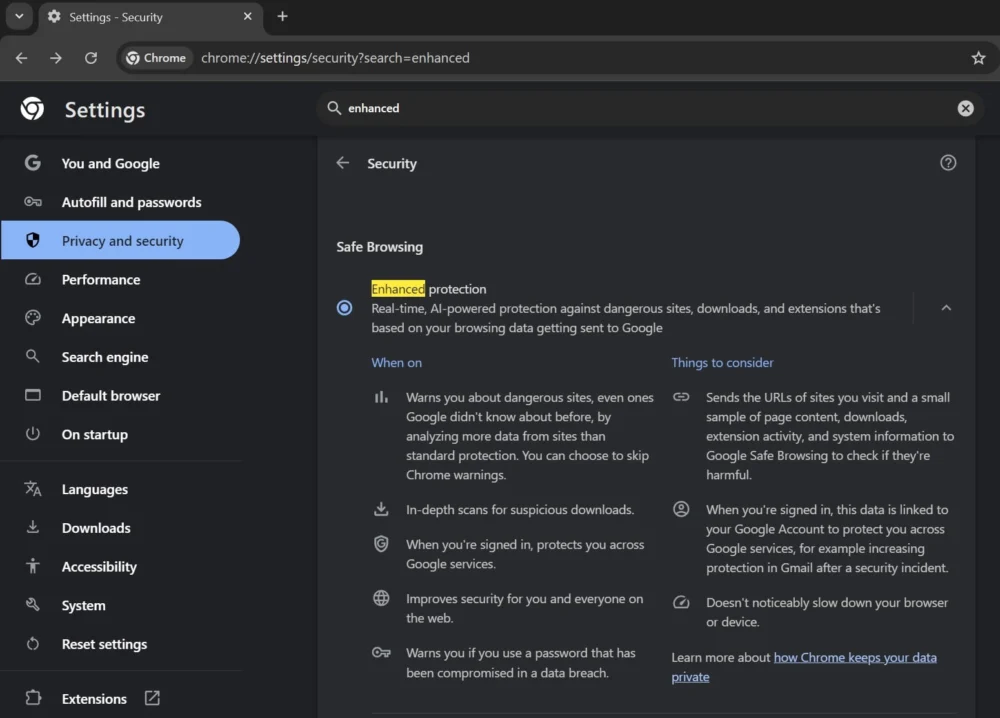
The landscape of web security is undergoing a profound transformation, driven by the integration of sophisticated artificial intelligence, often running directly on the end-user’s device. Google Chrome, the world’s dominant web browser, has recently introduced a significant new administrative control: the ability for users to completely decouple and delete the local machine learning models underpinning its advanced "Enhanced Protection" security suite. This development signals a critical juncture where user agency meets the opaque nature of embedded AI, particularly within security mechanisms designed to operate in real-time without constant server communication.
For several years, Chrome’s Enhanced Protection has served as a proactive defense layer, moving beyond simple blacklist lookups to offer more dynamic safeguarding against malicious websites, phishing attempts, harmful downloads, and compromised extensions. While the feature existed previously, a notable upgrade occurred last year, incorporating proprietary, undisclosed AI models designed specifically for on-device computation. This shift implied a move toward instantaneous threat assessment, a necessity when dealing with rapidly propagating digital hazards that traditional, centralized security databases might lag in identifying.
The core innovation of the AI-enhanced version lies in its potential for pattern recognition. Unlike older methods that relied on checking URLs against a known list of threats—a process inherently reactive—on-device AI suggests a predictive capability. These local models are likely trained to recognize the structural, behavioral, or linguistic fingerprints of malicious content in real-time as a page loads or a file is initiated. This allows Chrome to potentially flag zero-day threats or novel social engineering tactics before they are reported globally. However, the exact mechanisms and the scope of this local processing remained largely proprietary information, leading to understandable curiosity regarding data handling and processing overhead.

The recent confirmation by Google, following observations made by independent security researchers, reveals that this enhanced protection relies on a specific set of AI models physically residing and executing on the user’s machine. More importantly, the company has now provided a direct pathway—a digital kill switch, effectively—for users uncomfortable with this local execution. This option is accessible within the browser’s System settings, specifically through toggling off the feature labeled "On-device GenAI." This action results in the deletion of the associated local models, reverting the Enhanced Protection functionality to its prior, potentially less sophisticated, non-AI state.
The Significance of On-Device Processing
The decision to deploy Generative AI models locally, rather than exclusively relying on cloud-based analysis, carries significant implications for both security posture and user privacy.
From a performance standpoint, on-device processing eliminates network latency. Real-time threat detection demands millisecond responses, especially when intercepting drive-by downloads or rapid redirects designed to trick users into entering credentials. Cloud analysis, even optimized through APIs, introduces inherent delays. By hosting the models locally, Chrome ensures immediate feedback, a tangible benefit in the race against online attackers.
From a privacy perspective, this architecture is often touted as a win. If the analysis of browsing behavior, URL structure, or download metadata is performed entirely on the user’s endpoint, theoretically, sensitive data streams are not being continuously transmitted to Google servers for processing. This aligns with growing global regulatory trends and consumer demand for local data handling. The explicit option to remove the model underscores Google’s acknowledgment of user desire for transparency and control over local computational resources being dedicated to AI tasks.

However, the term "On-device GenAI" is broad. While it currently powers scam detection and download analysis—tasks traditionally categorized under classification and anomaly detection—the mere existence of the setting suggests a broader integration strategy. It implies that Chrome is building an infrastructure capable of running various machine learning tasks locally. This infrastructure could be leveraged in the future for features beyond security, such as advanced local content summarization, improved autofill suggestions based on complex contextual understanding, or localized resource management optimizations, all benefiting from the same foundational model architecture.
Industry Implications: The Privacy vs. Efficacy Tightrope
This move by Chrome reflects a broader industry reckoning regarding the deployment of edge AI, particularly in sensitive domains like cybersecurity. Major software vendors are caught between the undeniable efficacy gains offered by advanced AI and the fundamental user requirement for privacy and control.
Security experts often argue that cloud-based analysis, while slower, offers superior adaptability. Large cloud models can be updated instantly across billions of endpoints as new threat intelligence emerges. Local models, conversely, require explicit software updates to learn about new threats, leaving a window of vulnerability between the discovery of a new attack vector and the distribution of an updated local model.
The introduction of the toggle allows users to manually perform a risk-benefit analysis. A user highly concerned with data sovereignty or resource consumption (local AI models can be memory and CPU intensive) might choose to disable the feature. Conversely, a user prioritizing maximum protection against emerging threats, regardless of the slight potential privacy trade-off (though Google maintains local processing), will keep Enhanced Protection enabled. This granular control shifts the burden of security optimization onto the end-user, a significant departure from previous browser security models which were often ‘all or nothing.’
For competitors like Mozilla Firefox and Microsoft Edge, Chrome’s implementation sets a new benchmark for transparency in AI deployment. If on-device security AI becomes the expected standard for premium protection, rivals will need to match this capability while also addressing the newly established precedent for opt-out mechanisms. Failure to provide similar granular control could be framed by privacy advocates as an intentional obfuscation of local data processing activities.
Expert Analysis: Deciphering the Model Architecture
To understand the implications fully, one must consider the nature of these local models. They are unlikely to be full-scale Large Language Models (LLMs) consuming vast amounts of resources. Instead, they are likely highly optimized, quantized, or distilled models—smaller, faster versions trained specifically for binary classification (e.g., safe/unsafe) or narrowly defined predictive tasks related to phishing indicators (e.g., analyzing URL entropy, checking embedded scripts for obfuscation).
The key technical challenge Google faced was fitting a sufficiently intelligent model onto consumer hardware without negatively impacting the browser experience. If the process of checking a site for danger causes noticeable page lag or excessive battery drain on mobile devices, the feature will be abandoned by users, regardless of its security benefits. The success of the "On-device GenAI" feature hinges on its efficiency.
Furthermore, the architecture likely employs a layered defense. The local model probably handles the initial, high-speed screening. If the local model flags something as highly suspicious but uncertain, it might then trigger a privacy-preserving communication to the cloud—perhaps sending only a hash or a highly sanitized snippet of the data—for a final verdict from Google’s centralized systems. The user’s ability to delete the local model effectively removes the first, fastest layer of defense.

The choice of the term "GenAI" (Generative AI) is noteworthy. While scam detection is fundamentally discriminative, applying the "GenAI" label suggests the underlying technology shares heritage with generative frameworks (like transformers). This association may be strategic, signaling to the market that Chrome is embracing cutting-edge AI architectures for security, even if the deployed function is currently purely analytical.
Future Trajectory and User Empowerment
The rollout through Chrome Canary—the bleeding-edge development channel—is standard procedure for testing stability and performance before a general stable release. The speed at which this feature moves to the wider user base will indicate Google’s confidence in its stability and the perceived necessity of user control over local AI components.
This development is a microcosm of the larger tension surrounding the proliferation of AI into everyday software. Users are increasingly interacting with systems whose decision-making processes are obscured by complex algorithms. By explicitly offering the ability to uninstall the very mechanism performing this algorithmic analysis, Chrome is attempting to strike a delicate balance: offering state-of-the-art protection while respecting autonomy.
If this pattern holds, we can anticipate similar granular controls appearing across other Google services integrating local AI, such as Workspace or Android features. Users may soon be asked to permit local models for tasks like predictive text input, advanced email sorting, or image processing, and the expectation will be that a corresponding setting exists to revert to non-AI functionality or to wipe the learned local parameters.
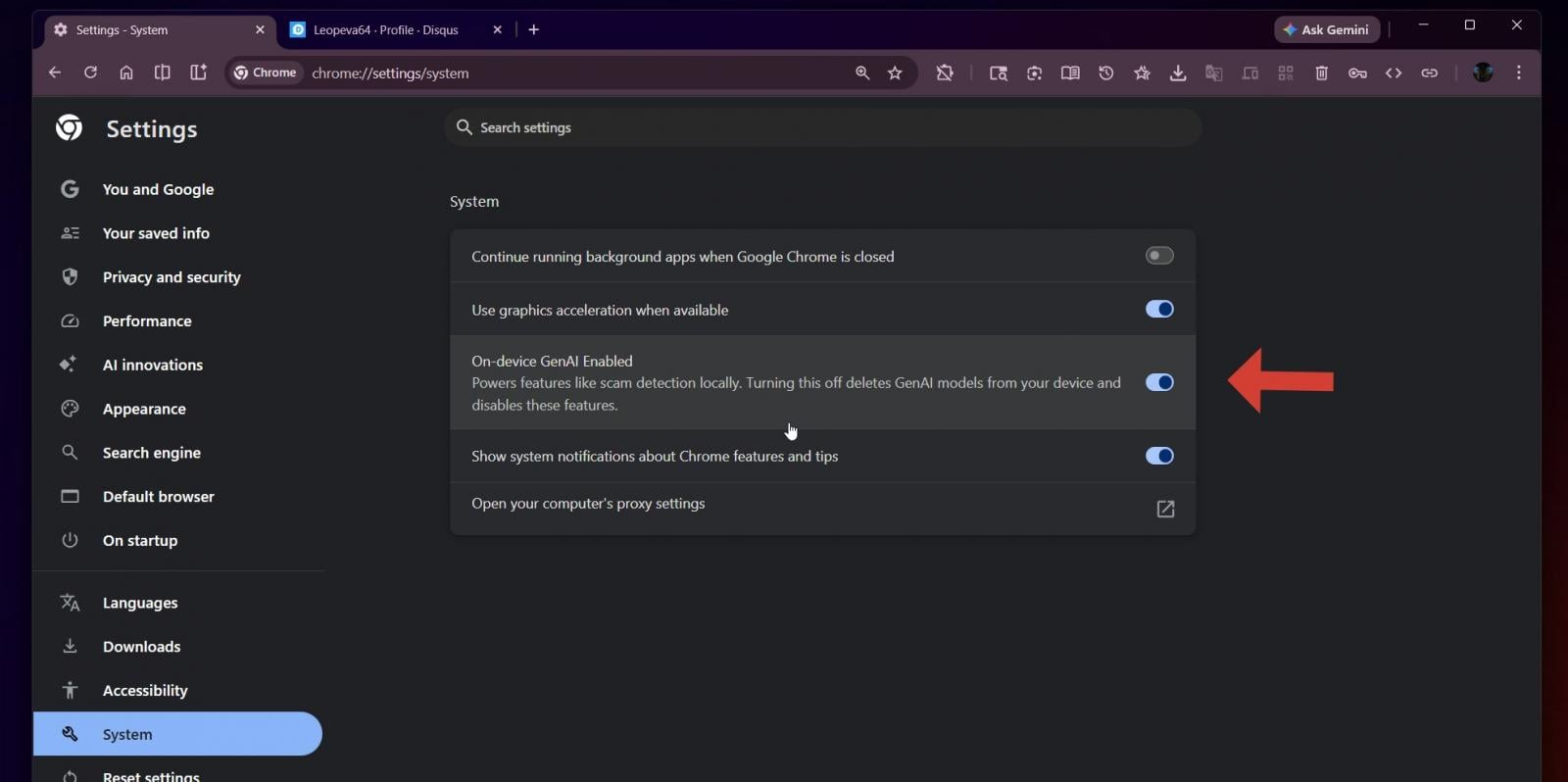
Ultimately, the introduction of the "On-device GenAI" toggle in Chrome’s system settings is less about disabling a single feature and more about establishing a precedent for user agency within the burgeoning era of ubiquitous, embedded artificial intelligence. It confirms that for the immediate future, the most advanced protections running on a user’s machine are optional, configurable, and, critically, removable. This transparency, however rudimentary in its initial form, is a necessary foundation for building sustained trust in automated security systems. The technical implementation must continue to prioritize efficiency to ensure that the user’s decision to opt for privacy over cutting-edge, localized inference does not result in a demonstrably less secure browsing experience.